9 speed automatic transmission
The Nissan Armada is equipped with a sophisticated 9-speed automatic transmission that is electronically managed by an advanced transmission control module. This system is engineered to deliver optimal fuel efficiency, smooth gear transitions, and responsive performance under a wide range of driving conditions.
The following guidelines outline the proper operation of the Nissan Armada transmission system. Adhering to these recommendations will help maximize performance, extend component life, and enhance overall driving comfort.
Starting the vehicle
After starting the engine in your Nissan Armada, firmly depress the brake pedal before selecting any gear such as R (Reverse), N (Neutral), or D (Drive)/M (Manual shift mode). Always ensure the vehicle is completely stationary before shifting.
This Nissan Armada automatic transmission is designed so that the brake pedal must be pressed before shifting from P (Park) to any driving position when the ignition is ON.
Shifting out of P (Park) is not possible if the ignition switch is in the OFF or Auto ACC position.
1. Keep the brake pedal fully depressed and press the R (Reverse) or D (Drive) button to engage a driving gear.
2. Release the parking brake and gradually release the foot brake to allow the Nissan Armada to begin moving smoothly.
WARNING
- Never press the accelerator pedal while shifting from P (Park) or N (Neutral) into R (Reverse), D (Drive), or manual mode in your Nissan Armada. Always keep the brake pedal depressed until the gear is fully engaged to prevent unintended movement and possible accidents.
- When the Nissan Armada engine is cold, idle speed may be higher than normal. Exercise caution when shifting into gear until the engine has warmed up.
- Do not shift into P (Park) or R (Reverse) while the Nissan Armada is moving forward, or into P (Park) or D (Drive) while the vehicle is reversing. Doing so may cause severe transmission damage or lead to loss of control.
- Avoid sudden downshifting on slippery roads, as this can result in reduced traction and possible loss of vehicle control.
CAUTION
- When stopping on an incline in your Nissan Armada, do not hold the vehicle in place using the accelerator pedal. Always use the brake pedal to prevent unnecessary strain on the transmission.
- Except in emergency situations, avoid shifting the Nissan Armada into N (Neutral) while driving. Coasting in neutral can lead to transmission damage and reduced control.
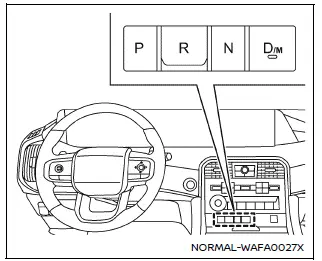
Shifting
Once the Nissan Armada engine is running, press the brake pedal fully and select the desired gear using the shift buttons (R, N, or D/M).
After selecting a gear, always confirm that the transmission has engaged the intended position before proceeding.
NOTE:
- Under certain conditions, the Nissan Armada may automatically shift
into the P (Park) position:
- When the vehicle is completely stopped
- When the driver’s seat belt is unfastened
- When the driver’s door is opened
- The Nissan Armada will also automatically shift into P (Park) when the
ignition is turned OFF.
However, if a malfunction occurs in the electronic shift control system and the transmission is not in P (Park), a warning buzzer will sound and the ignition cannot be turned OFF. In such cases, follow these steps:
- Stop the Nissan Armada and apply the parking brake.
- Depress the brake pedal and press the ignition switch to ON.
- Press the P button to shift into P (Park).
- Press the ignition switch again to turn it OFF.
The Nissan Armada automatic transmission system is designed to provide smooth shifting, enhanced safety, and reliable performance, ensuring a refined and confident driving experience in all conditions.
WARNING
- If you use an implantable cardiac pacemaker, implantable cardioverter defibrillator (ICD), or any other medical device, keep the affected body area away from the shift button in your Nissan Armada. The strong magnetic field generated by the shift button may interfere with the proper operation of such medical devices.
- Keep magnetic cards, electronic devices, or objects sensitive to magnetic fields away from the Nissan Armada shift button. Exposure to magnetic interference may lead to system malfunction or unintended vehicle behavior.
- Always apply the parking brake when the Nissan Armada transmission is
in any position and the engine is not running. Failure to do so may cause the
vehicle to move unexpectedly or roll away, resulting in serious injury or property
damage.
Proper use of the parking brake is essential for maintaining vehicle stability, especially when parked on uneven surfaces.
- When driving on slopes, do not allow the Nissan Armada to roll backward while in D (Drive) or M (Manual) mode, and do not allow it to roll forward while in R (Reverse). Such situations may lead to loss of control and potential accidents.
CAUTION
Ensure that your Nissan Armada is completely stopped and the transmission is securely placed in the P (Park) position before exiting or turning off the vehicle.
P (Park) position:
Use the P (Park) position when parking your Nissan Armada or starting the engine. Always confirm that the vehicle has come to a complete stop before selecting this mode.
The brake pedal must be pressed when shifting from N (Neutral) or any driving position into P (Park). Always engage the parking brake. When parking on an incline, first apply the parking brake, then shift the Nissan Armada transmission into P (Park) for maximum safety.
CAUTION
Only engage the P (Park) position when the Nissan Armada is fully stationary to avoid transmission damage.
NOTE:
- If the Nissan Armada ignition is switched OFF while the transmission is not in P (Park), the system will automatically shift into the P (Park) position for safety.
- If the P (Park) button is pressed while the Nissan Armada is in motion, the command will be ignored. A warning buzzer will sound and the current gear will remain unchanged.
R (Reverse):
Use the R (Reverse) position when backing up your Nissan Armada. Always ensure the vehicle is completely stopped before engaging reverse gear.
The brake pedal must be depressed to shift into R (Reverse) from P (Park), N (Neutral), or any driving position.
If the Nissan Armada is shifted into R (Reverse) while still moving forward, a warning chime will sound and the system will automatically switch to N (Neutral) to prevent damage.
N (Neutral):
In the N (Neutral) position, no driving gear is engaged. The engine can be started in this mode, and it can also be used to restart a stalled engine while the Nissan Armada is moving.
D (Drive):
This is the primary driving mode for normal forward operation of the Nissan Armada, providing smooth and efficient gear changes.
If the Nissan Armada is shifted into D (Drive) while moving backward, the system will emit a warning sound and automatically shift into N (Neutral) to prevent transmission damage.
Neutral hold mode function
The Nissan Armada Neutral Hold Mode allows the engine to be turned off while the transmission remains in N (Neutral). When activated, the vehicle can be moved manually, even with the ignition OFF.
When using this function, ensure the parking brake is released intentionally and that the vehicle is in a controlled environment, as the Nissan Armada can roll freely.
This feature is particularly useful in situations such as vehicle transport or repositioning, but should always be used with caution to prevent unintended movement.
The Nissan Armada transmission system is designed to combine safety, convenience, and advanced electronic control, ensuring reliable operation in all driving conditions.
WARNING
- Use the Neutral Hold Mode in your Nissan Armada only on a flat and level surface. Activating this function on an incline or uneven terrain may cause the vehicle to move unexpectedly, which can lead to a collision or serious personal injury.
- After activating Neutral Hold Mode in the Nissan Armada and turning the ignition switch back to the ON position, always depress the brake pedal immediately. Since the transmission remains in N (Neutral), the vehicle may roll if not properly controlled.
- If the Neutral Hold Mode does not activate correctly despite following the proper procedure, this may indicate a malfunction in the Nissan Armada transmission system. It is strongly recommended to have the vehicle inspected by an authorized Nissan dealer.
To activate the Neutral Hold Mode in your Nissan Armada, follow these steps carefully:
1. Press the ignition switch to start the Nissan Armada engine.
2. Release both the parking brake and the Automatic Brake Hold function.
3. Depress the brake pedal and bring the Nissan Armada to a complete stop at the desired location (for example, a parking space or car wash entry).
4. Continue holding the brake pedal firmly throughout the following steps. Do not release it during the activation process.
5. Wait approximately 10 seconds without pressing any shift buttons.
NOTE:
Steps 6 through 8 must be completed within approximately 5 seconds for successful activation.
6. Press the P (Park) button and confirm that the Nissan Armada shift indicator shows P (Park).
7. Press the shift button to move into the N (Neutral) position and confirm that the indicator shows N (Neutral), then release the button.
8. Press the N (Neutral) button again. The Neutral Hold Mode activation indicator will appear on the Nissan Armada display.
9. Ensure that the parking brake is fully released.
10. Turn the ignition switch to the OFF position. The Nissan Armada engine will shut off while maintaining the transmission in N (Neutral).
To exit Neutral Hold Mode, simply shift the Nissan Armada transmission to any position other than N (Neutral).
NOTE:
- If the parking brake is still engaged, release it before attempting to move the Nissan Armada.
- When the ignition is turned OFF while the Nissan Armada is in N (Neutral), a notification message will appear on the vehicle information display.
- If Neutral Hold Mode cannot be activated, a message will appear. Wait briefly without performing any shifting operations, then repeat the procedure.
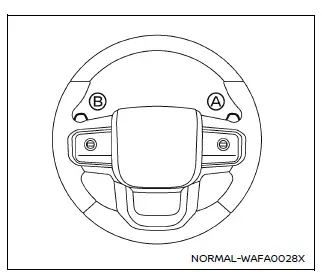
Paddle shifter
Manual shift mode
The Nissan Armada offers a manual shift mode that allows the driver to take more direct control of gear selection. While driving in D (Drive), selecting D again activates manual shift mode, providing a more engaging driving experience.
Gear changes in the Nissan Armada manual mode are performed using paddle shifters located on the steering wheel:
When upshifting, pull the right-side paddle shifter (+) A to move to a higher gear.
When downshifting, pull the left-side paddle shifter (−) B to shift into a lower gear.
To exit manual shift mode and return to standard automatic operation, simply shift the Nissan Armada transmission back to D (Drive).
The Nissan Armada transmission system combines advanced electronic control with manual driving flexibility, offering both comfort and performance tailored to different driving conditions.
When operating the Nissan Armada in D (Drive) mode, pulling either paddle shifter allows you to temporarily shift to a higher or lower gear. This feature provides additional control without fully switching to manual mode, enhancing responsiveness when needed.
After a short period of time, the Nissan Armada transmission will automatically return to standard D (Drive) operation. If you prefer to switch back manually, simply pull and hold the paddle shifter for approximately 1.5 seconds.
When the Nissan Armada is in manual shift mode, the currently selected gear range is clearly displayed in the vehicle information display, allowing the driver to monitor and control gear selection with precision.
Gear ranges in the Nissan Armada manual mode can be shifted step-by-step as follows:

9M (9th):
Use this gear in your Nissan Armada for standard highway driving, where optimal fuel efficiency and smooth cruising are required.
8M (8th), 7M (7th), 6M (6th) and 5M (5th):
These ranges are suitable for driving on long inclines or for controlled engine braking when descending extended slopes in the Nissan Armada.
4M (4th), 3M (3rd) and 2M (2nd):
Use these gears when climbing hills or when additional engine braking is needed on downhill roads to maintain safe speed in your Nissan Armada.
1M (1st):
This lowest gear is ideal for steep hill climbs, driving slowly through deep snow, or maximizing engine braking on sharp downhill gradients in the Nissan Armada.
- To maintain fuel efficiency in your Nissan Armada, avoid driving at high speeds for extended periods in gears lower than 7th.
- Pulling the same paddle shifter twice will shift through multiple gear ranges sequentially. However, if performed too quickly, the second shift may not engage correctly.
- In manual mode, the Nissan Armada transmission may refuse a gear selection if it determines that the shift could negatively impact performance or vehicle safety.
- In such cases, the automatic transmission position indicator will blink and an audible chime will alert the driver.
- The Nissan Armada transmission may also automatically upshift if engine speed becomes too high. As the vehicle slows down, it will downshift automatically, eventually returning to 1st gear before coming to a stop.
Accelerator downshift - In D (Drive) position -
For overtaking or climbing hills, fully press the accelerator pedal in your Nissan Armada. This action triggers a downshift to a lower gear, providing increased power depending on vehicle speed.
Fail-safe
The Nissan Armada transmission includes a fail-safe mode designed to protect the system under abnormal operating conditions. When activated, the transmission may remain locked in a specific forward gear depending on the situation.
If the Nissan Armada is driven under extreme conditions, such as excessive wheel spin followed by sudden braking, the fail-safe system may engage.
This protective function may activate even when all electronic systems are functioning normally. In such a case, turn the ignition switch to the OFF position and wait approximately 3 seconds. Then restart the Nissan Armada by switching the ignition back to ON.
The Nissan Armada should return to normal operation after this reset. If normal operation is not restored, have the transmission system inspected and repaired if necessary. It is recommended to visit an authorized Nissan Armada dealer for professional service.
The Nissan Armada transmission system is designed to balance performance, durability, and driver control, ensuring a smooth and reliable driving experience across various road conditions.
Other materials
Electric Ivt Control Actuator Position Learning
Description
Electric intake valve timing control (IVT) module requires the learning of camshaft reference position. This learning must be performed where the following operations are performed:
Replacement of electric IVT control module
Replacement of intake/Exhaust camshaft position sensor
Rep ...
Diagnosis and Repair Workflow
Work Flow
DETAILED FLOWINTERVIEW FROM THE CUSTOMER
Clarify customer complaints before inspection. First of all, perform an interview utilizing reproduce symptoms as well as fully understand it. Ask customer about his/her complaints carefully. Check symptoms by driving vehicle with customer, if neces ...
Head up Display
Diagnosis and Repair Work Flow
Work Flow
OVERALL SEQUENCEDETAILED FLOWINTERVIEW FOR MALFUNCTION
It is also important to clarify the customer concerns before starting the inspection. Interview the customer about the concerns carefully and understand the symptoms fully.
NOTE:
The customers are not pr ...