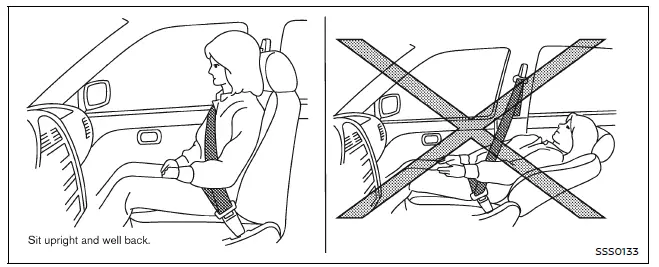
This section of the Nissan Armada manual provides essential safety guidance regarding seat positioning, seat belt usage, and overall occupant protection. Proper seating posture in the Nissan Armada is critical for maximizing the effectiveness of the supplemental restraint system and reducing the risk of injury in the event of sudden braking or a collision.
WARNING
- Do not ride in a moving Nissan Armada when the seatback is reclined.
This position is extremely dangerous because the shoulder belt will not rest properly against your body. In a collision, this can result in severe neck injuries or other serious trauma.
Additionally, you may slide under the lap belt, increasing the risk of internal injuries.
- For maximum protection in the Nissan Armada, always keep the seat in an upright position while the vehicle is in motion. Sit fully back in the seat with both feet firmly on the floor and ensure the seat belt is correctly fastened and adjusted.
- After adjusting your seat, gently move it back and forth to confirm that it is securely locked in place (for manual seats, if equipped).
- Never leave children unattended inside the Nissan Armada. They may accidentally activate controls or cause the vehicle to move, leading to serious accidents.
- To reduce the risk of injury or fatal incidents caused by unintended
vehicle operation, never leave children, vulnerable individuals, or pets unattended
inside the Nissan Armada.
Keep in mind that temperatures inside a parked vehicle can rise quickly, creating life-threatening conditions.
- The seatback should only be reclined as much as necessary for comfort. Seat belts in the Nissan Armada are most effective when occupants sit upright. Reclining too far increases the risk of sliding under the lap belt during a collision.
CAUTION
When adjusting seat positions in the Nissan Armada, avoid contact with moving components to prevent injuries or damage to the seat mechanism.
Other materials
Maintenance requirement
Basic information
Routine care and consistent maintenance are essential to keep your Nissan Armada
operating at peak performance, preserving both its mechanical integrity and emission
efficiency.
Regular servicing ensures that the engine, drivetrain, and all critical systems
of your Nissan A ...
Fuel System
Special Service Tool
The actual shape of the TechMate tools may differ from those of the special setvice tools illustrated here.
Tool number
(TechMate No.)
Tool name Description
KV101207S0
( — )
Unified fuel lock ring wrench
Removing and installing fuel tank lock ring
KV10119800
(†...
Diagnosis and Repair Workflow
Work Flow
OVERALL SEQUENCEDETAILED FLOWINTERVIEW FOR MALFUNCTION
Interview the symptom to the customer.
>>
GO TO 2.
SYMPTOM CHECK
Check the symptom from the customer's information. Check that any symptom occurs other than the interviewed symptom.
Insufficient cooling/heating>>
GO TO ...