Work Flow
OVERALL SEQUENCE
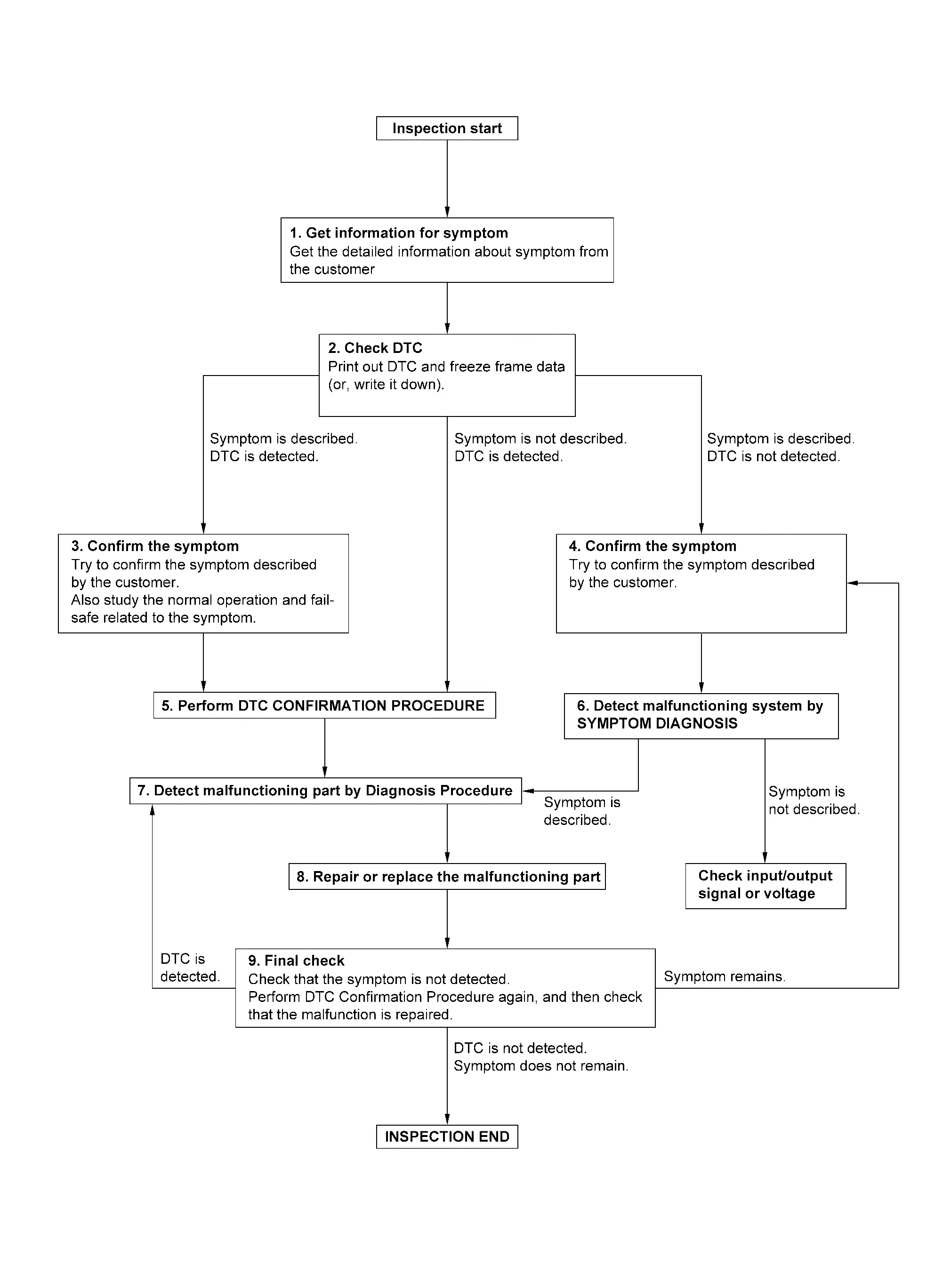
DETAILED FLOW
GET INFORMATION FOR SYMPTOM
-
Get detailed information from the customer about the symptom (the condition and the environment when the incident/malfunction occurs).
-
Check operation condition of the function that is malfunctioning.
>>
GO TO 2.
CHECK DTC
-
Check DTC.
-
Perform the following procedure if DTC is detected.
-
Record DTC and freeze frame data (Print them out using CONSULT.)
-
Erase DTC.
-
Study the relationship between the cause detected by DTC and the symptom described by the customer.
-
Are any symptoms described and any DTC detected?
Symptom is described, DTC is detected>>GO TO 3.
Symptom is described, DTC is not detected>>GO TO 4.
Symptom is not described, DTC is detected>>GO TO 5.
CONFIRM THE SYMPTOM
Try to confirm the symptom described by the customer.
Also study the normal operation and fail-safe related to the symptom.
Verify relation between the symptom and the condition when the symptom is detected.
>>
GO TO 5.
CONFIRM THE SYMPTOM
Try to confirm the symptom described by the customer.
Verify relation between the symptom and the condition when the symptom is detected.
>>
GO TO 6.
PERFORM DTC CONFIRMATION PROCEDURE
Perform DTC CONFIRMATION PROCEDURE for the detected DTC, and then check that DTC is detected again. At this time, always connect CONSULT to the vehicle, and check self diagnostic results in real time.
If two or more DTCs are detected, refer to DTC INSPECTION PRIORITY CHART, and determine trouble diagnosis order.
 NOTE:
NOTE:
-
Freeze frame data is useful if the DTC is not detected.
-
Perform Component Function Check if DTC CONFIRMATION PROCEDURE is not included on Service Manual. This simplified check procedure is an effective alternative though DTC cannot be detected during this check.
If the result of Component Function Check is NG, it is the same as the detection of DTC by DTC CONFIRMATION PROCEDURE.
Is DTC detected?
YES>>GO TO 7.
NO>>Check according to Intermittent Incident.
DETECT MALFUNCTIONING SYSTEM BY SYMPTOM DIAGNOSIS
Detect malfunctioning system according to SYMPTOM DIAGNOSIS based on the confirmed symptom in step 4, and determine the trouble diagnosis order based on possible causes and symptom.
Is the symptom described?
YES>>GO TO 7.
NO>>Monitor input data from related sensors or check voltage of related module terminals using CONSULT.
DETECT MALFUNCTIONING PART BY DIAGNOSIS PROCEDURE
Inspect according to Diagnosis Procedure of the system.
Is malfunctioning part detected?
YES>>GO TO 8.
NO>>Check according to Intermittent Incident.
REPAIR OR REPLACE THE MALFUNCTIONING PART
-
Repair or replace the malfunctioning part.
-
Reconnect parts or connectors disconnected during Diagnosis Procedure again after repair and replacement.
-
Check DTC. If DTC is detected, erase it.
>>
GO TO 9.
FINAL CHECK
When DTC is detected in step 2, perform DTC CONFIRMATION PROCEDURE again, and then check that the malfunction is repaired securely.
When symptom is described by the customer, refer to confirmed symptom in step 3 or 4, and check that the symptom is not detected.
Is DTC detected and does symptom remain?
YES-1>>DTC is detected: GO TO 7.
YES-2>>Symptom remains: GO TO 4.
NO>>Before returning the vehicle to the customer, always erase DTC.
Other materials
Door Lock Operation Warning Does Not Operate
Diagnosis Procedure
CHECK DOOR LOCK FUNCTION
Check door lock using door request switch.
Does door lock with door request switch?
YES>>
GO TO 2.
NO>>
Refer to DTC Diagnosis Procedure.
CHECK INTELLIGENT KEY WARNING BUZZER
Check Intelligent Key warning buzzer.
Refer to Diagnosis Procedure ...
Automatic Back Door Lock and Close Switch
Description
Automatic back door close function does not operate using automatic back door lock and close switch.
Diagnosis Procedure
CHECK AUTO OPEN/CLOSE FUNCTION
Check auto open/close function using automatic back door switch.
Is the inspection result normal?
YES>>
GO TO 2.
NO>>
Refe ...
Additional Service When Replacing Ecm
Description
Performing the following procedure can automatically activate recommunication of ECM and Intelligent Key unit, but only when the ECM is replaced with a new one*. For details, refer to Work Procedure.*: New one means a virgin ECM that has never been energized on-board.(In this step, initi ...