Work Flow
OVERALL SEQUENCE
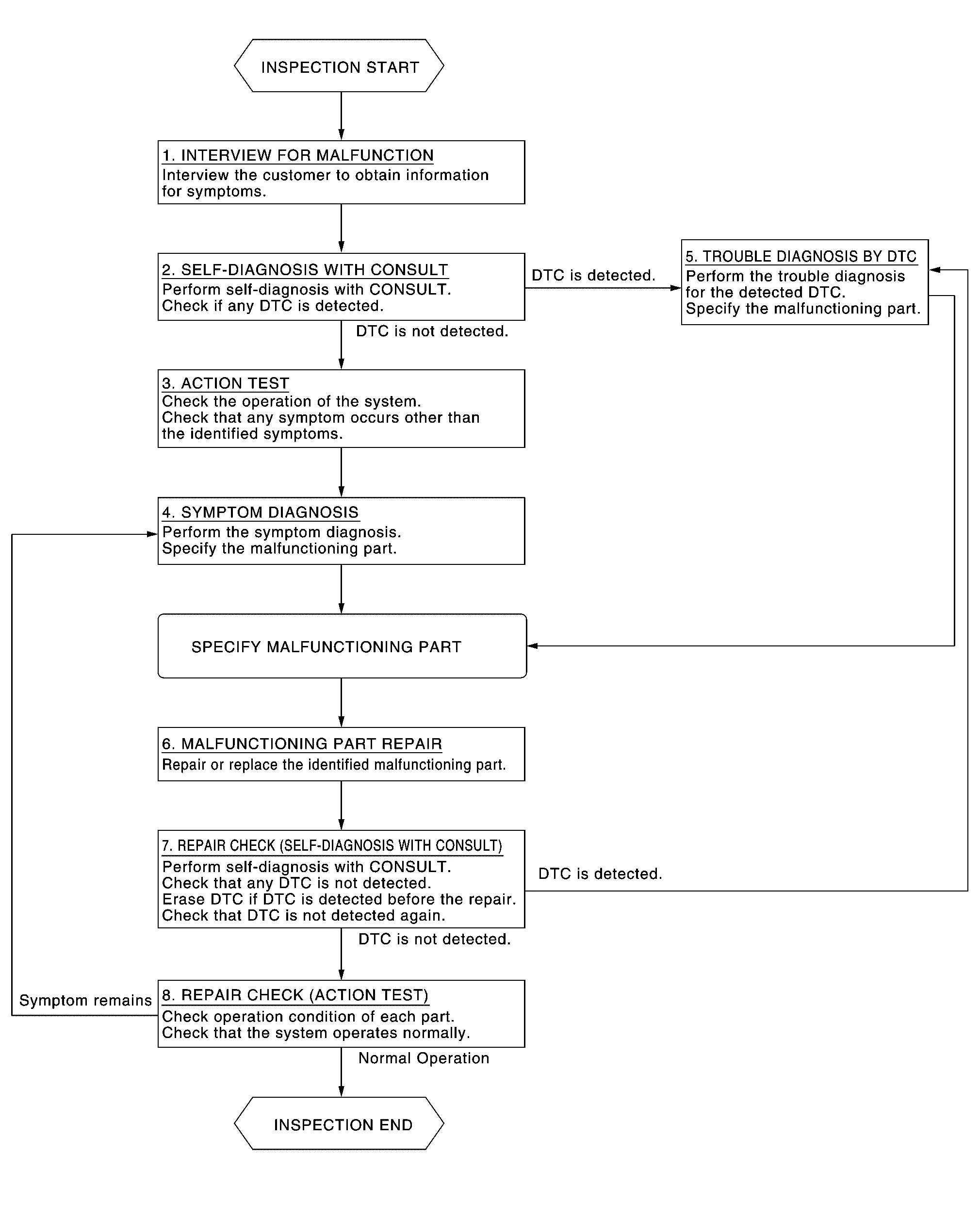
DETAILED FLOW
INTERVIEW FOR MALFUNCTION
It is also important to clarify the customer concerns before starting the inspection. Interview the customer about the concerns carefully and understand the symptoms fully.
 NOTE:
NOTE:
The customers are not professionals. Never assume that “maybe the customer means···� or “maybe the customer mentioned this symptom�.
>>
GO TO 2.
SELF-DIAGNOSIS WITH CONSULT
-
Perform “All DTC Reading� with CONSULT.
-
Check if any DTC is detected in self-diagnosis results of “LASER/RADAR�, “LANE CAMERA� and “ICC/ADAS 2�.
Is any DTC detected?
YES>>Record or print self-diagnosis results and freeze frame data (FFD). GO TO 5.
NO>>GO TO 3.
ACTION TEST
Perform the ProPILOT Assist 2.1 system action test to check the operation status. Refer to Work Procedure.
Check if any other malfunctions occur.
>>
GO TO 4.
SYMPTOM DIAGNOSIS
Perform the applicable diagnosis according to the diagnosis chart by symptom. Refer to Symptom Table.
>>
GO TO 6.
TROUBLE DIAGNOSIS BY DTC
-
Erase self-diagnostic results.
-
Ignition switch OFF → ON.
CAUTION:
Be sure to wait of 10 seconds after turning ignition switch OFF or ON.
-
Check the DTC in the self-diagnosis results.
-
Perform trouble diagnosis for the detected.
-
LASER/RADAR: Refer to DTC Index.
-
LANE CAMERA: Refer to DTC Index.
-
ICC/ADAS 2: Refer to DTC Index.
-
NOTE:
If Network-DTC is detected, first diagnose the CAN communication system.
>>
GO TO 6.
MALFUNCTIONING PART REPAIR
Repair or replace the identified malfunctioning parts.
>>
GO TO 7.
REPAIR CHECK (SELF-DIAGNOSIS WITH CONSULT)
-
Erases self-diagnosis results.
-
Perform “All DTC Reading� again after repairing or replacing the malfunctioning parts.
-
Check if any DTC is detected in self-diagnosis results of “LASER/RADAR�, “LANE CAMERA� and “ICC/ADAS 2�.
-
LASER/RADAR: Refer to DTC Index.
-
LANE CAMERA: Refer to DTC Index.
-
ICC/ADAS 2: Refer to DTC Index.
-
Is any DTC detected?
YES>>GO TO 5.
NO>>GO TO 8.
REPAIR CHECK (ACTION TEST)
Perform the ProPILOT Assist 2.1 system action test. Check if the malfunction symptom is solved or no other symptoms occur.
Is there any malfunction symptom?
YES>>GO TO 4.
NO>>INSPECTION END
Other materials
Starting the engine
Basic information
1. Apply the parking brake.
2. Confirm that the Nissan Armada is in the P (Park) position.
The Intelligent Key must be inside the Nissan Armada when operating the ignition
system.
3. Press the ignition switch to the ON position. Then depress the brake pedal
and press the ig ...
Sub-Tcm
Exploded View
Bracket
Sub-TCM
: N·m (kg-m, in-lb)
: vehicle front
Removal and Installation
WARNING:
Jacking up or lift up the vehicle may the vehicle height to go down which cause a personal injury and/or damage to the air suspension component parts. Re ...
Preparations
Special Service Tools
The actual shapes of TechMate tools may differ from those of special service tools illustrated here.
Tool number
(TechMate No.)
Tool name Description
(NI-39570)
Chassis ear
Locates the noise
(NI-50397)
NISSAN Squeak and Rattle Kit
Repairs the cause of noise
C ...