Work Flow
OVERALL SEQUENCE
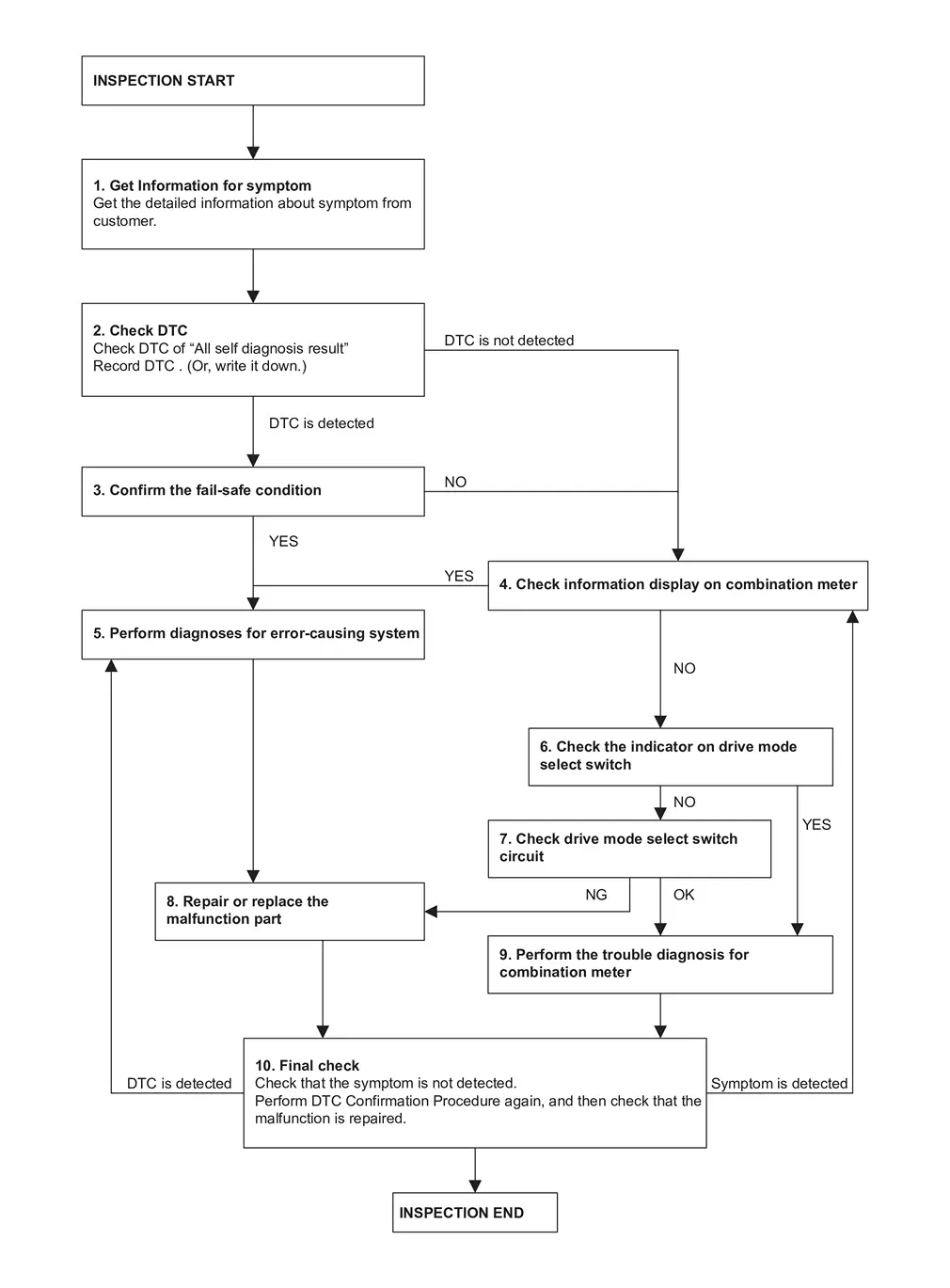
DETAILED FLOW
GET INFORMATION FOR SYMPTOM
-
Get the detailed information about symptom from customer.
-
Check the drive mode indicator on the meter appeared.
-
Check the drive mode indicator on the meter changed when operates the drive mode selector switch.
>>
GO TO 2.
CHECK THE DTC
 With CONSULT
-
Check DTC of “All self diagnosis result�.
-
Perform the following procedure if DTC is displayed.
-
Record DTC and freeze frame data. (Or, write it down.)
-
Are any DTCs detected?
YES>>GO TO 3.
NO>>GO TO 4.
CONFIRM THE FAIL-SAFE CONDITION
Confirm the fail-safe condition of detected DTC. Refer to Fail-safe.
Are there any DTCs that causes drive mode selector function is suspended?
YES>>GO TO 5.
NO>>GO TO 4.
CHECK INFORMATION DISPLAY ON COMBINATION METER
-
Ignition switch OFF and wait at least 10 seconds.
-
Ignition switch ON.
-
Check that STANDARD is displayed on the information display screen of the combination meter.
-
Check that the view of information display change when switching left and right the drive mode select switch.
Is the inspection result normal?
YES>>GO TO 5.
NO>>GO TO 6.
PERFORM DIAGNOSES FOR ERROR-CAUSING SYSTEM
With CONSULT
Perform the trouble diagnosis of components that DTC indicated.
>>
GO TO 8.
CHECK THE INDICATOR ON DRIVE MODE SELECT SWITCH
-
Ignition switch OFF and wait at least 10 seconds.
-
Ignition switch ON.
-
Check the indicator of STANDARD on drive mode select switch indicator.
-
Check the illuminated position changes according to the operation when switching the drive mode select switch.
Is the inspection result normal?
YES>>GO TO 9.
NO>>GO TO 7.
CHECK DRIVE MODE SELECT SWITCH CIRCUIT
Check drive mode select switch circuit. Refer to Diagnosis Procedure.
Is the inspection result normal?
YES>>GO TO 9.
NO>>GO TO 8.
REPAIR OR REPLACE THE MALFUNCTION PART
Repair or replace the malfunction part.
>>
GO TO 10.
CHECK COMBINATION METER
Check the COMBINATION METER. Refer to On Board Diagnosis Function.
>>
GO TO 10.
FINAL CHECK
-
Check that the symptom is not detected.
-
Perform DTC Confirmation Procedure again, and then check that the malfunction is repaired.
Is DTC detected and / or does symptom remain?
YES (DTC is detected)>>GO TO 5.
YES (Symptom remains)>>GO TO 4.
NO>>INSPECTION END
Other materials
Intelligent Driver Alertness (I-DA)
Basic information
WARNING
Failure to strictly follow all safety warnings and operating instructions
related to the Intelligent Driver Alertness system in the Nissan Armada may result
in serious injury or fatal accidents.
The Nissan Armada I-DA system is designed и�ключительно ...
Drain Assembly
Exploded View
Refer to Exploded View.
Removal and Installation
REMOVALRemove glass lid. Refer to Removal and Installation.
Tilt glass lid down.
Remove fixing screws , and then remove drain assembly.
INSTALLATIONInstall in the reverse order of removal. ...
Normal Operating Condition
Description
Symptom Possible cause
Unstable object detection
The vehicle is on a rough surface, such as stone or gravel.
When used in poor weather conditions, such as heavy snow/rain or strong wind.
When subjected to an ultrasonic noise generated from exhaust muffler or brakes.
When le ...