Basic information
WARNING
Failure to strictly follow all safety warnings and operating instructions related to the Intelligent Driver Alertness system in the Nissan Armada may result in serious injury or fatal accidents.
- The Nissan Armada I-DA system is designed и�ключительно as a driver assistance
warning feature that helps identify potential driver fatigue or reduced attention.
It does not control the steering, braking, or acceleration, and it cannot prevent loss of vehicle control.
- The Nissan Armada I-DA system may not detect every instance of driver fatigue or distraction under all driving conditions.
- It remains the full responsibility of the driver to:
- Stay focused and alert at all times.
- Operate the Nissan Armada safely and responsibly.
- Maintain proper lane position.
- Keep full control of the vehicle in all situations.
- Avoid driving when tired or fatigued.
- Minimize distractions such as mobile phone use or other in-vehicle distractions.
The Intelligent Driver Alertness system in the Nissan Armada continuously analyzes driving behavior to help identify signs of reduced driver attention or fatigue. By monitoring steering input patterns and overall driving style over time, the system can detect deviations from normal behavior that may indicate drowsiness.
When such changes are detected, the Nissan Armada I-DA system provides both visual and audible alerts to encourage the driver to take a break, helping to improve overall driving safety during long trips or demanding driving conditions.
I-DA system operation
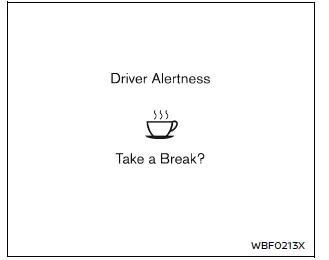
Example
If the Nissan Armada system determines that driver attention is decreasing or fatigue is developing, a message such as "Take a Break?" will appear in the vehicle information display, accompanied by an audible alert. This feature becomes active at speeds above approximately 37 MPH (60 km/h), ensuring that monitoring occurs primarily during highway or sustained driving conditions.
The Nissan Armada I-DA system continues to monitor driver behavior throughout the journey and may issue multiple alerts if necessary. This repeated monitoring helps ensure that the driver remains aware of their condition over extended driving periods.
Each time the ignition cycle is turned OFF and then back ON, the system resets and begins analyzing driving patterns again from the start, adapting to the current driving session.
The Nissan Armada I-DA system will not operate when the Steering Assist system is active, as system priorities shift to active driving support features.
How to enable/disable the I-DA system
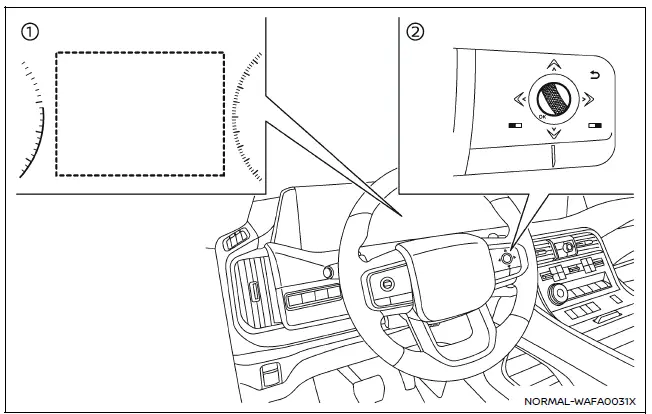
- Vehicle information display
- Steering-wheel-mounted control (right side)
To enable or disable the Intelligent Driver Alertness system in the Nissan Armada, follow these steps:
1. Press the
 button until "Settings" appears in the vehicle information display, then confirm
using the scroll dial. Use the scroll dial to navigate to "Driver Assistance" and
press to select.
button until "Settings" appears in the vehicle information display, then confirm
using the scroll dial. Use the scroll dial to navigate to "Driver Assistance" and
press to select.
2. Select "Driver Monitor", then choose "Driver Alertness" and confirm by pressing the scroll dial to turn the system ON or OFF.
NOTE:
The Nissan Armada I-DA system automatically reactivates each time the engine is restarted, ensuring that driver monitoring is consistently enabled by default.
I-DA system limitations
WARNING
The following limitations apply to the Nissan Armada Intelligent Driver Alertness system. Failure to consider these limitations may result in serious injury or death.
- The Nissan Armada I-DA system may not function correctly or may fail
to provide alerts under the following conditions:
- Poor road surfaces, including uneven pavement or potholes.
- Strong crosswinds affecting vehicle stability.
- Aggressive or sporty driving styles involving rapid acceleration or high-speed cornering.
- Frequent lane changes or rapid variations in vehicle speed.
- The system may not provide alerts in the following situations:
- Vehicle speeds below approximately 37 mph (60 km/h).
- Short or momentary lapses in driver attention.
- Brief distractions, such as reaching for or dropping an object.
System malfunction
If the Nissan Armada I-DA system detects a malfunction, the message "Malfunction See Owner's Manual" will appear in the vehicle information display, and the system will automatically deactivate to prevent unreliable operation.
Action to take:
Safely stop the Nissan Armada, shift into P (Park), and turn off the engine. Restart the vehicle to check if the issue resolves. If the warning message remains visible, the system requires professional inspection. It is strongly recommended to visit an authorized NISSAN dealer to ensure proper functionality of the Nissan Armada driver assistance systems.
Other materials
I-FCW system operation
The Nissan Armada I-FCW system becomes active at speeds above approximately 3
MPH (5 km/h), ensuring functionality during most driving scenarios.
When a potential forward collision risk is detected, the Nissan Armada system
immediately alerts the driver by flashing the vehicle-ahead detecti ...
Event Data Recorders (EDR)
Basic information
Your Nissan Armada is equipped with an Event Data Recorder (EDR), a system designed
to capture critical vehicle data during specific crash or near-crash situations.
These events may include airbag deployment or impact with road obstacles. The
primary function of the EDR is to ...
Door Outside Molding
Exploded View
Front door panel
Front door outside molding
Rear door outside molding
Rear door panel
: Pawl
: vehicle front
Front Door Outside Molding
Removal and Installation
REMOVALCAUTION:
Never damage the front door panel.Fully open front door gl ...