Exploded View
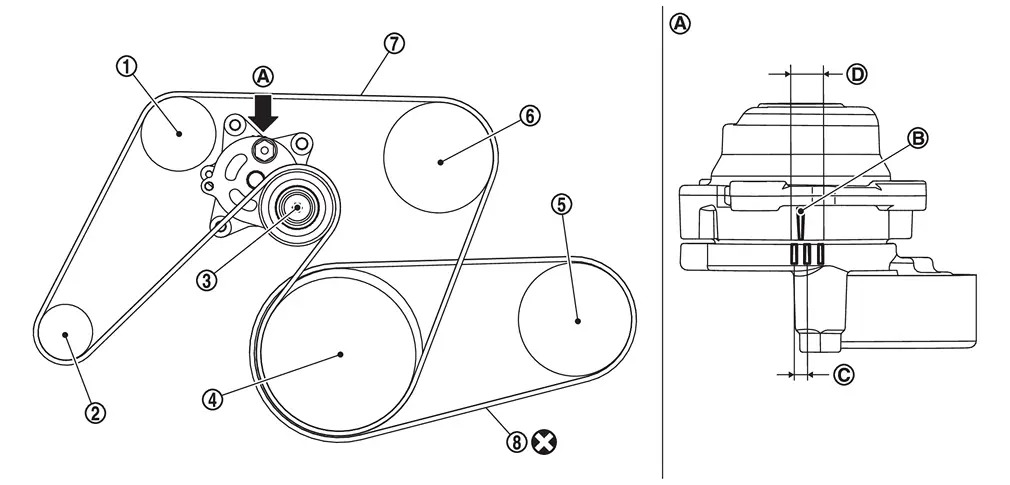
 |
Idler pulley |  |
Alternator |  |
Drive belt auto-tensioner |
 |
Crankshaft pulley |  |
A/C compressor |  |
Water pump |
 |
Drive belt |  |
A/C compressor belt | ||
 |
View |  |
Indicator |  |
Range when new drive belt is installed |
 |
Possible use range | ||||
 |
Always replace after every disassembly. |
Adjustment
Refer to Drive Belt.
Inspection
WARNING:
-
Jacking up or lift up the vehicle may the vehicle height to go down which cause a personal injury and/or damage to the air suspension component parts. Refer to Precaution for when Jacking and Lifting Up the vehicle with Electronic Air Suspension System.
INSPECTION BEFORE REMOVAL
Drive belt
WARNING:
Be sure to perform the this step when engine is stopped.
-
Check that the indicator (notch on fixed side) of drive belt auto-tensioner is within the possible use range.
 NOTE:
NOTE:
Check the drive belt auto-tensioner indication when the engine is cold.
-
Visually check the entire drive belt for wear, damage or crack.
-
If the indicator (notch on fixed side) is out of the possible use range or belt is damaged, replace drive belt.
A/C compressor belt
WARNING:
Perform this step when engine is stopped.(30 min or longer after engine is stopped)
-
Visually check entire drive belt for wear, damage or cracks.
-
Using a tensiometer and confirm belt tension or vibration frequency value.
NOTE:
Before measuring, turn crankshaft pulley twice.
-
Measure belt
tension at " " points. (Both side measurement are correct)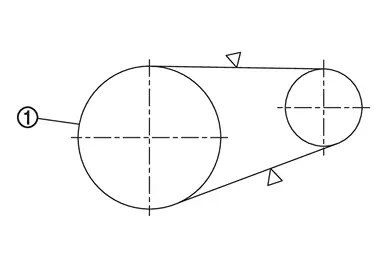
-
Confirm the belt tension value or the vibration frequency value. (see table below)
Belt tension Frequency 580 - 1327 N 192 - 292 Hz
INSPECTION AFTER INSTALLATION
Drive belt
-
Turn crankshaft pulley clockwise several times to equalize tension between each pulley, and then confirm tension of drive belt at indicator (notch on fixed side) is within the possible use range. Refer to Exploded View.
Other materials
USB (Universal Serial Bus) charging connector
In the Nissan Armada, the Type-C USB charging connector 1 is предназначен exclusively
for charging external devices such as smartphones, tablets, and other portable electronics.
To begin charging in the Nissan Armada, simply connect a compatible USB device
into the connector. On ...
Engine Control System
Symptom Table
SYSTEM — BASIC ENGINE CONTROL SYSTEM SYMPTOM Reference page
HARD/NO START/RESTART (EXCP. HA) ENGINE STALL HESITATION/SURGING/FLAT SPOT SPARK KNOCK/DETONATION LACK OF POWER/POOR ACCELERATION HIGH IDLE/LOW IDLE ROUGH IDLE/HUNTING IDLING VIBRATION SLOW/NO RETURN TO IDLE ...
Diagnosis and Repair Work Flow
Work Flow
OVERALL SEQUENCEDETAILED FLOWGET INFORMATION FOR SYMPTOM
Get detailed information from the customer about the symptom (the condition and the environment when the incident/malfunction occurs).
Check operation condition of the function that is malfunctioning.
>>
GO TO 2.
CHECK ...