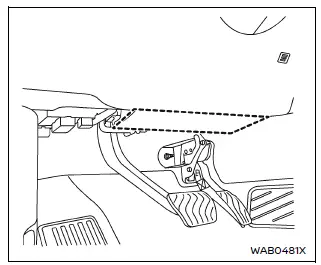
Driver's side
In the Nissan Armada, the supplemental knee air bags are strategically positioned within the lower dashboard area, also known as the knee bolster, on both the driver and front passenger sides. These systems are an integral part of the overall Supplemental Restraint System (SRS) and must always be used in conjunction with properly fastened seat belts.
The knee air bag in the Nissan Armada is designed to deploy primarily during high-severity frontal collisions. However, depending on the nature and force of the impact, it may also activate in other types of collisions where similar forces are detected. In some situations, deployment may not occur, which is considered normal system behavior.
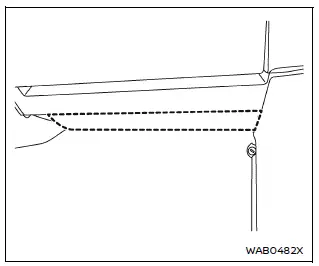
Front passenger's side
It is important to understand that visible vehicle damage in the Nissan Armada does not always reflect whether the knee air bag system should have deployed. The system operates based on internal sensor data rather than external appearance.
When a knee air bag deploys in the Nissan Armada, occupants may hear a loud sound followed by the release of a light smoke. This smoke is harmless and does not indicate fire, but inhalation should be avoided as it may cause temporary irritation. Individuals with respiratory sensitivities should move to fresh air immediately.
The primary function of the knee air bag in the Nissan Armada is to reduce impact forces on the lower body, particularly the knees and legs, helping to minimize the risk of serious injury. While it enhances occupant protection, deployment may still result in minor abrasions or discomfort due to the rapid inflation process.
The knee air bag inflates extremely quickly in the Nissan Armada to provide immediate protection. Because of this rapid deployment, occupants who are seated too close to the knee bolster or in an improper position may be at increased risk of injury. After deployment, the air bag will either deflate quickly or remain inflated briefly before deflating.
The knee air bag system in the Nissan Armada operates only when the ignition switch is in the ON position.
When the ignition is turned ON, the supplemental air bag warning light illuminates and then turns off after approximately 7 seconds if the system is functioning correctly.
WARNING
- Do not place any objects between the knee bolster and the driver or front passenger seat in the Nissan Armada. In the event of deployment, such objects may become dangerous projectiles and cause serious injury.
- Immediately after deployment, knee air bag components in the Nissan Armada may be extremely hot. Avoid touching them to prevent burns.
- No unauthorized modifications should be made to the knee air bag system,
including wiring or components.
Unauthorized alterations may result in system malfunction or accidental deployment, increasing the risk of injury.
- Do not modify the electrical or suspension systems of the Nissan Armada, as such changes may interfere with proper knee air bag operation.
- Any tampering with the knee air bag system, including modifications to the knee bolster or surrounding trim, can lead to serious personal injury and must be strictly avoided.
- All service work related to the knee air bag system in the Nissan Armada should be performed by an authorized NISSAN dealer. This includes installation of additional electrical equipment.
- The SRS wiring harnesses* must never be modified or disconnected. Unauthorized testing or probing of the system is strictly prohibited.
*The SRS wiring harness connectors in the Nissan Armada are color-coded in yellow or orange for easy identification.
When selling your Nissan Armada, it is important to inform the new owner about the presence and proper use of the knee air bag system. Direct them to the relevant sections of this Owner’s Manual to ensure continued safe operation.
Proper understanding and use of the knee air bag system in the Nissan Armada contributes significantly to overall occupant safety, especially in combination with correct seating posture and seat belt usage.
Other materials
4wd Mode Does Not Change
Description
Vehicle does not enter 4-wheel drive mode even though 4WD warning turned to OFF.
Diagnosis Procedure
CHECK DTC OF TRANSFER CONTROL UNIT
With CONSULT
Ignition switch ON.
Perform self-diagnosis for “AWD/4WD�.
Is any DTC detected?
YES >>
Check DTC detected item. Refer to DT ...
Rear Wiper
Exploded View
Rear wiper motor
Rear wiper blade
Rear wiper arm
Pivot seal
: N·m (kg-m, in-lb)
Rear Wiper Arm
Removal and Installation
CAUTION:
Clean back door window glass and rear wiper refill so that back door window glass may not be damaged by dust, ...
Chassis Control
Symptom Table
INTELLIGENT TRACE CONTROLPerform self-diagnosis using CONSULT before the symptom diagnosis. Perform trouble diagnosis if any DTC is detected. Refer to DTC Index. Symptom Possible cause Inspection item
Intelligent trace control inoperative/ineffective
No intelligent trace control ...