Exploded View
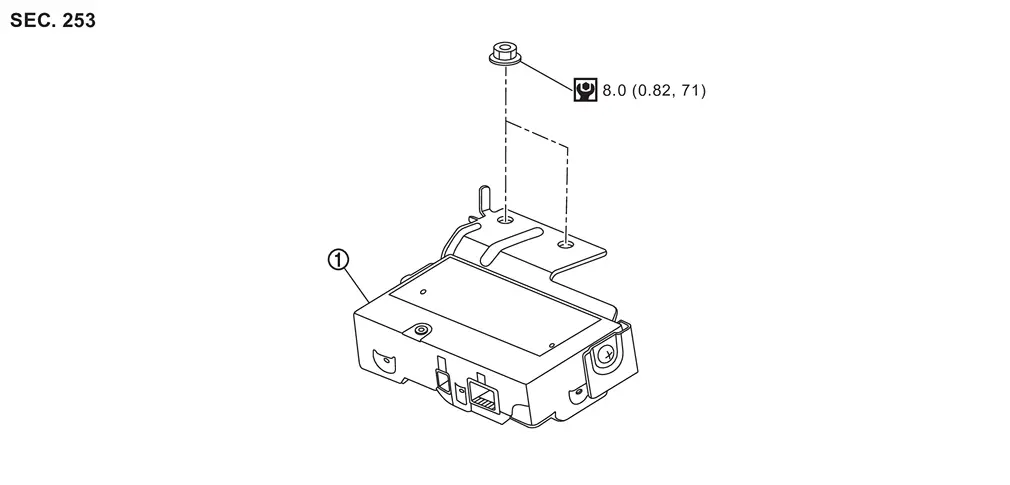
 |
Driver monitor camera control unit | ||||
 |
: N·m (kg-m, in-lb) | ||||
Removal and Installation
REMOVAL
Remove the front speaker grille. Refer to Removal and Installation.
Remove the mounting nuts, and remove the driver monitor camera control unit.
Disconnect the driver monitor camera control unit connector.
INSTALLATION
Installation is in the reverse order of removal.
CAUTION:
Make sure that check that the value of "Face" in "DATA MONITOR" of "Driver Monitor Camera" is "In range" after replacing or removing the driver monitor camera.
Other materials
Diagnosis and Repair Work Flow
Work Flow
DETAILS OF TROUBLE DIAGNOSIS FLOWCHARTCOLLECT THE INFORMATION FROM THE CUSTOMER
It is also important to clarify customer concerns before starting the inspection. First of all, perform an interview utilizing Diagnostic Work Sheet and reproduce the symptom as well as fully understand it. Dep ...
Calibration of G Sensor
Description
CAUTION:
Always perform the decel G sensor calibration and side G sensor calibration before driving when the following operation is performed. Refer to Work Procedure.×: Required —: Not required Procedure
Decel G sensor calibration
Side G sensor calibration
Removing/ installi ...
Instrument Panel Assembly
Exploded View
INSTRUMENT PANEL ASSEMBLY
Front speaker grille*1
Display unit cover
Display unit
Instrument panel assembly
Instrument mask LH
Instrument finisher A
Display unit finisher LH
Instrument pad A
Steering column cover upper
Steering column cover lower
Instrum ...