Exploded View
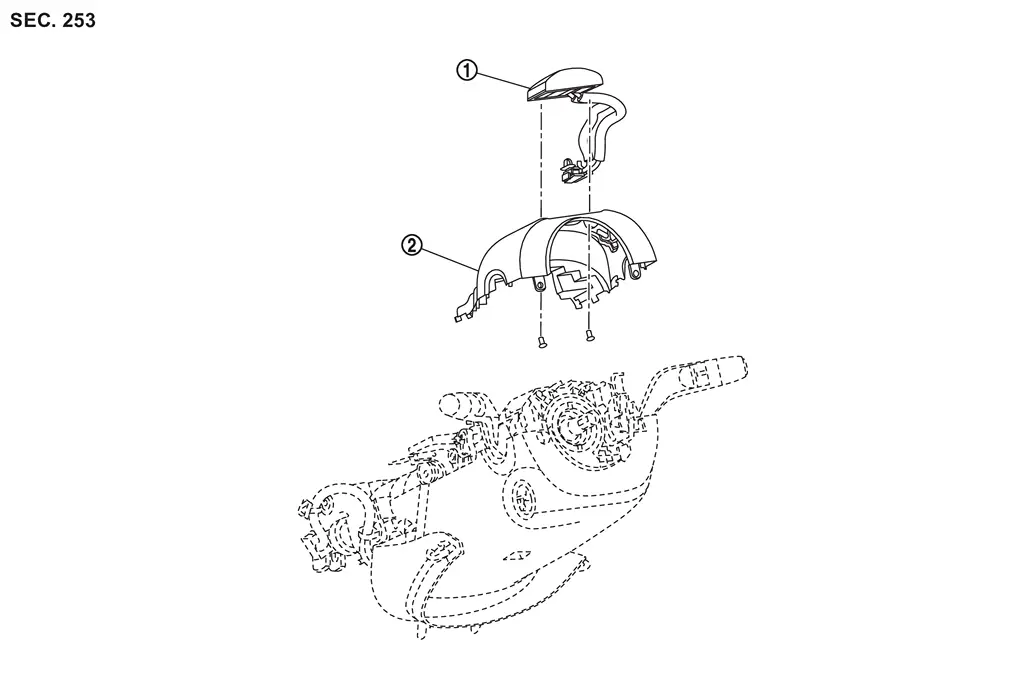
 |
Driver monitor camera |  |
Steering column cover upper |
Removal and Installation
REMOVAL
Remove the steering column cover upper. Refer to Removal and Installation.
Disconnect the driver monitor camera connector.
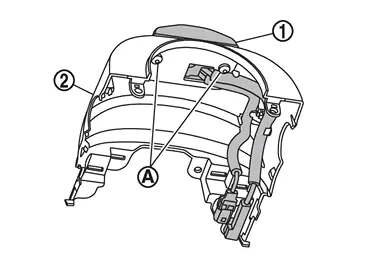
Remove the driver monitor camera mounting screws  , and remove the driver monitor camera from the steering column cover upper .
INSTALLATION
Installation is in the reverse order of removal.
CAUTION:
Make sure that check that the value of "Face" in "DATA MONITOR" of "Driver Monitor Camera" is "In range" after replacing or removing the driver monitor camera.
Other materials
Air fresheners
Many air fresheners contain chemical solvents that may negatively affect the
interior materials of your Nissan Armada if not used properly.
When using an air freshener inside the Nissan Armada, follow these precautions
to prevent damage and maintain the premium interior finish:
Hanging-type ...
Diagnosis and Repair Work Flow
Work Flow
DETAILED FLOWINTERVIEW FROM THE CUSTOMER
CAUTION:
Customers are not professional. Never guess easily like “maybe the customer means that...,� or “maybe the customer mentions this symptom�.
>>
GO TO 2.
CHECK SYMPTOM
Reproduce the symptom that is indicated by the customer, b ...
Tcu
Exploded View
Steering member
Bracket
TCU
: Pawl
Removal & Installation
REMOVALCAUTION:
Before replacing TCU, perform “ADDITIONAL SERVICE WHEN REPLACING TCU". For details, refer to Work Procedure.Remove the glove box assembly. Refer to Removal and I ...