Basic information
In the Nissan Armada equipped with ProPILOT Assist 2.1, the Driver Monitor system plays a critical role in ensuring driver awareness and safety. Using a driver-facing camera mounted on the steering column, the system continuously evaluates the driver’s attentiveness by analyzing head position, gaze direction, and eye openness.
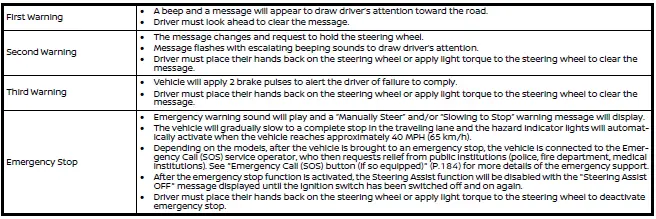
If the Nissan Armada detects that the driver is not paying sufficient attention to the road ahead, a sequence of escalating visual and audible warnings will be triggered. These alerts are specifically designed to bring the driver’s focus back to the driving task as quickly as possible.
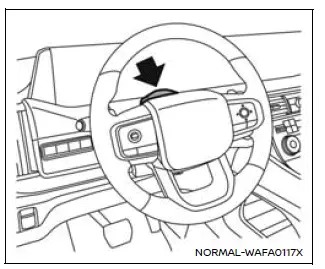
NOTE:
The Driver Monitor system in the Nissan Armada operates continuously in all driving modes and is not limited to when ProPILOT Assist 2.1 is active.
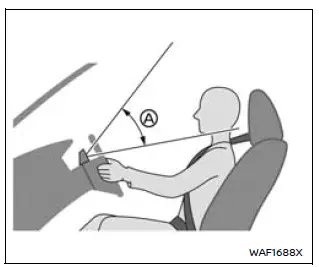
If the driver’s face falls outside the detection range A, the Nissan Armada Driver Monitor may not function correctly. To ensure proper operation, adjust your seating position or steering column so the camera has a clear, unobstructed view of your entire face.
Attention to the road (ProPILOT Assist 2.1)
On Nissan Armada models equipped with ProPILOT Assist 2.1, the system uses advanced camera-based monitoring to determine whether the driver is actively observing the road ahead. Maintaining attention is essential to avoid progressive warning alerts and ensure safe operation of driver assistance features.
Other materials
Engine Assembly
Exploded View
Engine mounting bracket (RH)
Engine mounting insulator (RH)
Stopper bracket (RH)
Engine mounting bracket (LH)
Engine mounting insulator (LH)
Stopper bracket (LH)
Engine mounting insulator (rear)
Comply with the assembly procedure wh ...
Rear Wheel Hub and Housing
Exploded View
Ball seat
Axle housing
Bushing
Baffle
Back plate
Hub bolt
Wheel hub and bearing assembly
Disc rotor
Wheel hub lock nut
Cotter pin
Tightening must be done following the installation procedure. Refer to Removal and Installat ...
Third Seat Reclining Switch
Removal and Installation
REMOVALRemove seat switch escutcheon. Refer to Removal and Installation.
Disengage fixing pawls and then remove third seat reclining switch.
: Pawl
INSTALLATIONInstall in the reverse order of removal. ...