Feeder Layout
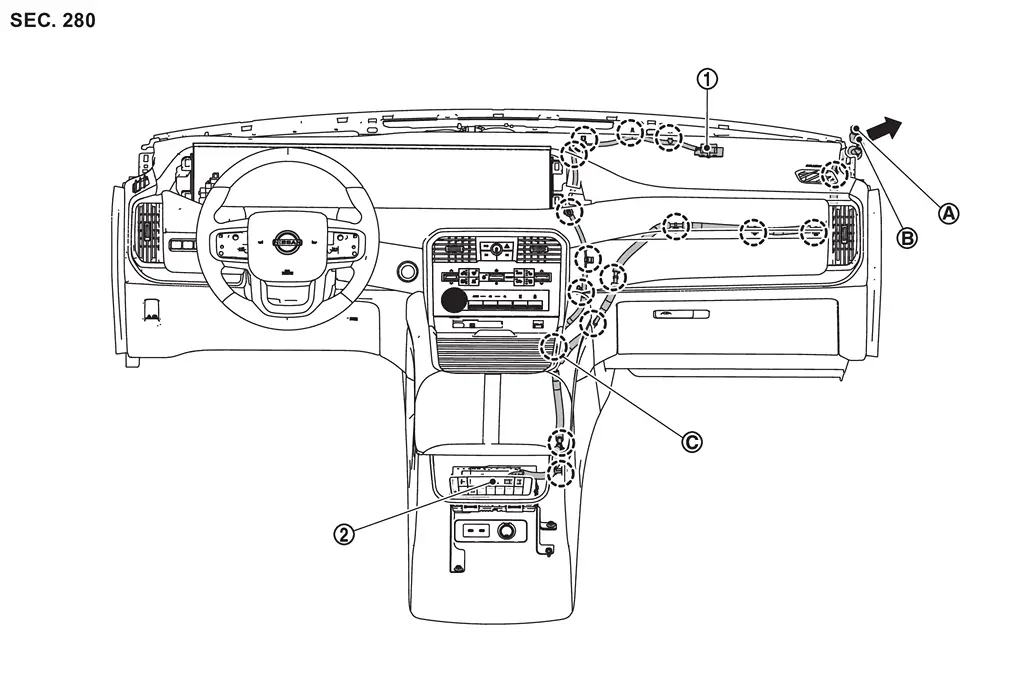
 |
GPS antenna |  |
AV control unit | ||
 |
Harness connector (M323) |  |
Harness connector (M412) |  |
Clip with connector (M325) |
 |
: Clips | ||||
 |
To antenna feeder (vehicle side) |
Removal & Installation
REMOVAL
Remove the instrument panel assembly. Refer to Exploded View.
Remove the GPS antenna mounting screw , and then remove GPS antenna .
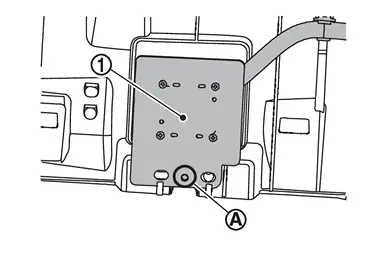
INSTALLATION
Install in the reverse order of removal.
Other materials
Front Oil Seal
Exploded View
Drive pinion lock nut
Companion flange
Front oil seal
Front final drive assembly
: N·m (kg-m, ft-lb)
: Always replace after every disassembly.
Removal and Installation
WARNING:
Jacking up or lift up the vehicle may the vehicle height to ...
A/c Auto Amp.
Exploded View
Front blower unit assembly
A/C auto amp.
: vehicle front
Removal and Installation
REMOVAL2WD ModelsRemove glove box assembly. Refer to Removal and Installation.
Remove passenger knee air bag module. Refer to Removal and Installation.
Disconnect A/C auto amp. ...
Precautions
Precaution for Supplemental Restraint System (SRS) "AIR BAG" and "SEAT BELT PRE-TENSIONER"
The Supplemental Restraint System such as “AIR BAG� and “SEAT BELT PRE-TENSIONER�, used along with a front seat belt, helps to reduce the risk or severity of injury to the driver and front passenger fo ...