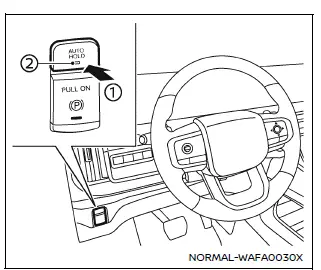
To enable the automatic brake hold feature in your Nissan Armada, ensure the ignition switch is in the ON position, then press the automatic brake hold switch 1. Once activated, the indicator light on the switch 2 will illuminate, confirming that the system is ready for operation.
When the Nissan Armada automatic brake hold system enters standby mode, the corresponding indicator light (white) will illuminate, signaling that the function is available for use.
How to activate the automatic brake hold function
Before the Nissan Armada automatic brake hold function can actively maintain braking force, the following conditions must be met:
- The driver’s seat belt must be securely fastened.
- The electronic parking brake must be released.
- The Nissan Armada must not be in the P (Park) position.
- The vehicle must not be positioned on a steep incline.
NOTE:
The Nissan Armada automatic brake hold system retains its last selected state even after the ignition is turned off, unless manually changed by the driver.
How to deactivate the automatic brake hold function
To turn off the Nissan Armada automatic brake hold feature, press the automatic brake hold switch again. The indicator light will turn off, confirming that the system has been deactivated.
If the braking force is currently being held by the Nissan Armada automatic brake hold system, first press and hold the brake pedal, then deactivate the function using the switch.
WARNING
Always press and hold the brake pedal firmly when deactivating the automatic brake hold function while braking force is applied. Once the function is turned off, braking force will be released immediately, which may cause the Nissan Armada to move unexpectedly.
Failure to properly secure the vehicle may result in unintended movement, leading to serious injury or property damage.
Other materials
Trip computer
Example
Basic information
In the Nissan Armada, the trip computer is controlled using intuitive switches
located directly on the steering wheel, allowing the driver to navigate menus without
distraction.
Scroll dial - in the Nissan Armada this control enables smooth navigation
throu ...
Precautions
Precaution for Supplemental Restraint System (SRS) "AIR BAG" and "SEAT BELT PRE-TENSIONER"
The Supplemental Restraint System such as “AIR BAG� and “SEAT BELT PRE-TENSIONER�, used along with a front seat belt, helps to reduce the risk or severity of injury to the driver and front passenger fo ...
Advanced Ambient Light (rear Door Upper)
Exploded View
Advanced ambient light (rear door upper) is integrated structure with rear door finisher. For exploded view of rear door finisher, refer to Exploded View.
Replacement
CAUTION:
Disconnect the battery negative terminal or remove power circuit fuse when performing the operation for prev ...