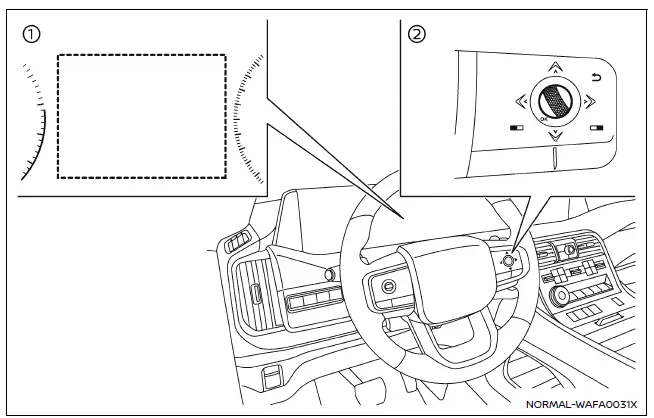
- Vehicle information display
- Steering-wheel-mounted controls (right side)
Basic information
To activate or deactivate the Nissan Armada LDW system, follow these steps:
1. Press the
 button until "Settings" appears in the vehicle information display, then press the
scroll dial.
2. Navigate to "Driver Assistance" using the scroll dial and confirm your selection.
3. Select "Lane Assist", then choose "Warning" and confirm to enable or disable the LDW system.
NOTE:
If the Nissan Armada LDW system is turned off, it will remain disabled even after restarting the engine until it is manually reactivated.
I-LI system operation
The Nissan Armada Intelligent Lane Intervention (I-LI) system must be activated using the ProPILOT Assist switch each time the ignition is turned ON.
Similar to LDW, the Nissan Armada I-LI system operates at speeds above approximately 37 MPH (60 km/h) and requires clearly visible lane markings to function correctly.
When the vehicle drifts toward the lane boundary, the system first issues a warning via steering wheel vibration and a blinking orange indicator. It then provides subtle steering input to assist the driver in returning the Nissan Armada to the center of the lane.
To activate the I-LI system in the Nissan Armada, press the ProPILOT Assist switch on the steering wheel after starting the engine. The I-LI ON indicator will illuminate on the vehicle information display. Press the switch again to deactivate the system.
When the system is turned off, the I-LI ON indicator will also turn off.
The Nissan Armada lane assistance technologies provide an additional layer of confidence during highway driving, especially on long journeys, but they are most effective when combined with attentive and responsible driving habits. :contentReference[oaicite:0]{index=0}
Other materials
LDW/I-LI system limitations
WARNING
The following outlines important limitations of the Nissan Armada LDW and
I-LI systems. Failure to understand and follow these limitations may result in serious
injury or death.
The Nissan Armada I-LI system may activate unintentionally when changing
lanes without signaling or wh ...
Noise, Vibration and Harshness (nvh) Troubleshooting
NVH Troubleshooting Chart
NVH Troubleshooting chartUse the Chart Below to Help You Find the Cause of the Symptom
Locate the area where noise occurs.
Confirm the type of noise.
Specify the operating condition of the engine.
Check specified noise source.
If necessary, ...
Action Test
Work Procedure
After repairing the malfunction symptom of ProPILOT Assist 2.1, perform an operation check of ProPILOT Assist 2.1 and check that ProPILOT Assist 2.1 operates normally.CAUTION:
Always drive safely when performing the action test.CHECK FOR ProPILOT ASSIST SWITCH
Start the engine.
Pr ...