Exploded View
Refer to Exploded View.
Removal and Installation
REMOVAL
Remove front evaporator. Refer to Removal and Installation.
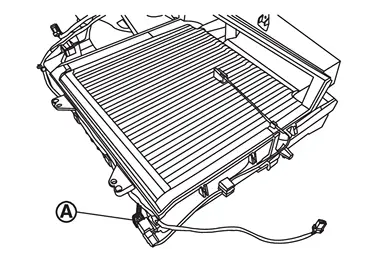
Disconnect sub harness connector  from intake sensor harness connector.
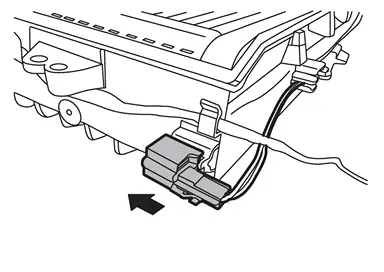
Remove intake sensor harness connector from front case upper.
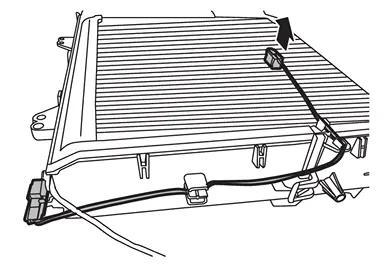
Remove intake sensor from front evaporator.
CAUTION:
-
Mark the mounting position of intake sensor bracket prior to removal so that the reinstalled sensor can be located in the same position.
-
Never damage the evaporator core.
INSTALLATION
Note the following item, and then install in the reverse order of removal.
CAUTION:
Never rotate the bracket insertion part when removing and installing the intake sensor.
Other materials
Basic information
CAUTION
Always use the Nissan Armada power outlets with the engine running to
prevent battery discharge.
Avoid using the power outlets simultaneously with high electrical loads
such as air conditioning, headlights, or defrosters.
Ensure all connected devices are turned OFF before plugg ...
Piston
Piston
DESCRIPTION Selection points Selection parts Selection items Selection methods
Between cylinder block and crankshaft
Main bearing
Main bearing grade
(bearing thickness)
Determined by match of cylinder block bearing housing grade (inner diameter of housing) and crankshaft journal gr ...
Body Side Trim
Exploded View
Rear body side welt
Assist grip
Center pillar upper garnish
Front body side welt
Front pillar garnish
Assist grip
Front kicking plate
Dash trim clip
Dash side finisher
Harness protector
Front side bracket
Center pillar lower garnish
Center pill ...