
Nissan Armada 2025-2026 Owner's Manual: Intelligent Around View Monitor system limitations
Basic information
WARNING
The Nissan Armada Intelligent Around View Monitor has inherent limitations. Ignoring these limitations while operating the vehicle may result in serious injury or even fatal accidents.
- Do not operate the Nissan Armada Intelligent Around View Monitor if the outside mirrors are folded. Always ensure the liftgate is securely closed before relying on the system.
- The distance to objects displayed on the Nissan Armada monitor may differ from the actual real-world distance due to camera angles and image processing.
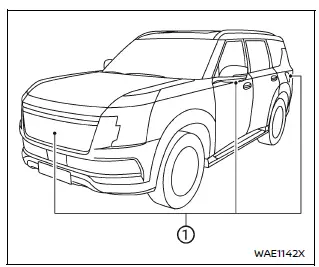
- The Nissan Armada cameras are positioned in the front grille, beneath
the outside mirrors, and above the rear license plate.
Avoid placing any objects over these cameras, as it may obstruct visibility and reduce system effectiveness.
- When washing your Nissan Armada, avoid directing high-pressure water
streams at the cameras.
Water intrusion may cause condensation, malfunction, fire hazards, or even electrical shock.
- Do not hit or apply force to the Nissan Armada cameras. These are precision components and may become damaged, leading to system failure or safety risks.
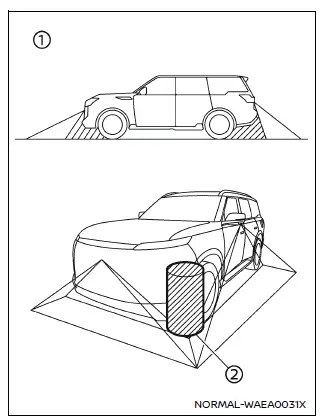
The Nissan Armada Intelligent Around View Monitor cannot display all areas around the vehicle and does not detect moving objects.
In front and rear views, objects located below the bumper or directly on the ground may not be visible 1. In bird’s-eye view, tall objects positioned near the boundary seams 2 of camera stitching may not appear on the display.
These are normal limitations of the Nissan Armada system and should always be considered during operation.
The following conditions are operational characteristics of the Nissan Armada system and do not indicate a malfunction:
- There may be a slight delay when switching between different Nissan Armada camera views.
- Extreme temperatures (very hot or very cold) may reduce image clarity on the display.
- Direct strong light shining into the Nissan Armada cameras may obscure objects.
- The display may flicker under certain lighting conditions such as fluorescent lights.
- Colors shown on the Nissan Armada monitor may differ slightly from real-world colors.
- Objects may appear unclear or distorted in low-light or nighttime conditions.
- Differences in sharpness may be noticeable between individual camera feeds in bird’s-eye view.
- Do not apply wax to the Nissan Armada camera lenses.
If wax is present, gently clean it using a soft cloth with a diluted mild cleaning solution, then dry thoroughly.
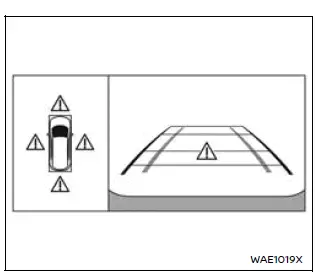
System temporarily unavailable
When the "
 "
icon appears on the Nissan Armada display, it indicates that the Around View Monitor
is experiencing abnormal operating conditions.
"
icon appears on the Nissan Armada display, it indicates that the Around View Monitor
is experiencing abnormal operating conditions.
Although this does not affect basic driving capability, the Nissan Armada system should be inspected as soon as possible.
It is recommended to have your Nissan Armada checked by an authorized NISSAN dealer.
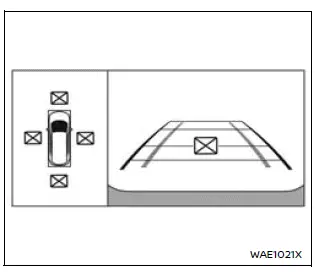
When the "
 "
icon is shown, the Nissan Armada camera system may be affected by temporary electronic
interference from nearby devices.
"
icon is shown, the Nissan Armada camera system may be affected by temporary electronic
interference from nearby devices.
This condition typically does not impact driving performance but indicates that the system should be inspected if the issue persists.
A visit to a NISSAN dealer is recommended for proper diagnostics.
System maintenance
CAUTION
- Never use alcohol, benzine, or paint thinner to clean Nissan Armada cameras, as these substances can cause discoloration or damage.
- Avoid physical damage to the Nissan Armada camera units, as this may negatively affect monitor performance.
If dirt, rain, or snow accumulates on any of the Nissan Armada cameras 1, image clarity may be reduced.
To maintain optimal performance, clean the camera lenses using a soft cloth dampened with a mild cleaning solution, then wipe dry.
Regular maintenance of the Nissan Armada camera system ensures reliable operation and enhances overall driving safety and visibility.
 How to switch the display
With the ignition switch in the ON position, the Nissan Armada Intelligent Around
View Monitor can be activated either by pressing the CAMERA/
button or by shifting the transmission into the R ( ...

Other materials:
Basic information
WARNING
Do not allow children to play with seat belts inside the Nissan Armada. Many
seating positions are equipped with Automatic Locking Retractor (ALR) seat belts.
If a belt becomes wrapped around a child’s neck while ALR mode is active, it may
tighten and cause serious injury or dea ...
Clock and outside air temperature
In the Nissan Armada, both the clock 1 and the outside air temperature 2 are
conveniently displayed at the top section of the vehicle information display, allowing
the driver to quickly access essential information while driving.
Clock
The clock in the Nissan Armada can be adjusted through ...
Basic information
Drive Mode Selector (example)
Vehicle information display (example)
The Nissan Armada features a versatile Drive Mode Selector system that allows
the driver to tailor vehicle performance to different driving conditions. By rotating
the selector dial to the left or right, you can quickl ...

0.0047