
Nissan Armada 2025-2026 Owner's Manual: Clock and outside air temperature
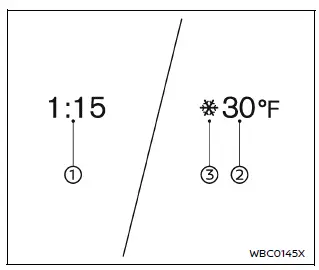
In the Nissan Armada, both the clock 1 and the outside air temperature 2 are conveniently displayed at the top section of the vehicle information display, allowing the driver to quickly access essential information while driving.
Clock
The clock in the Nissan Armada can be adjusted through the vehicle settings menu or by referring to the dedicated "Clock" section in the system settings or the NissanConnect Owner’s Manual.
Accurate time display in the Nissan Armada ensures better trip planning and synchronization with navigation and infotainment functions.
Outside air temperature (ºF or ºC)
The Nissan Armada displays the outside air temperature in either ºF or ºC, depending on user preference, within a measurement range of −40 to 140ºF (−40 to 60ºC).
This system also includes a low temperature alert feature. When the outside temperature drops below 27ºF (−3ºC), a warning indicator appears in the Nissan Armada to notify the driver of potential icy road conditions.
The temperature sensor 3 in the Nissan Armada is positioned in front of the radiator, where it continuously monitors ambient conditions.
However, readings may be influenced by external factors such as engine heat, road surface temperature, airflow direction, or prolonged idling, which can cause slight variations.
As a result, the temperature displayed in the Nissan Armada may differ from readings shown on road signs, billboards, or other external sources.
For optimal awareness, drivers of the Nissan Armada should consider these variations and always adapt driving behavior to real road conditions, especially in cold weather.
 Trip computer
Example
Basic information
In the Nissan Armada, the trip computer is controlled using intuitive switches
located directly on the steering wheel, allowing the driver to navigate menus without
...
 Touch screen display
Basic information
In the Nissan Armada, many vehicle systems and advanced features can be conveniently
controlled through the intuitive touch screen display, providing a modern and user-friendly
...
Other materials:
Forward-facing child restraint installation using the seat belts
WARNING
When installing a forward-facing child restraint in the Nissan Armada,
the three-point seat belt must be placed into Automatic Locking Retractor (ALR)
mode.
If ALR mode is not activated, the child restraint may not be securely
fastened. This can cause the seat to shift or t ...
Basic information
Drive Mode Selector (example)
Vehicle information display (example)
The Nissan Armada features a versatile Drive Mode Selector system that allows
the driver to tailor vehicle performance to different driving conditions. By rotating
the selector dial to the left or right, you can quickl ...
System temporarily unavailable
Condition A
When driving the Nissan Armada, external radar interference from other vehicles
or surrounding sources may disrupt the radar sensor’s ability to accurately detect
vehicles ahead. In such situations, the Intelligent Forward Collision Warning (I-FCW)
system will automatically deac ...

0.0034