Intelligent Key
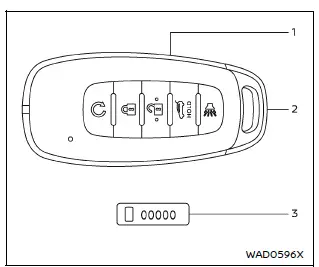
Example
- Intelligent Key (2 sets)
- Mechanical key (inside Intelligent Key) (2 sets)
- Key number plate
Basic information
The Nissan Armada is equipped with an advanced Intelligent Key system that allows convenient and secure vehicle access and operation.
The Nissan Armada can only be operated using Intelligent Keys that are properly registered with both the Intelligent Key system and the Nissan Vehicle Immobilizer System. Up to four Intelligent Keys can be programmed for a single Nissan Armada.
Any additional keys must be registered by an authorized Nissan dealer. During this process, all existing key data is erased and reprogrammed, so it is essential to bring all available Nissan Armada Intelligent Keys when performing registration.
Each Nissan Armada Intelligent Key is supplied with a key number plate. Record this number and store it in a secure place outside the vehicle, such as in your wallet.
If all keys are lost, the key number will be required to create replacements. If at least one key remains, duplication can be performed without the key number.
Nissan does not keep records of key numbers, making it especially important for Nissan Armada owners to store this information safely.
CAUTION
- Always carry the Nissan Armada Intelligent Key with you when driving.
It is a precision electronic device with an integrated transmitter and must
be handled carefully.
- The Nissan Armada Intelligent Key is water-resistant, but exposure to moisture may cause damage. If it becomes wet, dry it immediately and thoroughly.
- Avoid bending, dropping, or subjecting the Intelligent Key to impacts.
- In very low temperatures below 14ºF (-10ºC), the Nissan Armada Intelligent Key battery performance may decrease.
- Do not expose the Nissan Armada Intelligent Key to temperatures above 140ºF (60ºC) for extended periods.
- Do not modify or alter the Intelligent Key in any way.
- Avoid using magnetic holders, as they may interfere with the Nissan Armada key signal.
- Keep the Intelligent Key away from electronic devices such as TVs, computers, and smartphones to prevent signal interference.
- Do not immerse the Nissan Armada Intelligent Key in water or wash it, as this may affect system functionality.
If a Nissan Armada Intelligent Key is lost or stolen, it is strongly recommended to erase its ID from the system to prevent unauthorized access. Contact an authorized Nissan dealer for assistance.
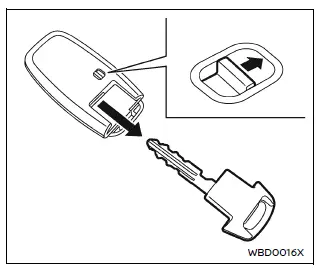
Mechanical key
The Nissan Armada Intelligent Key contains a mechanical backup key for emergency use.
To remove it, slide the release knob located on the back of the Intelligent Key.
To reinstall, insert the mechanical key fully until it locks securely into place.
The mechanical key can be used to manually lock or unlock the Nissan Armada driver’s door if the electronic system is unavailable.
CAUTION
Always keep the mechanical key inserted in the Nissan Armada Intelligent Key when not in use to avoid misplacement.
Valet hand-off
When handing over your Nissan Armada to a valet, it is recommended to provide only the Intelligent Key while keeping the mechanical key for added security.
To prevent access to personal belongings stored in the glove box of your Nissan Armada, follow these steps:
1. Remove the mechanical key from the Intelligent Key.
2. Lock the glove box using the mechanical key.
3. Give the Nissan Armada Intelligent Key to the valet and keep the mechanical key with you.
This procedure ensures that your valuables remain secure while your Nissan Armada is being handled by others.
Other materials
How to use remote keyless entry function
WARNING
In the Nissan Armada, radio frequency signals generated by the Intelligent
Key may interfere with certain medical devices.
Individuals using pacemakers or other electronic medical equipment should
consult the device manufacturer before using the Nissan Armada Intelligent Key.
...
Inside mirror
Basic information
In the Nissan Armada, adjust the inside mirror by carefully setting both its
height and angle to achieve optimal rearward visibility and driving comfort.
Manual anti-glare type (if so equipped)
The Nissan Armada manual anti-glare inside mirror can be adjusted to reduce ...
Transfer Assembly
Exploded View
Transfer assembly
: N·m (kg-m, ft-lb)
Removal and Installation
WARNING:
Jacking up or lift up the vehicle may the vehicle height to go down which cause a personal injury and/or damage to the air suspension component parts. Refer to Precaution for when Jacking and Li ...