Basic information
The Nissan Armada memory seat system is designed to enhance comfort and personalization by allowing drivers to store and recall their preferred driving positions effortlessly.
This advanced Nissan Armada feature includes:
- Memory storage function
- User profile linking to stored positions
- Integrated setting memory function
Memory storage function
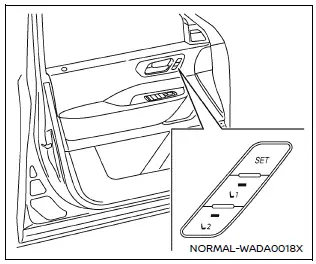
Memory seat switch
Basic information
The Nissan Armada allows storage of two customized driving positions, including the driver’s seat, steering wheel, and outside mirrors.
To save your preferred Nissan Armada driving position, follow these steps:
1. Adjust the driver’s seat, steering wheel, and outside mirrors to your desired position using the appropriate controls.
2. Press the SET button and, within 5 seconds, press memory button (1 or 2).
3. The indicator light on the selected Nissan Armada memory button will illuminate for approximately 5 seconds.
4. A confirmation chime will sound, indicating that the settings have been successfully stored.
NOTE:
- The Nissan Armada memory storage process will be canceled if any of
the following occur after pressing SET:
- The ignition switch is used to start the engine.
- The seat, steering wheel, or mirrors are adjusted again.
- Storing a new position on the same Nissan Armada memory button will overwrite the previously saved configuration.
Confirming memory storage
To verify stored settings in the Nissan Armada, press the SET button.
If a memory position exists, the corresponding memory button (1 or 2) will remain illuminated for approximately 5 seconds, while the other briefly lights and turns off.
Recalling switch memory positions
NOTE:
For safety, the Nissan Armada memory recall function should only be used when the transmission is in the P (Park) position.
To recall a saved driving position, simply press memory button (1 or 2).
The Nissan Armada driver’s seat, steering wheel, and mirrors will automatically move to the stored positions.
NOTE:
The recall function may not operate if a certain amount of time has passed after turning the ignition OFF.
Linking the profiled user function to a stored memory position
Basic information
The Nissan Armada allows you to link a personalized user profile to a stored memory position, creating a seamless driving experience.
To link a user profile:
1. Turn the ignition ON while carrying the registered Nissan Armada Intelligent Key.
NOTE:
Ensure that only one Intelligent Key is inside the Nissan Armada. Multiple keys may cause incorrect identification.
2. Adjust the driver’s seat, steering wheel, and mirrors to your preferred position.
3. Turn the ignition OFF.
The next time the user profile is selected and the Nissan Armada ignition is turned ON with the same Intelligent Key, the system will automatically restore the saved driving position.
This integration between the Nissan Armada memory seat system and user profiles significantly improves comfort and convenience for multiple drivers.
Entry/Exit function
The Nissan Armada entry/exit function automatically adjusts the seat and steering wheel to facilitate easier access in and out of the vehicle.
When the vehicle is in P (Park):
- The driver’s seat slides backward and the steering wheel moves upward when the driver’s door is opened and the ignition is OFF.
- This also occurs when the ignition is turned from ON to OFF while the door is open.
When returning to driving mode:
- The Nissan Armada seat and steering wheel automatically return to their previous positions when the ignition is turned ON.
This feature can be customized or disabled through the Nissan Armada vehicle settings menu by turning OFF "Exit Seat Slide" or "Exit Steering".
Setting memory function
The Nissan Armada memory system can also store and recall additional personalized settings linked to each Intelligent Key.
- Air conditioning system preferences
- Steering wheel position
- Navigation system settings
- Audio system configuration
- Seat position
To activate these personalized Nissan Armada settings:
1. Carry the Intelligent Key associated with the stored preferences and unlock
the vehicle using the request switch or the UNLOCK
 button.
2. Turn the ignition ON to automatically apply the saved settings.
System operation
The Nissan Armada memory seat system may not function or may stop operating under the following conditions:
- When the vehicle speed exceeds approximately 2 MPH (3 km/h).
- When the transmission is shifted out of P (Park).
- When the steering wheel adjustment lever is used.
- When any Nissan Armada memory button is pressed while the system is already in operation.
The Nissan Armada memory seat system provides a premium level of comfort and convenience, ensuring that each driver enjoys a perfectly tailored driving position every time they enter the vehicle.
Other materials
Readiness for Inspection/Maintenance (I/M) test
WARNING
A Nissan Armada equipped with Four-Wheel Drive (4WD) must never be tested
on a two-wheel dynamometer or similar equipment used in some emissions testing facilities.
Always inform inspection personnel that your Nissan Armada is a 4WD vehicle
before testing begins.
Using incorrect testi ...
Road Wheel Tire
Exploded View
Tire
Air valve
Wheel
: For non-reusable parts, refer to the TPMS configuration diagram.
Refer to TIRE PRESSURE SENSOR : Exploded View.
: N·m (kg-m, ft-lb)
Removal & Installation
WARNING:
Jacking up or lift up the vehicle may the vehicle height to go down which ...
Electrical Brake Control Unit
Exploded View
Reservoir cap
Electrical brake control unit
Bracket
Caution label
Gasket
Spacer
: N·m (kg-m, ft-lb)
: N·m (kg-m, in-lb)
: Always replace after every disassembly.
Removal & Installation
WARNING:
Jacking up or lift up the vehicle may the vehicle ...