Exploded View
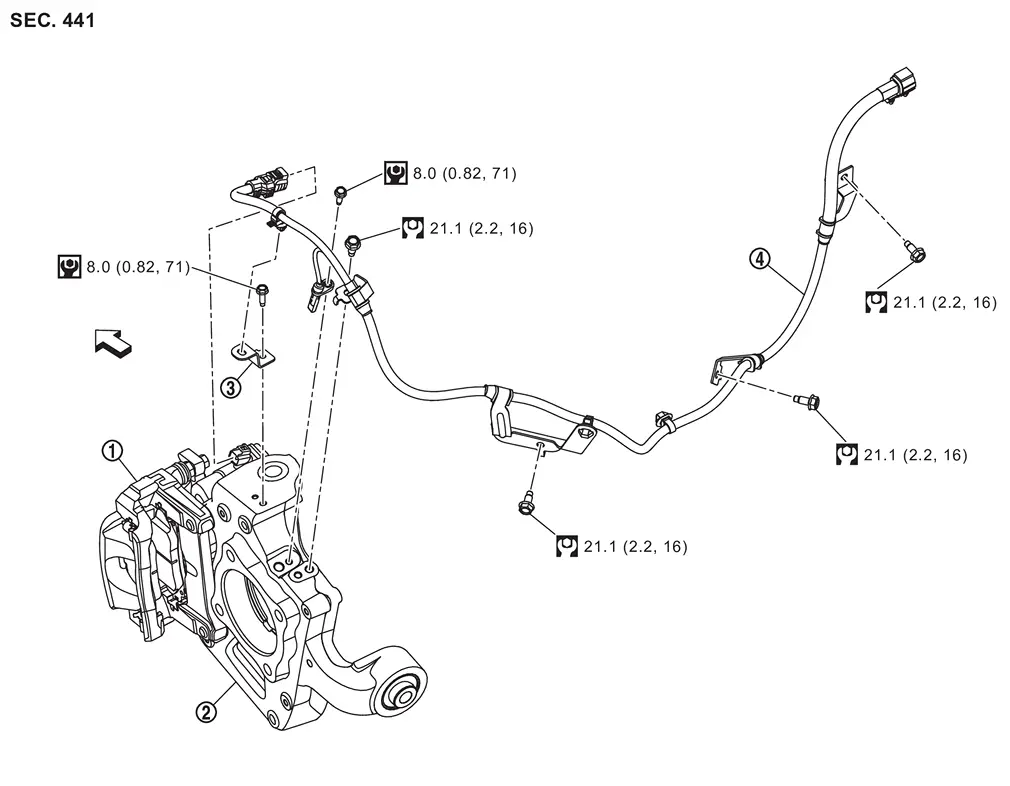
 |
Rear brake caliper assembly |  |
Axle housing |  |
Bracket |
 |
Parking brake actuator harness and rear wheel sensor | ||||
| : vehicle front | |||||
 |
: N·m (kg-m, ft-lb) | ||||
 |
: N·m (kg-m, in-lb) | ||||
Removal and Installation
WARNING:
-
Jacking up or lift up the vehicle may the vehicle height to go down which cause a personal injury and/or damage to the air suspension component parts. Refer to Precaution for when Jacking and Lifting Up the vehicle with Electronic Air Suspension System.
REMOVAL
Turn the ignition switch ON.
CAUTION:
Never start the engine.
Release the parking brake.
CAUTION:
If the brake cannot be released, release it manually. Refer to Diagnosis Procedure.
Turn the ignition switch OFF.
Disconnect 12V battery negative terminal. Refer to Removal and Installation.
Remove rear tires. Refer to ROAD WHEEL TIRE : Removal & Installation.
Disconnect parking brake actuator harness and rear wheel sensor harness connectors.
Remove parking brake actuator harness and rear wheel sensor harness mounting bolts and bracket.
Remove parking brake actuator harness and rear wheel sensor harness from the vehicle.
INSTALLATION
Install the reverse order of the removal.
Other materials
Additional Service When Replacing Sub-Tcm
Description
WARNING:
Jacking up or lift up the vehicle may the vehicle height to go down which cause a personal injury and/or damage to the air suspension component parts. Refer to Precaution for when Jacking and Lifting Up the vehicle with Electronic Air Suspension System.
When replacing the ...
Door & Lock Tools and Preparation
Special Service Tools
The actual shapes of TechMate tools may differ from those of special service tools illustrated here.
Tool number
(TechMate No.)
Tool name Description
(NI-39570)
Chassis ear
Locates the noise
(NI-50397)
NISSAN Squeak and Rattle Kit
Repairs the cause of noise
C ...
Door Does Not Lock/unlock with Intelligent Key (one Key)
Description
All doors do not lock/unlock using Intelligent Key button. (One Intelligent Key has the symptom, other keys operate normally.)SYMPTOM TABLE (ONE INTELLIGENT KEY HAS THE SYMPTOM, OTHER KEYS OPERATE NORMALLY) Door lock operation (remote keyless entry) Door lock operation (one touch sensor ...