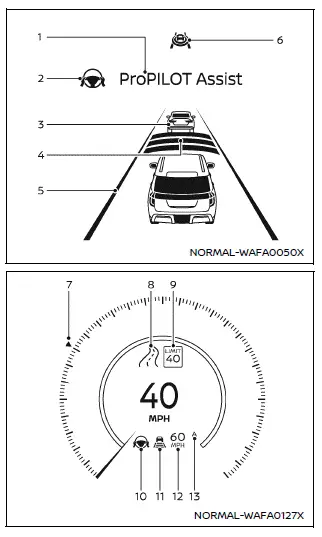
ProPILOT Assist and ProPILOT Assist 1.1
- ProPILOT activation
Appears once the Nissan Armada ProPILOT Assist system is enabled, confirming that the driver assistance features are ready to operate and support the driver during travel. - Steering Assist indicator
Displays the current Steering Assist status in the Nissan Armada using color-coded feedback for intuitive understanding- Gray: Steering Assist is in standby mode and waiting for activation conditions
- Green: Steering Assist is actively assisting with lane centering
- Vehicle ahead detection indicator
Shows whether the Nissan Armada system detects a vehicle ahead (available when Intelligent Cruise Control is active) - Set distance indicator
Indicates the selected following distance to the vehicle ahead, helping maintain safe spacing - Lane marker indicator
Displays detection of lane markings and system readiness- No display: Steering Assist is OFF
- Gray: Lane markers are not detected
- Green: Lane markers detected and Steering Assist active
- Yellow: Lane departure warning detected
- ProPILOT status indicator (
 )
)
Reflects overall system status in the Nissan Armada- White: System ON but in standby
- Blue: System fully active and engaged
- Target speed indicator
Displays the selected cruising speed- White triangle: Standard cruise control speed
- Green triangle: Intelligent Cruise Control speed
- Road information indicator (for ProPILOT Assist 1.1) (
 )
)
Shows real-time road data detected by the Nissan Armada system - Detected road sign (speed limit) indicator (for ProPILOT Assist
1.1) (
 )
)
Displays detected speed limits to enhance driver awareness - Steering Assist status indicator/ warning (
 ,
,
 )
)
Shows Steering Assist condition- No display: Steering Assist OFF
- Gray: Standby
- Green: Active
- Yellow: System malfunction
- Red: Hands-off warning detected
- Speed control status indicator/set distance indicator/lane marker
indicator (
 )
)
Provides combined status of speed control and lane tracking- White: ICC standby
- Green: ICC active
- Vehicle icon visible: Lead vehicle detected
- No icon: Maintaining preset speed
- Yellow: ICC malfunction
Also reflects Steering Assist state through lane marker colors.
- No lane: OFF
- Gray: Standby
- Green: Active
- Vehicle set speed indicator
Shows the configured driving speed- Gray: ICC standby
- Green: ICC active
Units can be switched between MPH and km/h depending on driver preference.
- Speed Limit Link indicator (for ProPILOT Assist 1.1) (A,
 ,
,
 )
)
Indicates automatic speed adjustment based on detected limits
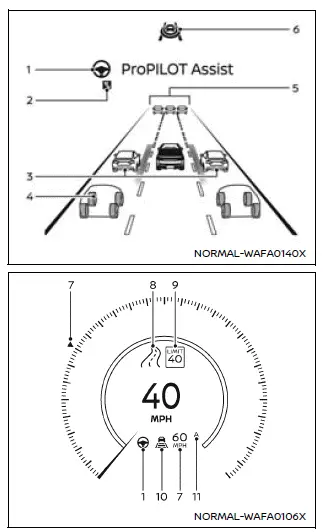
ProPILOT Assist 2.1
NOTE:
Display layout and details in the Nissan Armada may vary slightly depending on the ProPILOT Assist version installed.
Display colors dynamically change depending on the active mode of Nissan Armada ProPILOT Assist 2.1.
- Steering Assist indicator
Shows the real-time status of steering assistance. - Lane Change Assist Indicator (ProPILOT Assist 2.1) (
 )
)
Appears when lane change assistance is available. - Side detection (ProPILOT Assist 2.1)
Indicates presence of vehicles in blind spot areas. - Surrounding Vehicle Display (ProPILOT Assist 2.1)
Provides a visual representation of surrounding traffic including cars, trucks, and motorcycles. Available on mapped highways at speeds above approximately 37 MPH (60 km/h). Requires active subscription and driver consent. - Vehicle ahead detection indicator
Confirms detection of a vehicle ahead. - ProPILOT Assist 2.1 status indicator
Shows overall operational status. - Vehicle Set Speed Indicator
Displays current set cruising speed. - Road information indicator (
 )
)
Shows detected road characteristics. - Detected road sign (speed limit) indicator (
 )
)
Displays recognized speed limits. - Intelligent Cruise Control (ICC) Status Indicator
Shows speed control, distance setting, and lead vehicle detection. - Speed Limit Adjust Indicator (A)
Indicates automatic adjustment of vehicle speed according to detected limits.
NOTE:
- When activated, the Nissan Armada ProPILOT Assist screen is displayed automatically. This can be customized in Settings → Customize Display → ProPILOT Assist Display.
- The ProPILOT Assist 2.1 interface is also projected onto the Head-Up Display (HUD) for enhanced visibility.
- Refer to licensing details for HD map data in the Nissan Armada documentation.
Safety Shield Status Screen:
The Safety Shield Status Screen appears when the Nissan Armada ProPILOT Assist system is activated, before setting the speed. It provides a comprehensive overview of active safety systems, including blind spot monitoring, forward collision systems, and side assistance features.
Activating ProPILOT Assist also enables intervention systems if they are selected in the driver assistance settings of the Nissan Armada.
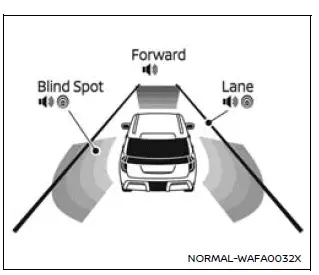
Example (all enabled)
- When "Warning" systems are active, the "
 "
mark appears in each zone.
"
mark appears in each zone. - When "Intervention" systems are enabled, the "
 "
mark is shown.
"
mark is shown. - If systems are disabled, "OFF" is displayed.
NOTE:
To customize driver assistance settings in your Nissan Armada, navigate to Settings → Driver Assistance in the vehicle information display.
Additional tip: Regularly verify that all sensors and cameras in your Nissan Armada are clean and unobstructed to ensure accurate system performance and maximum safety.
Other materials
How to Set Srt Code
SRT Set Driving Pattern
CAUTION:
Always drive the vehicle in safe manner according to traffic conditions and obey all traffic laws.*1: Depress the accelerator pedal until vehicle speed is 90 km/h (56 MPH), then release the accelerator pedal and keep it released for more than 10 seconds. Depress the ...
Low Tire Pressure Warning Lamp Does Not Turn Off
Description
The low tire pressure warning lamp does not turn OFF after several seconds is passed after engine starts.
Diagnosis Procedure
CHECK TIRE PRESSURE
Ignition switch ON.
CAUTION:
Never start the engine.
Check the tire pressure for all wheels and adjust to the specified value. Refer to TI ...
Additional Service When Replacing Ipdm E/r
Description
After replaced IPDM E/R, it is necessary to perform control unit configuration. For details, refer to Work Procedure.
Work Procedure
REPLACE IPDM E/R
Replace IPDM E/R. Refer to Removal and Installation.
>>
GO TO 2.
WRITING vehicle SPECIFICATION
Perform configuration (IPDM E/R). R ...