Basic information
The Intelligent Cruise Control (ICC) system in the Nissan Armada is an integral component of the advanced ProPILOT Assist suite. Before using this feature, it is strongly recommended to carefully review the entire ProPILOT Assist section to fully understand system operation, limitations, and display indicators. Proper knowledge ensures safer and more efficient use of the Nissan Armada’s intelligent driving technologies.
The ICC system in the Nissan Armada utilizes a forward-facing radar sensor to continuously monitor traffic conditions ahead and adapt vehicle behavior accordingly. Its operation can be summarized as follows:
- When no vehicle is detected in the same lane, the Nissan Armada ICC system maintains the speed selected by the driver, delivering a smooth and consistent driving experience similar to traditional cruise control.
- When a vehicle is detected ahead, the Nissan Armada automatically adjusts its speed to maintain a preset following distance. If the leading vehicle slows down or stops, the system will decelerate the vehicle to a complete stop and hold it stationary when required.
- When the vehicle ahead moves out of the lane or accelerates, the Nissan
Armada ICC system will smoothly accelerate back up to the preset cruising speed.
Maximum speed: 90 MPH (144 km/h)
The ICC system in the Nissan Armada is capable of applying up to approximately 40% of the vehicle’s total braking force. It is designed for use in stable traffic conditions where speeds remain relatively consistent. If additional acceleration is needed beyond the system’s capability, the driver can override ICC at any time by pressing the accelerator pedal.
While the driver is accelerating manually, the Nissan Armada ICC system will not apply braking. Additionally, the system requires detection of a lead vehicle when traveling below approximately 15 MPH (24 km/h) to function properly.
To initially activate the ICC system in the Nissan Armada, the vehicle must be traveling at a minimum speed of approximately 20 MPH (30 km/h).
NOTE:
When the ICC system applies braking in the Nissan Armada, the brake lights will automatically illuminate to alert following traffic.
For ProPILOT Assist 1.1 and 2.1:
Additional intelligent features available in the Nissan Armada enhance the ICC system’s performance and driving comfort:
- Speed Adjust by Route automatically adapts vehicle speed based on highway curves, interchanges, and navigation data, improving efficiency and safety.
- Speed Limit Assist detects speed limit signs and can notify the driver or adjust the set cruising speed accordingly, depending on system configuration.
System operation
The Nissan Armada ICC system offers two distinct cruise control modes to suit different driving preferences and conditions:
- Conventional cruise control (fixed speed)
- Intelligent Cruise Control (adaptive speed with distance control)
NOTE:
Steering Assist functionality is not available when the Nissan Armada is operating in conventional fixed-speed cruise control mode.
To use Intelligent Cruise Control without Steering Assist in the Nissan Armada, activate ProPILOT Assist and then disable Steering Assist via the steering wheel controls or the vehicle settings menu.
To engage conventional cruise control mode, press and hold the ProPILOT Assist switch for more than approximately 1.5 seconds, then set the desired speed.
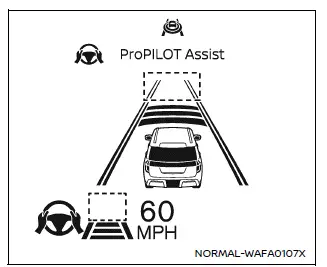
System set display - no vehicle detected ahead (for ProPILOT Assist and
ProPILOT Assist 1.1)
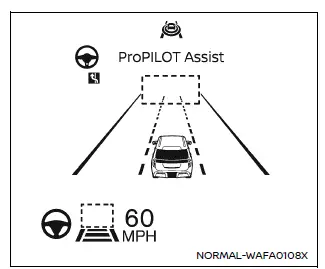
System set display - no vehicle detected ahead (for ProPILOT Assist 2.1)
If no vehicle ahead detected:
When no leading vehicle is identified, the Nissan Armada ICC system maintains the selected cruising speed just like a traditional cruise control system, ensuring a stable and comfortable driving experience over long distances.
Additional tip: For optimal performance of the Nissan Armada Intelligent Cruise Control system, always keep radar sensors clean and unobstructed, and remain attentive to traffic conditions even when the system is active.
When no vehicle is detected in front of the Nissan Armada, the Intelligent Cruise Control (ICC) system will smoothly and progressively accelerate the vehicle back to the driver’s preset cruising speed, ensuring a comfortable and controlled driving experience.
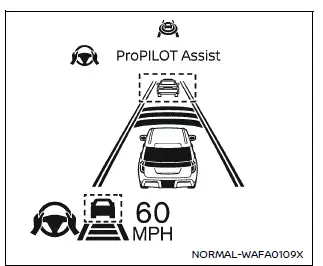
System set display - a vehicle detected ahead (for ProPILOT Assist and ProPILOT
Assist 1.1)
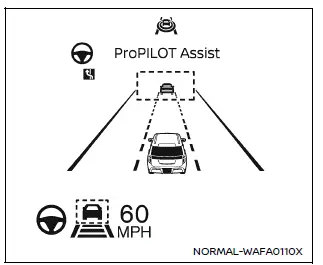
System set display - a vehicle detected ahead (for ProPILOT Assist 2.1)
If vehicle ahead is detected:
When the Nissan Armada detects a vehicle traveling ahead in the same lane, the ICC system intelligently adjusts vehicle speed by modulating throttle input and applying braking as necessary. This ensures that the Nissan Armada maintains a safe and driver-selected following distance while matching the speed of the leading vehicle.
If the vehicle ahead stops:
If the detected vehicle ahead begins to slow down and comes to a complete stop, the Nissan Armada will automatically decelerate and bring itself to a full stop as well. Once stationary, the "(RES+-) Follow Vehicle Ahead" message will appear on the vehicle information display, indicating readiness to resume movement.
- For Nissan Armada models equipped with ProPILOT Assist 1.1 or ProPILOT Assist 2.1, if the vehicle ahead stops and your vehicle remains stopped for less than approximately 30 seconds on a freeway, the system will display the "Follow Vehicle Ahead" message. When traffic resumes, your Nissan Armada will automatically begin moving again without driver intervention.
- For vehicles without these enhanced systems, or when not driving on a freeway, the Nissan Armada will automatically resume movement only if it has been stopped for less than approximately 3 seconds. If the stop duration exceeds this time, manual input will be required to continue driving.
To reactivate the ICC system after a stop in the Nissan Armada, either press the RES+- switch in any direction or gently press the accelerator pedal to resume motion.
If the Nissan Armada remains stationary for more than approximately 3 minutes, the ICC system will automatically deactivate, and the electronic parking brake will engage to secure the vehicle safely.
WARNING
If another vehicle cuts into your lane after your Nissan Armada has come to a stop using the ICC system, the system may not detect it depending on its position or movement. As a result, your vehicle could begin to accelerate toward the new vehicle. Always be prepared to apply the brake pedal and maintain a safe following distance.
Cut-in detection:
If a vehicle suddenly merges into your lane close to your Nissan Armada, the ICC system may alert you by flashing the vehicle-ahead detection indicator, helping you stay aware of changing traffic conditions.
Passing a slower vehicle:
When overtaking a slower vehicle, particularly in the left lane, the Nissan Armada ICC system may briefly increase acceleration to assist with a smoother lane change maneuver. However, the system will never exceed the preset speed defined by the driver.
Approach warning:
If your Nissan Armada approaches the vehicle ahead too quickly—either due to sudden deceleration of the leading vehicle or a vehicle merging into your lane—the system will issue both visual and audible alerts. In such situations, the driver must take immediate action.
- If the warning chime sounds.
- If the vehicle-ahead detection indicator begins to flash.
- If you determine that additional braking is necessary to maintain a safe distance.
Additional tip: Even with advanced systems like ICC in the Nissan Armada, always remain attentive and ready to take full control of the vehicle, especially in complex or unpredictable traffic situations.
The warning chime in the Nissan Armada Intelligent Cruise Control (ICC) system may not always activate when vehicles are traveling very close together. This behavior can occur under specific driving conditions where the system determines that no immediate intervention is required.
- When both your Nissan Armada and the vehicle ahead are traveling at nearly identical speeds and the distance between them remains constant.
- When the vehicle ahead is accelerating and increasing the distance from your Nissan Armada, reducing the need for a proximity alert.
NOTE:
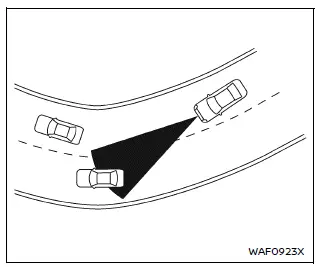
The approach warning chime in the Nissan Armada may activate and the system display may flash even when there is no direct vehicle ahead. This can occur when the radar sensor detects objects located near the sides of the vehicle or along the roadside. In such cases, the ICC system may automatically adjust speed by accelerating or decelerating.
This situation is more likely when driving the Nissan Armada on winding roads, narrow lanes, steep inclines, or when entering and exiting curves. Under these conditions, the radar sensor may interpret roadside objects as potential obstacles. Therefore, the driver must manually maintain a safe following distance and remain attentive at all times.
Additionally, sensor performance in the Nissan Armada may be influenced by steering input, lane positioning, traffic density, or even vehicle condition (for example, if the vehicle has sustained damage). These factors can affect how accurately the system detects surrounding objects.
NOTE:
For optimal operation of the Nissan Armada ICC and ProPILOT Assist systems, always ensure that radar sensors, cameras, and sonar units are clean and unobstructed. Dirt, ice, snow, or damage can significantly reduce system effectiveness and accuracy.
Warnings and malfunctions
Under certain conditions, the Nissan Armada ICC system will automatically cancel operation to ensure driver safety. When this occurs, a warning chime will sound and the system cannot be re-engaged until the issue is resolved.
- No vehicle is detected ahead and the Nissan Armada is traveling below approximately 15 MPH (24 km/h). For ProPILOT Assist 1.1 or 2.1 models operating on mapped limited-access highways, the system will also cancel if the vehicle remains stopped for more than approximately 3 seconds without detecting a vehicle ahead.
- Any vehicle door is open.
- The driver's seat belt is not fastened.
- The Nissan Armada has remained stopped by the ICC system for approximately 3 minutes or longer.
- The transmission is shifted out of the D (Drive) position or manual shift mode.
- The electronic parking brake is engaged.
- Drive modes such as SNOW, SAND, ROCK, or MUD/RUT are selected (if equipped), which may limit ICC functionality.
- The Vehicle Dynamic Control (VDC) system is turned off.
- The VDC or traction control system is actively operating.
- Wheel slip is detected.
- The Automatic Emergency Braking (AEB) system with Pedestrian Detection intervenes with stronger braking.
- The radar signal is temporarily blocked or interrupted.
- The vehicle is operating in 4H or 4L mode (for 4WD-equipped Nissan Armada models).
- The vehicle height is set to HIGH via the air suspension system (if equipped), which may affect sensor alignment.
If all conditions for proper operation are met and the Nissan Armada ICC system still does not function as expected, refer to the "Driver assistance troubleshooting guide" for a complete list of system messages and diagnostic steps.
Additional tip: Always treat the Nissan Armada ICC system as a support feature rather than a replacement for attentive driving, especially in complex environments or rapidly changing traffic conditions.
Other materials
Front Wheel Hub and Knuckle
Inspection
WARNING:
Jacking up or lift up the vehicle may the vehicle height to go down which cause a personal injury and/or damage to the air suspension component parts. Refer to Precaution for when Jacking and Lifting Up the vehicle with Electronic Air Suspension System.
COMPONENT PARTMake s ...
Calibration of G Sensor
Description
CAUTION:
Always perform the decel G sensor calibration and side G sensor calibration before driving when the following operation is performed. Refer to Work Procedure.×: Required —: Not required Procedure
Decel G sensor calibration
Side G sensor calibration
Removing/ installi ...
Third Seat Belt Buckle
Removal and Installation
REMOVALSeat Belt Buckle LH and Connector BuckleRemove luggage floor board LH. Refer to Removal and Installation.
Disconnect harness connector.
Remove seat belt buckle LH and connector buckle mounting anchor bolt .
Pull out seat belt buckle LH and connector buckle from thir ...