Exploded View
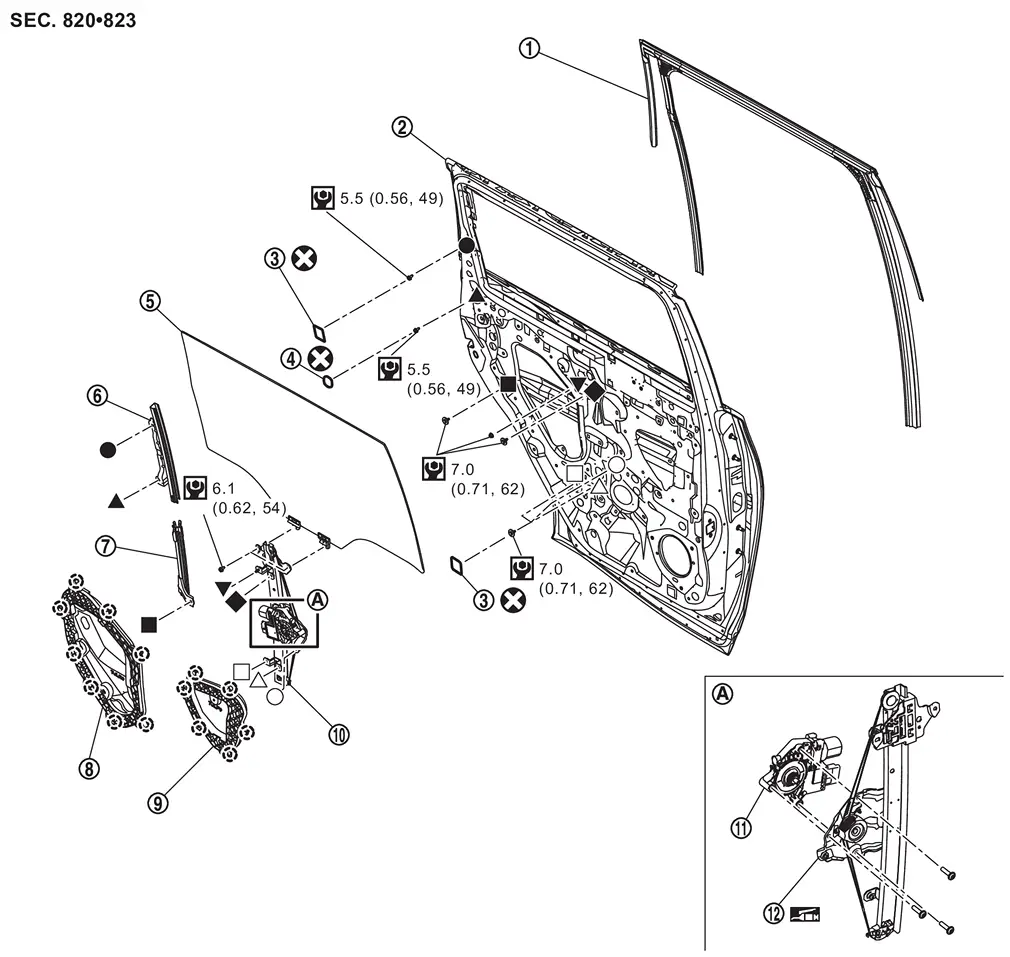
 |
Rear door glass run |  |
Rear door panel |  |
Hole seal 1 |
 |
Hole seal 2 |  |
Rear door glass |  |
Rear door lower sash upper |
 |
Rear door lower sash lower |  |
Rear door inner frame rear |  |
Rear door inner frame front |
 |
Rear door regulator assembly |  |
Rear door power window motor |  |
Rear door regulator |
 |
: Clip | ||||
 |
: Always replace after every disassembly. | ||||
 |
: N·m (kg-m, in-lb) | ||||
 |
: Body grease | ||||
 , , , ,  , ,  , ,  , ,  , ,  , ,  : Indicates that the part is connected at points with same symbol in actual vehicle. : Indicates that the part is connected at points with same symbol in actual vehicle. |
|||||
Other materials
Change of System Mode
Description
CAUTION:
When the following operations are performed, always use CONSULT, for performing "System mode change" of "Work support". Refer to Work Procedure.×: Required —: not required Procedure System mode change
Removing/installing ABS actuator and electric unit (control unit)
†...
Head up Display Screen Is Not Displayed
Diagnosis Procedure
CHECK HEAD UP DISPLAY MAIN SWITCH OPERATION
With CONSULT
Turn ignition switch ON.
Select "Main switch" in "Data Monitor" mode of "Head Up Display” using CONSULT.
Check "Main switch" indication as per the following condition.
Monitor item Condition Indication
Main sw ...
Additional Service When Replacing Distance Sensor
Work Procedure
Always perform the distance sensor configuration after replacing the distance sensor.
Always perform the radar alignment after removing and installing or replacing the distance sensor.
CAUTION:
The system does not operate normally unless the distance sensor configuration and the r ...