Exploded View
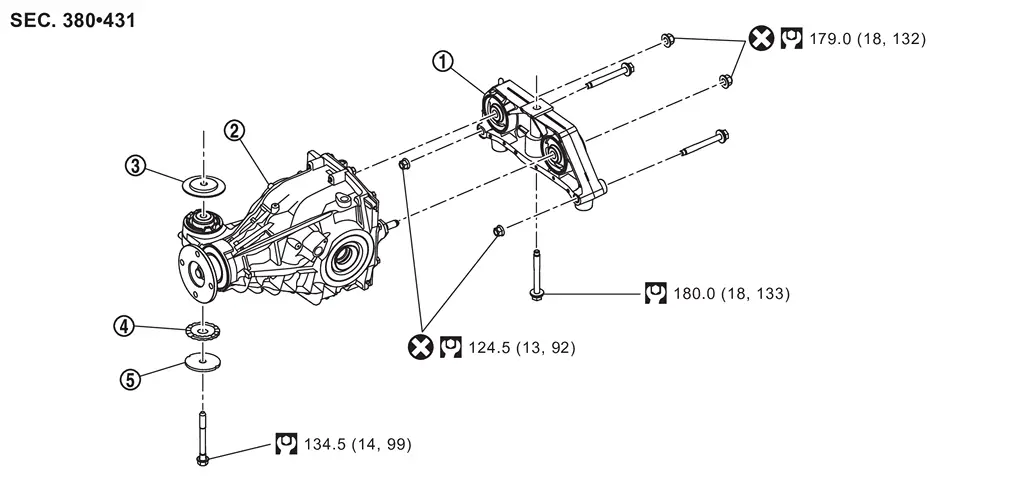
 |
Final drive mounting bracket |  |
Rear final drive assembly |  |
Upper stopper |
 |
Lower stopper |  |
Washer | ||
 : N·m (kg-m, ft-lb) : N·m (kg-m, ft-lb) |
|||||
 : Always replace after every disassembly. : Always replace after every disassembly. |
|||||
Removal and Installation
WARNING:
-
Jacking up or lift up the vehicle may the vehicle height to go down which cause a personal injury and/or damage to the air suspension component parts. Refer to Precaution for when Jacking and Lifting Up the vehicle with Electronic Air Suspension System.
REMOVAL
-
Drain gear oil. Refer to Draining.
-
Remove rear propeller shaft from final drive. Refer to Removal and Installation (2WD) or Refer to Removal and Installation (4WD).
-
Remove drive shafts. Refer to Removal and Installation.
-
Remove rear supension member stay. Refer to Removal and Installation.
-
Remove breather hose from rear final drive assembly. Refer to Removal and Installation.
-
Set a suitable jack to rear final drive assembly.
CAUTION:
Never place a jack under the rear cover.
-
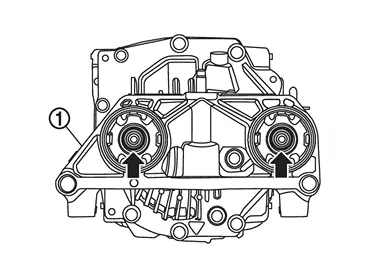
Remove rear final drive assembly mounting nuts (
 ) from final drive mounting bracket
  .
.
-
Remove rear final drive assembly mounting bolt (
) and remove rear final drive assembly .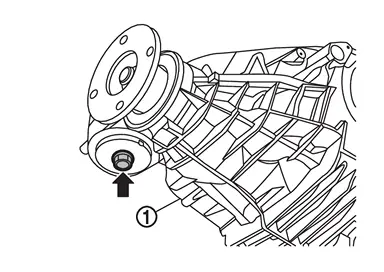
CAUTION:
Secure rear final drive assembly to a suitable jack while removing it.
-
Remove upper stopper, lower stopper, and washer.
-
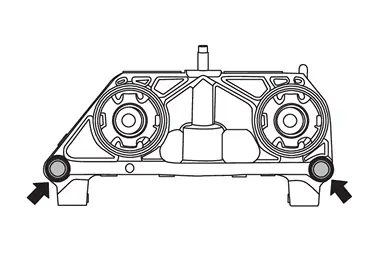
Remove final drive mounting bracket mounting bolts and nuts (
).
-
Remove final drive mounting bracket mounting bolt (
) and remove final drive mounting bracket .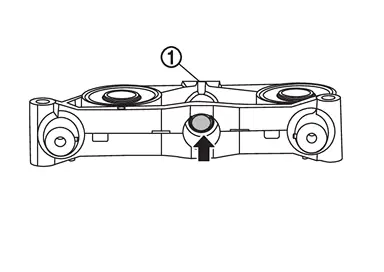
INSTALLATION
Note the following, and install in the reverse order of removal.
-
For non-reusable parts, refer to Exploded View.
-
For each tightening torque, refer to Exploded View.
-
Perform inspection after installation. Refer to Inspection.
Inspection
INSPECTION AFTER INSTALLATION
Check the oil level and the oil leakage after installation. Refer to Inspection.
Other materials
Basic information
Touch screen display
WARNING
Failure to follow proper Nissan Armada RearView Monitor usage instructions
may result in serious injury or fatal accidents.
The Nissan Armada RearView Monitor is an assistance feature and must
not replace proper driving practices.
Always visual ...
Precautions for Removing Battery Terminal
PRECAUTIONS FOR REMOVING BATTERY TERMINAL : Precautions
When disconnecting the 12V battery terminal, turn off the ACC power before disconnecting the 12V battery terminal, observing “How to disconnect 12V battery terminal” described below.
NOTE:
Some ECUs operate for a certain fixed time ev ...
Map Lamp Bracket
Removal and Installation
REMOVALRemove headlining assembly. Refer to Removal and Installation.
Disengage body harness fixing clips , and then remove body harness from map lamp bracket.
: vehicle front
Remove map lamp bracket.
Without moonroof models
Remove map lamp bracket fixing clips .
...