Basic information
Example
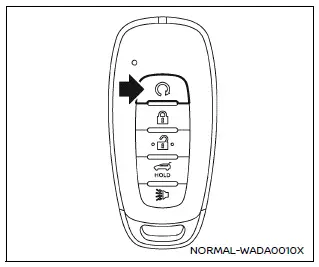
The Nissan Armada remote engine start feature is activated using the dedicated
 button on the Intelligent Key (if equipped), allowing the engine to be started conveniently
from outside the vehicle.
button on the Intelligent Key (if equipped), allowing the engine to be started conveniently
from outside the vehicle.
This advanced Nissan Armada functionality enhances comfort by enabling systems such as climate control to operate automatically, especially if they were active during the last ignition cycle.
Depending on your region, local laws may regulate or limit the use of remote engine start in the Nissan Armada, including restrictions on engine idling time or requiring the vehicle to remain within view. Always check applicable regulations before using this feature.
Environmental conditions, signal interference, and battery status may influence the performance of the Nissan Armada Intelligent Key and its remote engine start capability.
Remote engine start operating range
WARNING
- To prevent injury or fatal incidents in the Nissan Armada, never leave
children, pets, or individuals requiring assistance unattended inside the vehicle.
The interior temperature of a closed Nissan Armada can rise quickly, especially in warm weather, posing serious health risks.
- Never use the Nissan Armada remote engine start system in enclosed areas
such as garages.
Exhaust gases contain carbon monoxide, which is odorless and extremely dangerous, potentially causing unconsciousness or death.
CAUTION
If the Nissan Armada Intelligent Key battery is weak or if strong radio interference is present, the effective operating range may decrease, and the system may not function as intended.
The Nissan Armada remote engine start can only be used when the Intelligent Key is within the proper operating distance from the vehicle.
The typical operating range for the Nissan Armada remote engine start system is approximately 197 ft (60 m).
Remote starting the engine
To start the Nissan Armada engine remotely, follow these steps:
1. If the doors are unlocked, press the LOCK
 button to secure all doors.
2. Aim the Nissan Armada Intelligent Key toward the vehicle.
3. Press the LOCK
 button again.
4. Within 5 seconds, press and hold the remote engine start
 button until the turn signals flash and the tail lights illuminate. If the Nissan
Armada is not in direct view, hold the button for at least 2 seconds.
button until the turn signals flash and the tail lights illuminate. If the Nissan
Armada is not in direct view, hold the button for at least 2 seconds.

Once activated, the Nissan Armada will perform the following actions:
- The parking lights will illuminate and remain on while the engine is running.
- The Nissan Armada doors will stay locked, and climate systems may activate automatically.
- The engine will run for approximately 20 minutes before shutting off automatically.
Before driving the Nissan Armada, press and hold the brake pedal and switch the ignition to the ON position. For additional driving instructions, refer to the appropriate section of the manual.
To reuse the Nissan Armada remote engine start feature, the vehicle must be driven at speeds above 4 MPH (7 km/h).
Canceling a remote engine start
To stop a remote engine start in the Nissan Armada, perform one of the following actions:
- Aim the Intelligent Key at the Nissan Armada and press the remote engine start button until the parking lights turn off.
- Activate the hazard warning lights.
- Turn the ignition ON and then OFF.
- Wait until the 20-minute timer expires.
- Open the hood of the Nissan Armada.
- Shift the gear selector out of the P (Park) position.
- If the theft alarm is triggered due to unauthorized access.
- Press the ignition switch without the Intelligent Key inside the Nissan Armada.
- Press the ignition switch with the Intelligent Key present but without pressing the brake pedal.
- Press the accelerator pedal.
- If the Nissan Armada begins moving after remote start, the system will shut down automatically.
Conditions the remote engine start will not work
The Nissan Armada remote engine start system will not activate under the following conditions:
- If the ignition switch is already in the ON position.
- If the hood is not fully closed.
- If the hazard lights are activated.
- If the engine is already running.
- If the remote engine start
 button is not held long enough (minimum 2 seconds).
 - If the remote engine start
 button is not pressed within 5 seconds after pressing the LOCK
 button.
 - If the Nissan Armada doors are not properly closed and locked.
(The hazard lights will flash twice to indicate failure.)
- If the liftgate is open (hazard lights will flash twice).
- If the "Key System Error" warning is active on the Nissan Armada display.
- If the theft alarm has been triggered.
- If the Nissan Armada remote start has already been used once without driving the vehicle afterward.
- If the gear selector is not in the P (Park) position.
The Nissan Armada remote engine start system is designed to deliver comfort, convenience, and safety, ensuring the vehicle is ready for operation in various weather and driving conditions.
Other materials
Push-button ignition switch operation
CAUTION
Avoid leaving your Nissan Armada with the ignition switch in the ON position
while the engine is not running for extended periods, as this can drain the
battery.
Use electrical accessories in your Nissan Armada primarily when the engine
is running. If accessories must be used ...
Squeak and Rattle Trouble Diagnoses
Work Flow
CUSTOMER INTERVIEW
The customer may not be able to provide a detailed description or the location of the noise. Attempt to obtain all the facts and conditions that exist when the noise occurs (or does not occur).
If there is more than one noise in the vehicle, perform a diagnosis and re ...
Head up Display Screen Is Not Displayed
Diagnosis Procedure
CHECK HEAD UP DISPLAY MAIN SWITCH OPERATION
With CONSULT
Turn ignition switch ON.
Select "Main switch" in "Data Monitor" mode of "Head Up Display� using CONSULT.
Check "Main switch" indication as per the following condition.
Monitor item Condition Indication
Main sw ...