
Nissan Armada 2025-2026 Service and Repair Manual: Removal and Installation
REMOVAL
Disconnect the battery cable from the negative terminal.
Disengage the fixing pawl on the vehicle front side of the IPDM E/R cover A and then pull up IPDM E/R cover A.
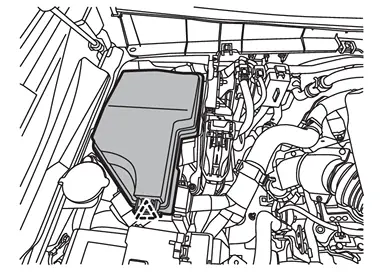
 | : Pawl |
Disengage the fixing pawls on the vehicle rear side of the IPDM E/R cover A and then remove IPDM E/R cover A.
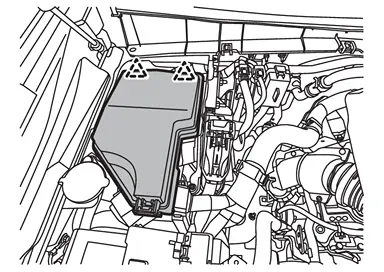
| : Pawl |
Disengage the fixing pawls and then pull up IPDM E/R.
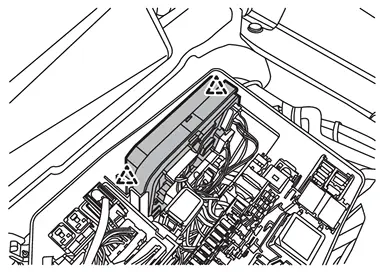
| : Pawl |
Disconnect the IPDM E/R harness connector and then remove IPDM E/R from the vehicle.
INSTALLATION
Install in the reverse order of removal.
CAUTION:
Be sure to perform ADDITIONAL SERVICE WHEN REPLACING IPDM E/R when replacing IPDM E/R. Or not doing so, IPDM E/R control function does not operate normally. Refer to Description.
 Exploded View
IPDM E/R cover A IPDM E/R IPDM E/R cover B IPDM E/R cover C IPDM E/R cover D IPDM E/R cover E IPDM E/R cover bracket : Pawl ...

Other materials:
Exploded View
Front door panel Grommet Front door striker TORX bolt Front door check link Front door hinge (lower) Front door hinge (upper) Front door weather-strip Front door parting seal rear Front door parting seal front Drain hole cover : Clip : Always replace after every disassembly. : N·m (kg- ...
Instrument panel
Example
The instrument panel of the Nissan Armada combines advanced technology with ergonomic
design, providing clear visibility of all essential driving information while maintaining
easy access to controls and comfort features.
Side ventilator — directs airflow for optimal cabin com ...
USB (Universal Serial Bus) charging connector
In the Nissan Armada, the Type-C USB charging connector 1 is предназначен exclusively
for charging external devices such as smartphones, tablets, and other portable electronics.
To begin charging in the Nissan Armada, simply connect a compatible USB device
into the connector. On ...

0.0055