
Nissan Armada 2025-2026 Owner's Manual: USB (Universal Serial Bus) charging connector
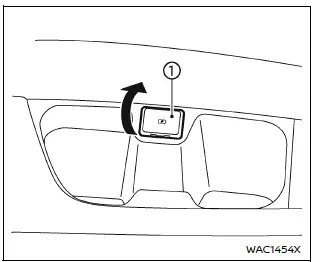
In the Nissan Armada, the Type-C USB charging connector 1 is предназначен exclusively for charging external devices such as smartphones, tablets, and other portable electronics.
To begin charging in the Nissan Armada, simply connect a compatible USB device into the connector. Once connected, charging will start automatically without any additional action required.
The Nissan Armada USB charging system provides continuous power as long as the ignition switch is in the ON position, ensuring reliable charging during your journey.
However, charging performance in the Nissan Armada may vary depending on the specifications and compatibility of the connected device, and some devices may not charge.
CAUTION
- Do not force a USB device into the Nissan Armada connector. Inserting the plug at an angle may damage both the port and the device.
- Always remove the USB cable carefully and avoid pulling on the connector cover, as this may cause damage to the Nissan Armada charging port.
 Basic information
CAUTION
Always use the Nissan Armada power outlets with the engine running to
prevent battery discharge.
Avoid using the power outlets simultaneously with high electrical loads
such as air ...
 Wireless charger
Lid
Charging pad
The Nissan Armada wireless charger is conveniently located beneath a lid in the
center console. Press the lid to open it, then place your smartphone on the charging
pa ...
Other materials:
Forward-facing child restraint installation using LATCH
Before installing a forward-facing child restraint in the Nissan Armada, carefully
review all Warnings and Cautions provided in the "Child safety" and "Child restraints"
sections. Proper installation is essential to ensure maximum protection for your
child while traveling i ...
Speed Limit Assist (a feature of ProPILOT Assist 1.1 and 2.1)
Speed Limit Assist in the Nissan Armada is an advanced functionality integrated
within the ProPILOT Assist 1.1 and 2.1 systems. This feature works in conjunction
with the built-in map locator and Traffic Sign Recognition (TSR) system to help
drivers maintain compliance with posted speed limits ...
Basic information
The Vehicle Dynamic Control (VDC) system in the Nissan Armada is an advanced
stability and traction management system that continuously monitors driver inputs
and vehicle behavior through multiple sensors. By analyzing steering input, wheel
speed, and vehicle motion, the Nissan Armada VDC syst ...

0.0087