Example
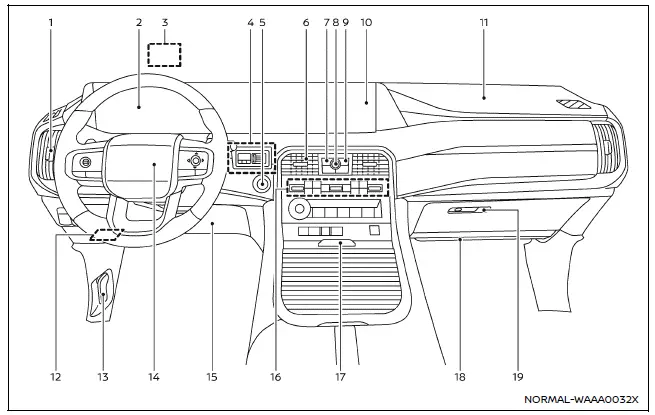
The instrument panel of the Nissan Armada combines advanced technology with ergonomic design, providing clear visibility of all essential driving information while maintaining easy access to controls and comfort features.
- Side ventilator — directs airflow for optimal cabin comfort.
- Meters and gauges / Clock — displays critical driving data and time information.
- Head Up Display (HUD)* — projects driving data directly onto the windshield.
- Trailer Brake Controller Unit (TBCU)* — assists in controlling trailer braking systems.
- Push-button ignition switch — enables quick and convenient engine start/stop functionality.
- Center ventilator — ensures balanced air distribution across the cabin.
- CAMERA* /
 button — activates camera systems for enhanced visibility and parking assistance.
- Audio switches** — provide quick access to multimedia functions.
- Hazard indicator flasher switch — activates emergency hazard lights.
- Touch screen display**
- Intelligent Around View Monitor* — delivers a 360-degree view of surroundings.
- RearView monitor* — assists during reversing maneuvers.
- NissanConnect system** — integrates navigation, media, and connectivity features.
- Heater and air conditioner — controls cabin temperature and airflow.
- Defroster — clears windshield and windows in cold conditions.
- Heated steering wheel* — improves comfort in cold weather.
- Heated seats* — provides warmth for front occupants.
- Ventilated seats* — enhances cooling during hot conditions.
- Front passenger supplemental air bag — provides additional protection in frontal impacts.
- Fuse box — houses electrical system protection components.
- Hood release handle — allows access to the engine compartment.
- Driver supplemental front-impact air bag — enhances driver protection.
- Driver supplemental knee air bag — protects lower body during collisions.
- Heater and air conditioner — additional climate control interface.
- Console box
- Cup holders — convenient beverage storage.
- USB (Universal Serial Bus) connection ports** — enables device charging and connectivity.
- Wireless charger* — supports cable-free charging for compatible devices.
- Front passenger supplemental knee air bag — improves lower-body protection for the passenger.
- Glove box — provides storage for documents and personal items.
*: if so equipped
**: Refer to the separate NissanConnect Owner's Manual (if so equipped).
The Nissan Armada cockpit and instrument panel are engineered to deliver a premium driving experience, combining advanced technology, intuitive controls, and superior ergonomics to maximize comfort, safety, and convenience on every journey.
Other materials
Car phone or CB radio
When installing a car phone or CB radio system in your Nissan Armada, it is essential
to follow proper installation guidelines. Incorrect installation may interfere with
the vehicle’s electronic control modules and wiring systems, potentially affecting
performance and safety.
WARNING
Us ...
Action Test
Work Procedure
Always perform the rear automatic braking system action test to check that the system operates normally after replacing the ADAS control unit 2 or repairing any rear automatic braking system malfunction.CHECK REAR AUTOMATIC BRAKING SYSTEM SETTING
Start the engine.
Check that the r ...
Door Does Not Lock/unlock with Intelligent Key
Description
All doors do not lock/unlock using Intelligent Key button.NOTE:
Before starting diagnosis check that vehicle condition is as shown in “Conditions of vehicle�, and check each symptom.SYMPTOM TABLE (BOTH INTELLIGENT KEYS HAVE THE SAME SYMPTOMS) Door lock operation (remote keyless entry ...