The symbol of this Nissan Armada mode is
 .
.
STANDARD mode is the default setting in the Nissan Armada and is optimized for everyday driving. It provides a balanced combination of performance, comfort, and efficiency suitable for most road conditions.
ECO mode
Basic information
The symbol of this Nissan Armada mode is
 .
.
When ECO mode is activated in the Nissan Armada, 4WD modes such as 4H and 4L are unavailable. This mode prioritizes fuel efficiency by adjusting engine response and transmission behavior.
The Nissan Armada ECO mode supports smoother acceleration and more stable cruising, helping drivers adopt more fuel-efficient driving habits.
NOTE:
- Using ECO mode in the Nissan Armada does not guarantee improved fuel economy, as actual results depend on driving style, road conditions, and vehicle load.
- It is recommended to switch out of ECO mode in situations requiring
stronger acceleration, such as:
- Driving with heavy passengers or cargo
- Climbing steep inclines
ECO Customize (if so equipped)
The Nissan Armada ECO Customize feature allows drivers to fine-tune settings such as air conditioning, cruise control, and engine idling behavior to achieve a preferred balance between efficiency and performance.
- Cruise Control
When enabled, the Nissan Armada cruise control system adopts smoother acceleration patterns to improve fuel economy. When disabled, it returns to standard acceleration behavior.
NOTE:
When vehicle speed drops, such as during uphill driving, the Nissan Armada may take longer to return to the preset cruise speed compared to standard mode.
- Idling Stop
When activated, the Nissan Armada engine remains off for longer periods during idle conditions, even when the air conditioning system is in use, enhancing fuel efficiency. - Air Conditioning
When ECO air conditioning settings are enabled, system performance is slightly reduced to improve overall fuel consumption in the Nissan Armada.
Tire Pres ECO advice
The Nissan Armada includes a Tire Pressure ECO Advice feature that displays a message in the vehicle information display when low tire pressure is detected, helping optimize fuel efficiency.
When enabled, the ECO Drive Report will display the message: "Check Tire Pressures for Best Fuel Economy." You can switch directly to the tire pressure display using the steering wheel scroll control.
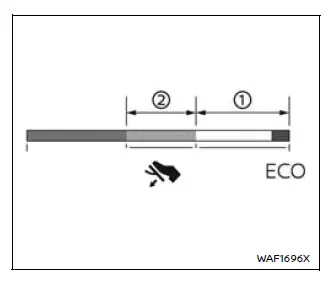
ECO Pedal Guide function (if so equipped)
The Nissan Armada ECO Pedal Guide provides real-time feedback to help improve driving efficiency. This feature is displayed in the vehicle information screen when ECO mode is active.
Use this system to optimize fuel consumption by maintaining efficient throttle input.
When the ECO Pedal Guide bar is within range 1, the Nissan Armada is operating in a highly efficient driving zone.
When the bar is within range 2, the vehicle is still within an economical driving range.
If the bar moves outside ranges 1 and 2, it indicates that the accelerator pedal is being pressed beyond optimal efficiency levels.
The ECO Pedal Guide will not be displayed under the following conditions:
- Vehicle speed is below approximately 2 MPH (4 km/h).
- The Nissan Armada transmission is in P (Park), N (Neutral), or R (Reverse).
The Nissan Armada Drive Mode Selector system enhances adaptability, allowing drivers to switch seamlessly between performance and efficiency depending on driving conditions and preferences. :contentReference[oaicite:0]{index=0}
Other materials
Tire Pressure Monitoring System (TPMS)
Basic information
For optimal safety and performance of your Nissan Armada, each tire—including
the spare tire (if equipped)—should be inspected at least once a month when cold
and inflated according to the manufacturer’s recommended pressure values listed
on the vehicle placard or tire ...
Steering Assist
Basic information
Steering Assist in the Nissan Armada is an integral component of the ProPILOT
Assist system, designed to enhance driving comfort and stability during highway
travel. Before using this feature in the Nissan Armada, it is essential to carefully
review the entire ProPILOT Assis ...
Fusible Link Inspection
How To Check
With ProPILOT ASSIST 2.1A melted fusible link can be detected by visual inspection. If its condition is questionable, use circuit tester or test lamp.
Fusible link
CAUTION:
If fusible link should melt, it is possible that critical circuit (power supply ...