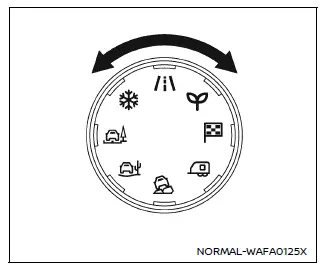
Drive Mode Selector (example)
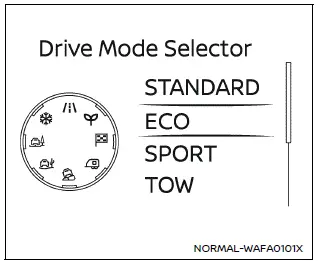
Vehicle information display (example)
The Nissan Armada features a versatile Drive Mode Selector system that allows the driver to tailor vehicle performance to different driving conditions. By rotating the selector dial to the left or right, you can quickly switch between available driving modes.
The selected mode is displayed clearly in the Nissan Armada vehicle information display, where a list of available modes briefly appears for easy selection.
NOTE:
- When selecting a drive mode in the Nissan Armada, the change may not occur instantly. This is normal system behavior and does not indicate a malfunction.
- Each time the ignition is turned ON, the Nissan Armada defaults to STANDARD mode.
NOTE:
The mode selection menu will automatically disappear after a few seconds. You can also manually clear it by pressing the scroll dial on the steering wheel.
If the Nissan Armada drive mode cannot be changed while the ignition is ON, have the system inspected by an authorized Nissan dealer.
WARNING
Do not focus your attention on the Drive Mode Selector or display while driving your Nissan Armada. Always keep your full attention on the road to ensure safe vehicle operation.
Other materials
Third Seat Belt Retractor
Removal and Installation
REMOVALSeat Belt Retractor (LH and RH)Remove third seat assembly. Refer to Removal and Installation.
Remove anchor plate mounting anchor bolt .
Remove shoulder anchor.Remove back pillar garnish. Refer to Removal and Installation. Remove shoulder anchor mounting anchor bolt ...
Front Combination Lamp
Exploded View
Radiator core support
Front combination lamp
Front fender assembly
: N·m (kg-m, in-lb)
Removal and Installation
CAUTION:
Disconnect the battery negative terminal or remove power circuit fuse when performing the operation for preventing electric leakage. Refer to Precaut ...
Rear Door Pocket Lamp
Exploded View
Rear door pocket lamp is integrated structure with rear door finisher. For exploded view of rear door finisher, refer to Exploded View.
Replacement
CAUTION:
Disconnect the battery negative terminal or remove power circuit fuse when performing the operation for preventing electric lea ...