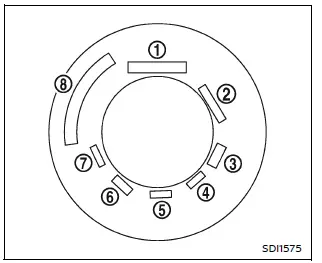
Example
Basic information
In the Nissan Armada, all tires are required by federal regulations to display standardized information directly on the sidewall.
This labeling provides essential data about the tire’s construction, performance capabilities, and specifications, allowing Nissan Armada owners to better understand tire characteristics and ensure safe operation.
Additionally, each tire includes a Tire Identification Number (TIN), which is critical for tracking manufacturing details and identifying tires in case of safety recalls.
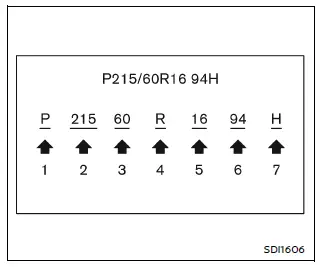
Example
- Tire size (example: P215/60R16 94H)
1. P: Indicates the tire is designed for passenger vehicles such as the Nissan Armada. (Not all tires include this marking.)
2. Three-digit number (215): Represents the tire width in millimeters, measured from sidewall to sidewall.
3. Two-digit number (60): Known as the aspect ratio, this defines the relationship between tire height and width.
4. R: Denotes radial construction, which is standard for modern Nissan Armada tires.
5. Two-digit number (16): Specifies the diameter of the wheel (rim) in inches.
6. Load index (94): Indicates the maximum load capacity each tire can support. This may not appear on all tires.
7. Speed rating (H): Defines the maximum safe operating speed for the tire. Never exceed this limit when driving your Nissan Armada.
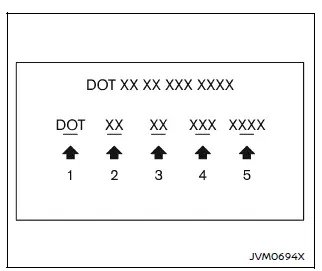
Example (Type A) (if so equipped)
- TIN (Tire Identification Number) for a new tire (example: DOT XX XX XXX XXXX)
1. DOT: Indicates compliance with standards set by the Department of Transportation.
This marking may appear in different positions relative to the TIN.
2. Manufacturer code: Identifies the tire manufacturer.
3. Tire size code: Corresponds to the tire dimensions.
4. Tire type code (optional): Provides additional construction information.
5. Date code: The last four digits indicate the production week and year (e.g., 3103 = 31st week of 2003). If not visible, check the opposite sidewall.
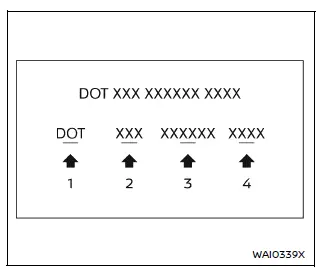
Example (Type B) (if so equipped)
- TIN (Tire Identification Number) for a new tire (example: DOT XXX XXXXXX XXXX)
1. DOT: Department of Transportation marking.
2. Three-digit manufacturer identification code.
3. Six-digit descriptive code identifying important tire characteristics.
4. Four-digit date code indicating manufacturing week and year.
- Tire ply composition and material
This information describes the number of layers (plies) used in the tire construction and the materials such as steel, polyester, or nylon, which contribute to durability and performance of the Nissan Armada tires.
- Maximum permissible inflation pressure
This value indicates the highest allowable air pressure for the tire. Never exceed this limit when inflating tires on your Nissan Armada.
- Maximum load rating
This number specifies the maximum weight that each tire can safely carry. Always replace tires with the same load rating as originally installed on your Nissan Armada.
- Term of "tubeless" or "tube type"
This identifies whether the tire requires an inner tube ("tube type") or is designed to function without one ("tubeless"), which is standard for most Nissan Armada vehicles.
- The word "radial"
If present, this confirms the tire uses radial construction, offering improved stability and comfort for the Nissan Armada.
- Manufacturer or brand name
The tire brand and manufacturer name are clearly displayed for identification and quality assurance.
Other tire-related terminology
In addition to the standard markings, certain technical terms may appear on Nissan Armada tires. One such term is the Intended Outboard Sidewall, which refers to the side of the tire designed to face outward when installed.
This may include decorative elements such as white lettering or branding, or may indicate the correct mounting orientation for asymmetrical tires.
Understanding tire labeling on your Nissan Armada helps ensure proper maintenance, safe driving conditions, and correct tire replacement decisions.
Other materials
Door Does Not Lock/unlock with One Touch Sensor and Intelligent Key
Description
All doors do not lock/unlock using one touch sensor and Intelligent Key.SYMPTOM TABLE (BOTH INTELLIGENT KEYS HAVE THE SAME SYMPTOMS) Door lock operation (remote keyless entry) Door lock operation (one touch sensor or request switch of front/rear/back door) or trunk/back door open operat ...
Front Combination Lamp
Exploded View
Radiator core support
Front combination lamp
Front fender assembly
: N·m (kg-m, in-lb)
Removal and Installation
CAUTION:
Disconnect the battery negative terminal or remove power circuit fuse when performing the operation for preventing electric leakage. Refer to Precaut ...
Calibrating Camera Image (around View Monitor)
3d Fixed View
Work Procedure
Calibration must be performed after removing/replacing the cameras, removing parts (e.g. front grille, door mirror, and others) mounted on the cameras, or replacing the around view monitor control unit.
The use of CONSULT is required to perform calibration or writin ...