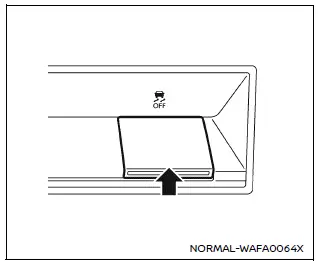
The Nissan Armada should normally be driven with the Vehicle Dynamic Control (VDC) system enabled, as it helps maintain vehicle stability and traction.
In situations such as being stuck in mud, snow, or sand, the Nissan Armada VDC system may reduce engine power to limit wheel spin. This can make it harder to free the vehicle.
If maximum engine power is required, the Nissan Armada allows you to temporarily disable the VDC system.
To turn off the VDC system, press the VDC OFF switch. The
 indicator will illuminate on the instrument panel.
To restore normal operation, press the VDC OFF switch again or restart the Nissan Armada engine.
This system plays a crucial role in maintaining control during challenging driving conditions, making it an essential safety feature of the Nissan Armada.
Other materials
Precautions
Precautions for removing battery terminal
When disconnecting the 12V battery terminal, turn off the ACC power before disconnecting the 12V battery terminal, observing “How to disconnect 12V battery terminal� described below.
NOTE:
Some ECUs operate for a certain fixed time even after ignit ...
Seat Belt Safety Precautions
Precaution for Supplemental Restraint System (SRS) "AIR BAG" and "SEAT BELT PRE-TENSIONER"
The Supplemental Restraint System such as “AIR BAG� and “SEAT BELT PRE-TENSIONER�, used along with a front seat belt, helps to reduce the risk or severity of injury to the driver and front passenger fo ...
Door Sash Cover
Exploded View
Front door panel
Rear door panel
Front door sash cover
Rear door sash cover front
Rear door sash cover rear
EPT seal [t: 2.0 mm (0.079 in)]
Double-sided tape
[t: 2.5 mm (0.098 in)]
Double-sided tape
[t: 0.8 mm (0.031 in)]
EPT seal [t: 6.0 mm (0.236 in)]
...