
Nissan Armada 2025-2026 Owner's Manual: Ventilated seats
Basic information
CAUTION
- In the Nissan Armada, avoid using the ventilated seat system for long periods when the seat is unoccupied to prevent unnecessary wear and energy consumption.
- Do not place heavy, sharp, or pointed objects on the Nissan Armada seats, as this may damage the internal ventilation components.
- If any liquid is spilled on the seat, immediately wipe it off using a clean, dry cloth to prevent system damage.
- Never clean the Nissan Armada seats with gasoline, thinner, or similar harsh chemicals, as these may degrade materials and internal components.
- If the ventilated seat system in the Nissan Armada does not operate correctly, switch it off and have it inspected by an authorized Nissan dealer.
The Nissan Armada ventilated seat system enhances comfort by circulating air through the seat surface, helping to cool occupants during warm weather conditions.
Control keys are available via the touch screen display, while physical switches are located on the instrument panel. Each seat in the Nissan Armada can be controlled independently for personalized comfort.
Operation with touch screen display
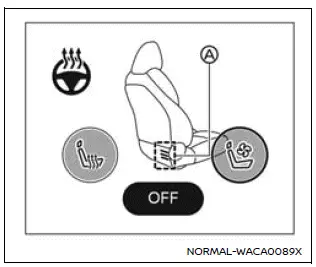
Example
1. Start the Nissan Armada engine.
2. Touch the
 or
or
 key to select the desired ventilation level.
Each press cycles through intensity levels (low, medium, high), and the indicator A illuminates in blue according to the selected setting.
3. To turn off the ventilated seats in the Nissan Armada, press the
 key repeatedly until the indicator A turns off.
Before leaving the Nissan Armada, always ensure the ventilated seat system is turned off.
For proper maintenance, including inspection of air filters for the Nissan Armada ventilated seats, it is recommended to visit an authorized Nissan dealer.
Operation with switch
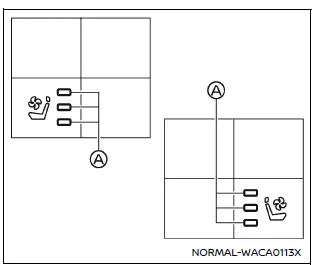
For front seats
1. Start the Nissan Armada engine.
2. Press the
 or
or
 switch to adjust ventilation intensity.
Each press increases the level, and the indicator A will glow blue depending on the selected airflow intensity.
3. To turn off the system, press the
 switch repeatedly until the indicator turns off.
Always turn off the ventilated seats before exiting the Nissan Armada to preserve system longevity.
Routine inspection of the Nissan Armada ventilated seat filters should be performed by a qualified Nissan technician.
 Heated seats
Basic information
WARNING
In the Nissan Armada, avoid using seat heaters if occupants are unable to
sense temperature changes or pain. Improper use may result in overheating and serious
injury.
...
 Steering Assist switch
The Steering Assist switch in the Nissan Armada allows the driver to temporarily
enable or disable the Steering Assist function.
Additionally, the system can be controlled through the "Dri ...
Other materials:
Cup holders
Basic information
CAUTION
In the Nissan Armada, avoid sudden acceleration or braking when using
the cup holders to prevent spills. Hot liquids may cause burns to you or your
passengers.
Use only soft or flexible containers in the Nissan Armada cup holders.
Hard objects may become haz ...
File menu
The file menu in the Nissan Armada driving recorder system allows users to conveniently
manage all recorded content, including photos and video files. Through this interface,
you can view, organize, and delete stored media directly from the touchscreen display,
making it easy to maintain stora ...
Hill Start Assist system
WARNING
Never depend solely on the Hill Start Assist system in the Nissan Armada
to prevent rollback when starting on an incline. Always remain attentive and
keep full control of the vehicle. When stopped on a steep hill, firmly press
the brake pedal. Extra caution is required on icy, m ...

0.0044