Basic information
WARNING
In the Nissan Armada, avoid using seat heaters if occupants are unable to sense temperature changes or pain. Improper use may result in overheating and serious injury.
CAUTION
- Do not operate the heated seats in the Nissan Armada for extended periods when not in use.
- Avoid placing insulating materials such as blankets or cushions on the
seats, as this may cause overheating.
This can reduce system efficiency and increase risk.
- Do not place heavy or sharp objects on the Nissan Armada seats, as this may damage the internal heating elements.
- If liquid is spilled on the seat, dry it immediately using a clean cloth to prevent damage.
- Use only appropriate cleaning methods—never apply gasoline, solvents, or harsh chemicals to the Nissan Armada seats.
- If the heated seat system malfunctions, turn it off and have the Nissan Armada inspected by an authorized dealer.
The Nissan Armada front and second-row seats (if equipped) feature built-in heating elements designed to enhance passenger comfort during cold weather.
Controls are available via the touch screen display, instrument panel switches, or rear console (depending on configuration), allowing independent adjustment for each seat.
The Nissan Armada system uses a control module that automatically adjusts heat levels to maintain consistent comfort.
Temperature intensity can be customized through the touch screen display.
When the cabin is sufficiently warm or before exiting the Nissan Armada, it is recommended to turn off the seat heaters.
Operation with touch screen display
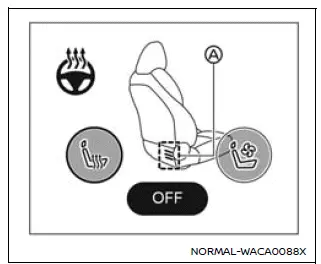
Example
1. Start the Nissan Armada engine.
2. Touch the
 key to select the desired heat level.
- High heat: touch once.
- Medium heat: touch twice.
- Low heat: touch three times.
- The indicator A illuminates according to the selected level.
3. To turn off the heated seat in the Nissan Armada, press the
 key repeatedly until the indicator A turns off.
Operation with switch
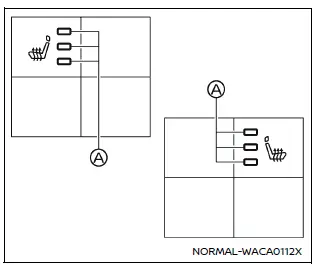
For front seats
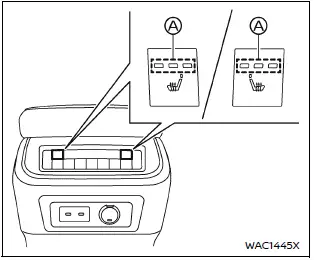
For 2nd row seats (if so equipped)
1. Start the Nissan Armada engine.
2. Press the heated seat switch to cycle through heat levels.
- High heat: press once.
- Medium heat: press twice.
- Low heat: press three times.
- The indicator light A will illuminate according to the selected intensity.
3. To turn off the system, continue pressing the switch until the indicator light turns off.
These features in the Nissan Armada provide enhanced comfort, especially during colder seasons, ensuring a premium driving experience for all occupants.
Other materials
Diagnosis and Repair Workflow
Work Flow
DETAILED FLOWINTERVIEW FROM THE CUSTOMER
CAUTION:
Customers are not professional. Never guess easily like “maybe the customer means that...,� or “maybe the customer mentions this symptom�.
>>
GO TO 2.
CHECK SYMPTOM
Reproduce the symptom that is indicated by the customer, b ...
Noise, Vibration and Harshness (nvh) Troubleshooting
NVH Troubleshooting Chart
Use the chart below to find the cause of the symptom. If necessary, repair or replace these parts. Possible cause and SUSPECTED PARTS Symptom Reference
BRAKE
Noise Shake Shimmy, Judder
Pads damaged
×
—
—
FRONT DISC BRAKE: Inspection and Adjustment
...
Take Away Warning Does Not Operate
Diagnosis Procedure
CHECK METER SPEAKER
Check meter speaker.
Refer to Removal and Installation.
Is the inspection result normal?
YES>>
GO TO 2.
NO>>
Repair or replace the malfunctioning parts.
CHECK INFORMATION DISPLAY
Check information display.
Refer to Work flow.
Is the inspection re ...