
Nissan Armada 2025-2026 Service and Repair Manual: Work Flow
OVERALL SEQUENCE
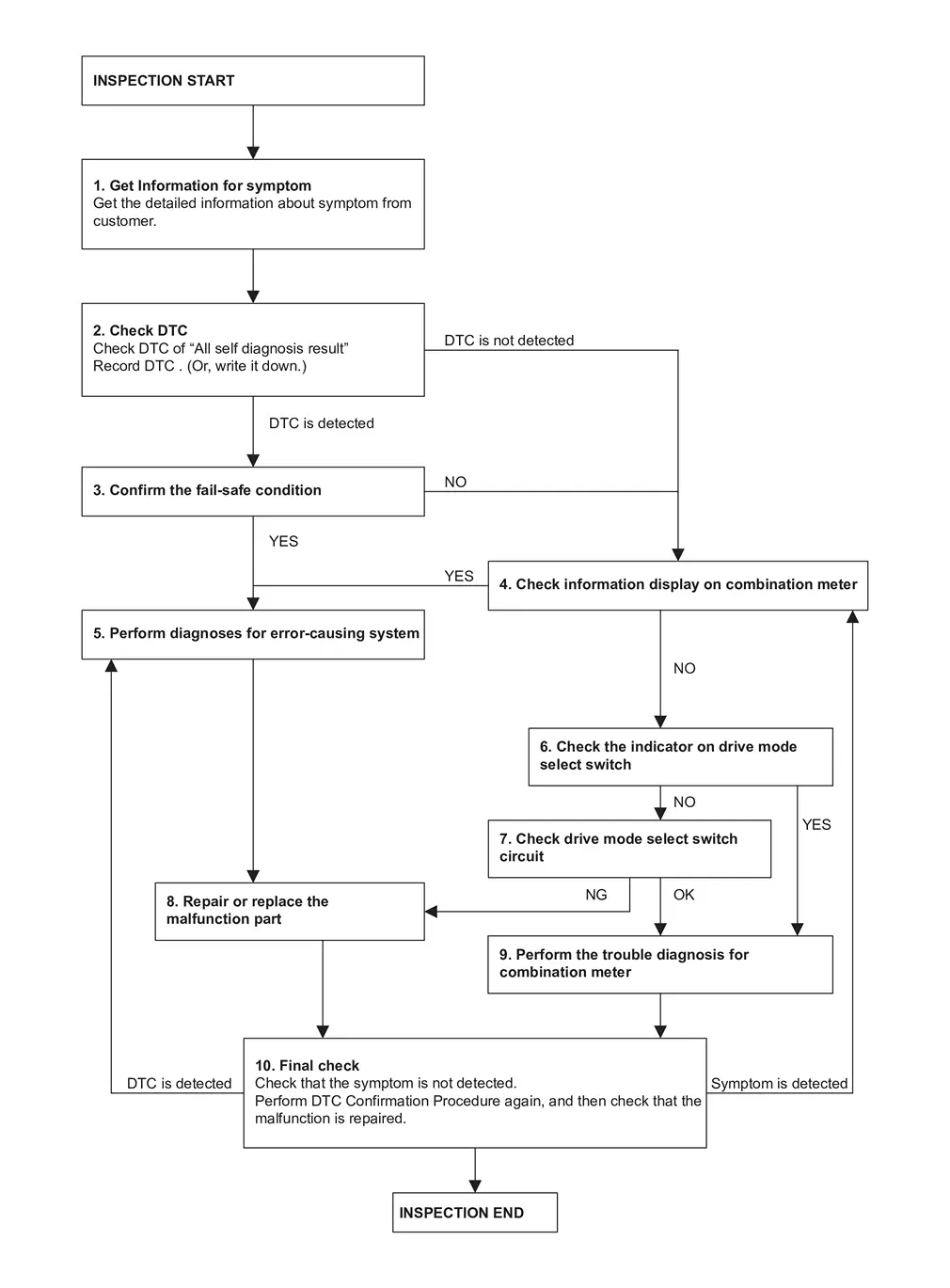
DETAILED FLOW
GET INFORMATION FOR SYMPTOM
Get the detailed information about symptom from customer.
Check the drive mode indicator on the meter appeared.
Check the drive mode indicator on the meter changed when operates the drive mode selector switch.
GO TO 2.
CHECK THE DTC
 With CONSULT
Check DTC of “All self diagnosis result�.
Perform the following procedure if DTC is displayed.
Record DTC and freeze frame data. (Or, write it down.)
Are any DTCs detected?
YES>>GO TO 3.
NO>>GO TO 4.
CONFIRM THE FAIL-SAFE CONDITION
Confirm the fail-safe condition of detected DTC. Refer to Fail-safe.
Are there any DTCs that causes drive mode selector function is suspended?
YES>>GO TO 5.
NO>>GO TO 4.
CHECK INFORMATION DISPLAY ON COMBINATION METER
Ignition switch OFF and wait at least 10 seconds.
Ignition switch ON.
Check that STANDARD is displayed on the information display screen of the combination meter.
Check that the view of information display change when switching left and right the drive mode select switch.
Is the inspection result normal?
YES>>GO TO 5.
NO>>GO TO 6.
PERFORM DIAGNOSES FOR ERROR-CAUSING SYSTEM
With CONSULT
Perform the trouble diagnosis of components that DTC indicated.
>>GO TO 8.
CHECK THE INDICATOR ON DRIVE MODE SELECT SWITCH
Ignition switch OFF and wait at least 10 seconds.
Ignition switch ON.
Check the indicator of STANDARD on drive mode select switch indicator.
Check the illuminated position changes according to the operation when switching the drive mode select switch.
Is the inspection result normal?
YES>>GO TO 9.
NO>>GO TO 7.
CHECK DRIVE MODE SELECT SWITCH CIRCUIT
Check drive mode select switch circuit. Refer to Diagnosis Procedure.
Is the inspection result normal?
YES>>GO TO 9.
NO>>GO TO 8.
REPAIR OR REPLACE THE MALFUNCTION PART
Repair or replace the malfunction part.
>>GO TO 10.
CHECK COMBINATION METER
Check the COMBINATION METER. Refer to On Board Diagnosis Function.
>>GO TO 10.
FINAL CHECK
Check that the symptom is not detected.
Perform DTC Confirmation Procedure again, and then check that the malfunction is repaired.
Is DTC detected and / or does symptom remain?
YES (DTC is detected)>>GO TO 5.
YES (Symptom remains)>>GO TO 4.
NO>>INSPECTION END


Other materials:
Distortions on Structures
We will look at the different forces acting on part deformations according to the direction the force is applied considering the three elements of force. We will be looking at the basics with a hammer and nail.
Direct Force
The force is applied directly perpendicular to the panel or part.
The force ...
I-FCW system operation
The Nissan Armada I-FCW system becomes active at speeds above approximately 3
MPH (5 km/h), ensuring functionality during most driving scenarios.
When a potential forward collision risk is detected, the Nissan Armada system
immediately alerts the driver by flashing the vehicle-ahead detecti ...
If your vehicle overheats
CAUTION
Never continue driving your Nissan Armada if the engine temperature rises
excessively. Doing so may result in severe engine damage or even a vehicle fire.
To prevent burns, never remove the radiator cap or coolant reservoir
cap while the Nissan Armada engine is hot. Pressurized h ...

0.0054