Basic information
WARNING
Improper use of the Nissan Armada AEB with Pedestrian Detection system may result in serious injury or even fatal accidents.
- The Nissan Armada AEB with Pedestrian Detection system is designed as a supplemental safety aid and does not replace the driver’s responsibility to remain attentive and drive safely under all conditions.
- This system cannot prevent all collisions and may not operate effectively in every driving, traffic, or environmental situation.
The Nissan Armada Automatic Emergency Braking (AEB) with Pedestrian Detection system is engineered to assist the driver by helping reduce the risk of frontal collisions in specific situations, including:
- Vehicles traveling ahead in the same lane
- Pedestrians crossing or moving within the vehicle’s path
- Cyclists detected in the forward driving direction
Additionally, the Nissan Armada system includes Intersection Assist functionality, which enhances safety during turning maneuvers by detecting potential collision risks:
- When turning left or right across the path of an oncoming vehicle
- When turning and a pedestrian is detected entering the vehicle’s intended path
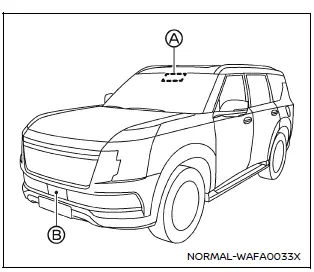
Example
The Nissan Armada AEB system utilizes a forward-facing radar sensor B mounted at the front of the vehicle to continuously measure the distance to vehicles ahead within the same lane.
To enhance detection capabilities for pedestrians and cyclists, the Nissan Armada combines radar data with input from a forward-facing camera A positioned behind the windshield, enabling more precise object recognition and improved response timing.
Additional note: For maximum effectiveness of the Nissan Armada AEB system, always ensure that sensors and cameras remain clean and unobstructed, and never rely solely on automated systems to replace active driver awareness.
System maintenance (ProPILOT Assist 2.1)
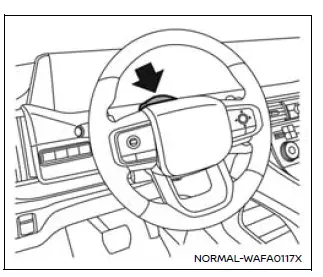
For reliable and accurate operation of the Nissan Armada ProPILOT Assist 2.1 system, it is crucial to keep the driver monitoring area clean and free from any obstruction at all times.
Regularly inspect the camera surface and gently remove dust, fingerprints, or any debris using a soft, clean cloth such as a lens-cleaning cloth. A properly maintained camera ensures that the Nissan Armada can correctly monitor driver attention and maintain the highest level of safety performance.
TERMS OF USE OF USHR INC. MATERIAL AND AGREEMENT TO END USER SUBLICENSE AGREEMENT
The Nissan Armada integrates advanced technologies, including licensed software, proprietary datasets, and intellectual property collectively referred to as “Ushr Materials.� These elements are embedded within the vehicle’s driver assistance systems and are governed by a licensing agreement with Ushr Inc.
By operating the Nissan Armada and utilizing its systems, you agree to the Ushr Inc. Terms of Use and End User Sub-License Agreement. These terms are available at www.ushrauto.com/legal and are incorporated into this documentation by reference. If you do not accept these terms, you must discontinue use of the associated systems.
This agreement defines your legal rights and obligations, including usage limitations, intellectual property protection, and liability restrictions. The Ushr Materials are provided strictly on an “AS IS� basis, without warranties of any kind, either express or implied.
All proprietary materials, including software and confidential information, remain the exclusive property of Ushr Inc. Any unauthorized copying, modification, extraction, or redistribution of these materials, in whole or in part, is strictly prohibited without prior written authorization.
 2022
Ushr Inc. All Rights Reserved.
2022
Ushr Inc. All Rights Reserved.
The names "Ushr", "Ushr Auto", associated logos, and branding elements are protected intellectual property of Ushr Inc., with all rights reserved.
 OpenStreetMap
contributors, www.openstreetmap.org/copyright.
OpenStreetMap
contributors, www.openstreetmap.org/copyright.
Other materials
Precautions for Removing Battery Terminal
PRECAUTIONS FOR REMOVING BATTERY TERMINAL : Precautions
When disconnecting the 12V battery terminal, turn off the ACC power before disconnecting the 12V battery terminal, observing “How to disconnect 12V battery terminal� described below.
NOTE:
Some ECUs operate for a certain fixed time ev ...
Configuration
Description
Vehicle specification needs to be written with CONSULT because it is not written after replacing the ABS actuator and electric unit (control unit).The configuration requires network connection. CONSULT connects to network and then it downloads the configuration data from the server. Then ...
Instrument Panel Assembly
Exploded View
INSTRUMENT PANEL ASSEMBLY
Front speaker grille*1
Display unit cover
Display unit
Instrument panel assembly
Instrument mask LH
Instrument finisher A
Display unit finisher LH
Instrument pad A
Steering column cover upper
Steering column cover lower
Instrum ...