CAUTION
- Always use the Nissan Armada power outlets with the engine running to prevent battery discharge.
- Avoid using the power outlets simultaneously with high electrical loads such as air conditioning, headlights, or defrosters.
- Ensure all connected devices are turned OFF before plugging in or disconnecting them from the Nissan Armada outlets.
- Keep the outlet covers closed when not in use to prevent moisture or debris from entering.
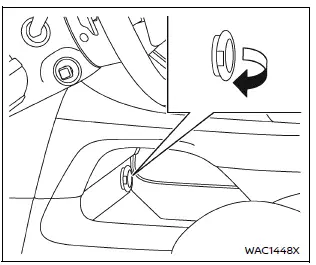
Power outlet (type A)
The Nissan Armada power outlet is conveniently positioned for easy access. Open the protective lid to use the outlet.
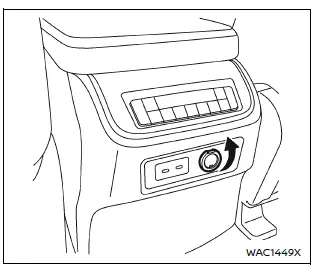
Power outlet (type A)
Type A:
The Nissan Armada Type A power outlet is suitable for powering small electronic devices such as mobile phones and portable accessories.
CAUTION
- The Nissan Armada outlet and plug may become warm during or immediately after use.
- Do not exceed a total load of 12V, 120W (10A) across all outlets in the Nissan Armada.
- Avoid using multiple adapters or connecting several devices simultaneously.
- Ensure the plug is fully inserted to maintain proper contact and prevent
overheating or fuse failure.
If not properly connected, overheating may occur.
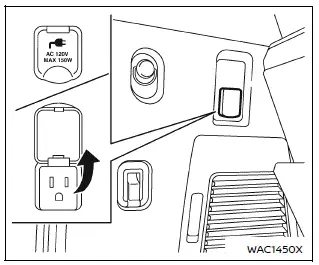
Power outlet (type B)
Type B (if so equipped):
The Nissan Armada Type B power outlet is located in the cargo area and operates when the ignition is in the ON position.
This outlet supports up to 120 volts and 150W (1.25A), making it suitable for higher-powered devices.
Lift the cover and connect your device securely.
After use, always switch off the Nissan Armada power outlet to conserve energy.
CAUTION
- Do not exceed the 120V, 150W (1.25A) rating when using the Nissan Armada Type B outlet.
- Always operate this outlet with the Nissan Armada engine running to avoid battery depletion.
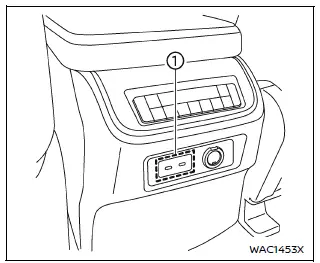
Back side of front console (9 volt, 27W, 3A)
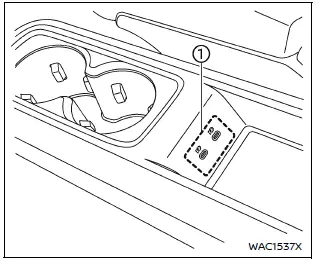
2nd row console (5 volt, 15W, 3A) (if so equipped)
The Nissan Armada also includes multiple USB charging ports throughout the cabin, ensuring convenient charging access for all passengers during travel.
Other materials
Air cleaner
To access the air filter in your Nissan Armada, release the retaining clips 1
and carefully lift the air cleaner housing upward 2.
The air filter element in the Nissan Armada is designed for single use and should
not be cleaned or reused. Replace it strictly according to the recommended mai ...
Evap Canister
Exploded View
Vent hose 1
Canister filter
Bracket 3
EVAP canister
Vent hose 2
Bracket 1
Vent hose 3
EVAP canister vent control valve
Clip
EVAP control system pressure sensor
Bracket 2
Vent hose 4
Clamp
To fuel tank. Refer to F ...
Precautions
Precautions for Removing Battery Terminal
When disconnecting the 12V battery terminal, turn off the ACC power before disconnecting the 12V battery terminal, observing “How to disconnect 12V battery terminal� described below.
NOTE:
Some ECUs operate for a certain fixed time even after ignit ...