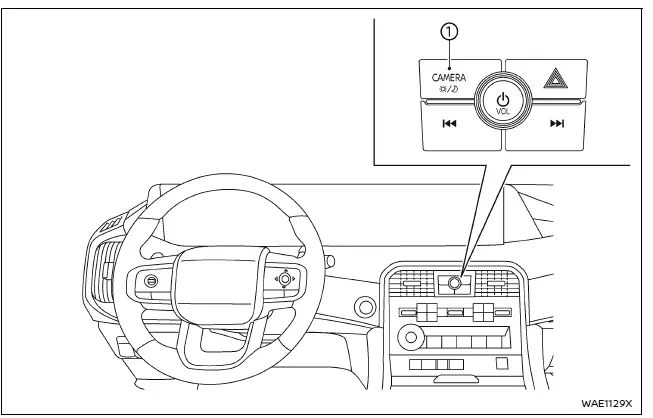
- CAMERA/
 button
WARNING
- Improper use of the Nissan Armada Moving Object Detection (MOD) system may lead to serious injury or fatal accidents. Always follow all safety instructions carefully.
- The Nissan Armada MOD system is designed as a driver assistance feature only and must not replace proper driving practices. Always check mirrors, surroundings, and blind spots before maneuvering the vehicle.
- The Nissan Armada MOD system automatically deactivates at speeds above 5 MPH (8 km/h) and will reactivate when the speed decreases.
- The Nissan Armada MOD system is not intended to detect stationary objects and should not be relied upon for obstacle avoidance.
The Nissan Armada Moving Object Detection system enhances driver awareness by identifying moving objects near the vehicle during low-speed maneuvers.
This Nissan Armada system is especially useful when exiting parking spaces, navigating garages, or driving in crowded parking areas.
Using advanced image processing technology, the Nissan Armada MOD system analyzes camera images in real time to detect movement around the vehicle.
Other materials
Rear Wheel Hub and Housing
Exploded View
Ball seat
Axle housing
Bushing
Baffle
Back plate
Hub bolt
Wheel hub and bearing assembly
Disc rotor
Wheel hub lock nut
Cotter pin
Tightening must be done following the installation procedure. Refer to Removal and Installat ...
Does Not Operate
Diagnosis Procedure
Automatic brake hold function does not operate when the operating conditions are satisfied.PERFORM SELF-DIAGNOSIS (CHASSIS CONTROL MODULE)
With CONSULT
Perform self-diagnosis for “CHASSIS CONTROL�.
Is DTC detected?
YES>>
Check the DTC. Refer to DTC Index.
NO>>
G ...
Automatic Back Door Switch
Description
Automatic back door open/close function does not operate using automatic back door switch.
Diagnosis Procedure
CHECK AUTO OPEN/CLOSE FUNCTION
Check auto open/close function using back door opener switch operation.
Is the inspection result normal?
YES>>
GO TO 2.
NO>>
Refer t ...