The Nissan Armada MOD system activates automatically under the following conditions:
- When the transmission is shifted into R (Reverse).
- When the CAMERA/
 button is pressed to enable the Around View Monitor display.
 - When the Nissan Armada vehicle speed drops below approximately 5 MPH (8 km/h).
The Nissan Armada MOD system operates depending on gear selection and driving conditions when the camera display is active:
- When the transmission is in P (Park) or N (Neutral) and the vehicle is stationary, the Nissan Armada MOD system detects moving objects in the bird’s-eye view. The system will not operate if any door is open, and performance may be affected if the mirrors are folded.
- When the transmission is in D (Drive) and the Nissan Armada speed is below approximately 5 MPH (8 km/h), moving objects are detected in the front view, front-wide view, and Invisible Hood View.
- When the transmission is in R (Reverse) and the Nissan Armada speed is below approximately 5 MPH (8 km/h), the system detects movement in the rear view and rear-wide view. The system will not function if the liftgate is open.
The Nissan Armada MOD system does not operate in front-side view or 3D view modes, and the MOD icon will not be displayed in those views (depending on model configuration).
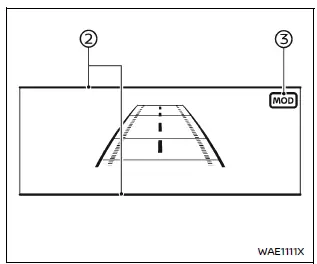
When the Nissan Armada MOD system detects movement near the vehicle, an orange frame appears in the corresponding camera view, and a single chime sounds as a warning.
If movement continues, the orange frame remains visible, helping the driver maintain awareness of the detected object.
NOTE:
When the Rear Cross Traffic Alert (RCTA) system is actively sounding a warning, the Nissan Armada MOD system will not emit an additional chime.
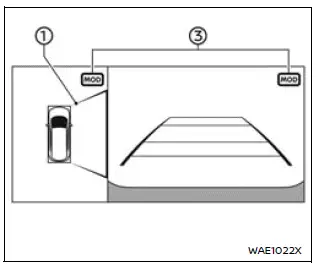
Front and bird's-eye views
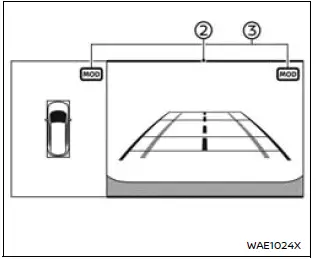
Rear and bird's-eye views
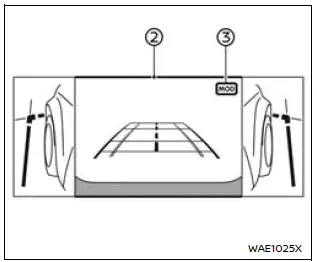
Rear and front-side views
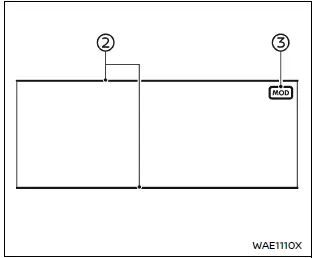
Front-wide view
Rear-wide view
In the Nissan Armada bird’s-eye view, the orange frame 1 highlights the exact camera zone (front, rear, left, or right) where motion has been detected.
In other Nissan Armada camera modes such as front, rear, front-wide, Invisible Hood View, and rear-wide, the orange frame 2 indicates the detected movement area.
A green MOD icon 3 confirms that the Nissan Armada system is actively monitoring for movement.
A gray MOD icon 3 indicates that the Nissan Armada MOD system is currently inactive in that view.
If the MOD system is manually turned off, the Nissan Armada MOD icon will not be displayed.
Turning MOD on and off
The Nissan Armada Moving Object Detection system can be enabled or disabled through the vehicle information display settings, allowing drivers to customize system behavior according to their preferences.
This flexibility ensures that the Nissan Armada driver can adapt the system to different driving environments while maintaining optimal safety and awareness.
Other materials
Resetting the seat positions
Basic information
The Nissan Armada is equipped with a memory system for 3rd row power seats, allowing
them to retain their original positions. However, under certain conditions such
as power interruption, the stored position may be lost and require recalibration.
WARNING
During the reset pro ...
Glass Mirror Position Cannot Be Adjusted
With Automatic Drive Positioner
Diagnosis Procedure
CHECK DOOR MIRROR MECHANISM
Check the following items.
Damage, deformation and foreign matter pinching of the door mirror mechanism.
Damage of harness due to rubbing and pinching.
Interference with other components.
Installed incorrectly.
...
Precautions
Precaution for Supplemental Restraint System (SRS) "AIR BAG" and "SEAT BELT PRE-TENSIONER"
The Supplemental Restraint System such as “AIR BAG� and “SEAT BELT PRE-TENSIONER�, used along with a front seat belt, helps to reduce the risk or severity of injury to the driver and front passenger fo ...