WARNING
Never operate the push-button ignition switch in your Nissan Armada while the vehicle is in motion, except in an emergency. Pressing the ignition switch three consecutive times or holding it for more than 2 seconds will stop the engine. If the engine shuts off while driving, this may result in loss of control, increasing the risk of a crash and serious injury.
Before using the push-button ignition system in your Nissan Armada, always ensure the vehicle is securely shifted into the P (Park) position by pressing the park button.
Operating range for engine start function
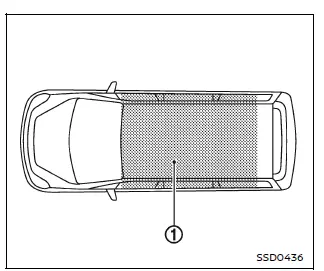
The Nissan Armada Intelligent Key system allows the engine to start only when the key is within the designated operating range 1. This ensures convenience while maintaining security.
If the Intelligent Key battery is low or if strong electromagnetic interference is present, the operating range may be reduced, and the system may not function as expected.
Even when the Intelligent Key is inside the Nissan Armada operating range, it is possible for another person inside the vehicle to start the engine without physically holding the key.
- The cargo area is generally outside the defined operating range, although the Intelligent Key may still function under certain conditions.
- If the Intelligent Key is placed on the instrument panel, inside the glove box, or in a door pocket, it may not be detected properly by the Nissan Armada system.
- If the Intelligent Key is positioned close to a door or window outside the vehicle, it may still be detected and function.
Other materials
Front Oil Seal
Exploded View
Front output shaft
Front oil seal
Front case
Snap ring
Sprockets with chain
Snap ring
Rear case
Rear companion flange
O-ring
: Always replace after every disassembly.
: N·m (kg-m, ft-lb)
: Apply transfer fluid.
: Apply Genuine Liquid Gas ...
Front Suspension Service Data and Specifications
Wheel Alignment
WITHOUT DYNAMIC DIGITAL SUSPENSION AND ELECTRONIC AIR SUSPENSION Item Standard
Camber
Degree minute (Decimal degree)
Minimum
−0°50′ (−0.83°)
Nominal
−0°05′ (−0.08°)
Maximum
0°40′ (0.66°)
Left and right difference*1
–0° 33′ (–0.55°) - 0 ...
Front Door Woofer
Removal & Installation
REMOVALRemove the front door finisher. Refer to Removal and Installation.
Disconnect front door woofer harness connector.
Remove the front door woofer mounting screws , and then remove the front door woofer .
INSTALLATIONInstallation is the reverse order of removal. ...