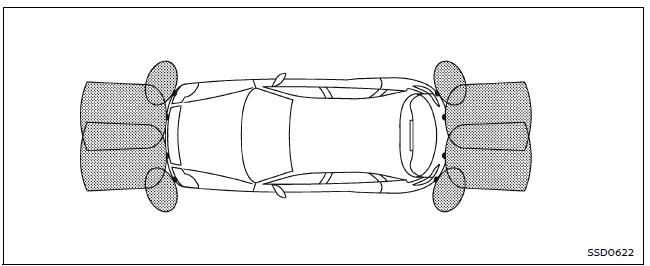
The front and rear sonar system in the Nissan Armada is designed to assist the driver during parking and low-speed maneuvers by detecting obstacles around the vehicle. Using ultrasonic sensors integrated into the front and rear bumpers, the Nissan Armada provides audible tones and visual indicators to alert the driver of nearby objects.
When the sonar system is activated in the Nissan Armada, a dedicated sonar view automatically appears in the vehicle information display, giving the driver a clearer understanding of the surrounding environment.
WARNING
- The Nissan Armada sonar system is intended as a convenience feature and must not be relied upon as a substitute for careful and attentive driving during parking or maneuvering.
- The driver of the Nissan Armada is always responsible for ensuring safety. Always visually check surroundings and confirm it is safe before moving the vehicle.
- Fully understand the operational limitations of the Nissan Armada sonar system. The indicator colors represent different distances to detected obstacles and should be interpreted correctly.
- External factors such as severe weather conditions or ultrasonic interference from sources like automatic car washes, air brake systems, or construction tools may affect system performance or cause false alerts.
- The Nissan Armada sonar system is designed to help detect larger stationary objects to minimize the risk of vehicle damage.
- The system may not detect small, moving, or low-lying objects. Objects below the bumper or very close to it may not be recognized. Always proceed slowly and cautiously.
- Certain materials and object shapes—such as soft surfaces (snow, cloth), thin items (wire, rope), or angled structures—may not reflect sound waves effectively and can go undetected by the Nissan Armada sonar sensors.
- The system measures distance using reflected sound waves. Strong surrounding noises or ultrasonic signals from other vehicles may interfere with detection accuracy.
If the Nissan Armada bumper is damaged, misaligned, or deformed, the sonar detection range may be affected, potentially resulting in inaccurate readings or false warnings.
CAUTION
- Loud background noise, such as high audio volume or open windows, may make it difficult to hear the sonar warning tones in the Nissan Armada.
- Ensure that the sonar sensors on the Nissan Armada bumpers remain clean and free of snow, ice, or dirt. Avoid using sharp tools when cleaning, as this may damage the sensors and reduce system accuracy.
Other materials
I-BSI system limitations
WARNING
The following limitations apply to the Nissan Armada Intelligent Blind Spot
Intervention (I-BSI) system. Failure to operate the vehicle within these limitations
may result in serious injury or death.
The Nissan Armada I-BSI system cannot detect all vehicles or objects
in every si ...
Door Motor
Exploded View
FRONT
Front heater & cooling unit assembly
Front air mix door motor (driver side)
Front mode door motor
Front blower unit assembly
Intake door motor
Front air mix door motor (passenger side)
: vehicle front
REAR
Rear A/C unit assembly
Rear mode door motor ...
Precautions
Precaution for Supplemental Restraint System (SRS) "AIR BAG" and "SEAT BELT PRE-TENSIONER"
The Supplemental Restraint System such as “AIR BAG� and “SEAT BELT PRE-TENSIONER�, used along with a front seat belt, helps to reduce the risk or severity of injury to the driver and front passenger fo ...