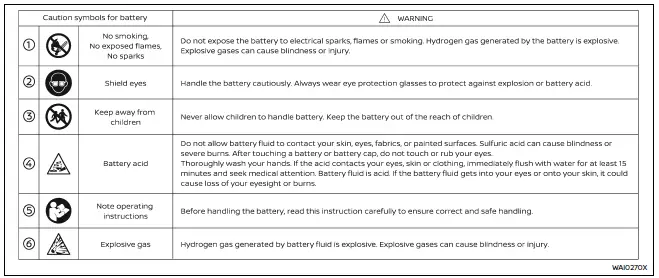
Basic information
- On the Nissan Armada, batteries labeled "do not open" are fully maintenance-free, meaning the internal electrolyte level does not require inspection. For accurate diagnostics and performance checks, it is strongly recommended to consult an authorized NISSAN dealer or a qualified technician.
- To ensure reliable operation of your Nissan Armada, always keep the battery housing clean and dry. If necessary, gently clean the surface using a mixture of baking soda and water to neutralize any corrosion.
- Inspect the battery terminals regularly. Make sure all connections are tight, corrosion-free, and securely fastened to maintain optimal electrical flow in your Nissan Armada.
- If the Nissan Armada will remain unused for an extended period (30 days
or longer), disconnect the negative terminal
 battery cable to prevent gradual discharge and preserve battery life.
NOTE:
To maintain battery health in your Nissan Armada, avoid conditions that may lead to battery drain or starting issues, including:
1. Prolonged use or installation of electronic devices (such as phone chargers, GPS systems, or entertainment equipment) when the engine is off.
2. Driving the Nissan Armada infrequently or only for short distances, which may not allow the battery to fully recharge.
In such situations, periodic battery charging is recommended to maintain proper performance and extend service life.
WARNING
- Never expose the Nissan Armada battery to open flames or sparks.
The battery emits hydrogen gas, which is highly explosive. Avoid contact between battery fluid and skin, eyes, fabrics, or painted surfaces.
After handling the battery or its cap, do not touch your eyes.
If contact occurs, wash hands thoroughly. In case of acid exposure, immediately rinse the affected area with water for at least 15 minutes and seek medical attention.
- Always wear appropriate eye protection and remove jewelry when working near the Nissan Armada battery.
- Battery terminals contain lead and lead compounds. Wash hands thoroughly after handling.
- Keep the battery out of reach of children at all times.
- Never tilt or invert the battery.
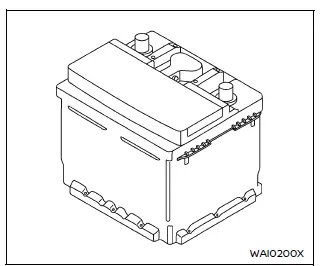
Example
NOTE:
Do not attempt to open or dismantle the Nissan Armada battery casing.
This battery is sealed and does not include removable caps.
Jump starting
If your Nissan Armada requires jump starting, refer to the appropriate section in the manual. If the engine still fails to start, the battery may require replacement. Professional inspection by a NISSAN dealer is recommended.
Variable voltage control system
CAUTION
- Do not connect accessories directly to the Nissan Armada battery terminals.
This bypasses the vehicle’s voltage management system and may prevent proper charging.
- Always operate electrical accessories with the engine running to avoid draining the Nissan Armada battery.
The Nissan Armada variable voltage control system monitors electrical demand and adjusts generator output to optimize battery charging efficiency.
Other materials
Parking, License Plate, Side Marker and Tail Lamps Are Not Turned on
Description
The parking, license plate, side marker and tail lamps are not turned ON in any condition.
Diagnosis Procedure
COMBINATION SWITCH INSPECTION
Check combination switch. Refer to Symptom Table.
Is the inspection result normal?
YES>>
GO TO 2.
NO>>
Repair or replace the malfun ...
Mac Key Writing
Description
When replacing BCM, it is necessary to write MAC key to BCM. Write MAC key to BCM according to "MAC Key writing" procedure of "CONSULT Operation Manual". Refer to Work Procedure.CAUTION:
During MAC key writing, maintain the following conditions:
Ignition switch ON
CONSULT is connecte ...
Engine Coolant
Service Data
ENGINE COOLANT CAPACITY (APPROXIMATELY)Unit: ℓ (US qt, Imp qt) Engine coolant capacity [With reservoir tank (“MAX� level)]
13.0 (13-6/8,11-4/8)
Reservoir tank engine coolant capacity (At “MAX� level)
1.61 (1-6/8,1-3/8)
...