Precautions on booster seats
WARNING
Improper use of a booster seat and seat belt in the Nissan Armada significantly increases the risk of serious injury or fatal consequences for a child in the event of a sudden stop or collision.
- Ensure that the shoulder belt in the Nissan Armada is correctly positioned across the child’s chest and shoulder, avoiding contact with the face or neck. The lap belt must sit low across the hips and never across the abdomen.
- Never allow the shoulder belt to be placed behind the child’s back or under the arm, as this greatly reduces the effectiveness of the restraint system in the Nissan Armada.
- A booster seat must only be used in seating positions equipped with a three-point lap/shoulder belt in the Nissan Armada.
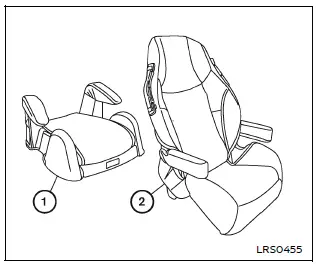
Booster seats are available in a variety of sizes and designs from multiple manufacturers. When selecting a booster seat for use in the Nissan Armada, consider the following key points to ensure safety and compatibility:
- Choose only a booster seat that is certified to comply with Federal Motor Vehicle Safety Standard 213 or Canadian Motor Vehicle Safety Standard 213.
- Test the booster seat inside the Nissan Armada to confirm compatibility with the vehicle’s seat design and seat belt system.
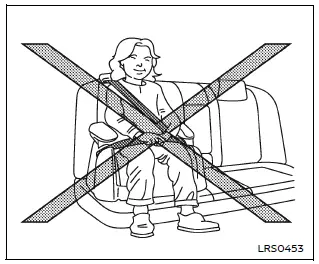
- Ensure that the child’s head is properly supported by either the booster seat or the vehicle seatback. In the Nissan Armada, the seatback should reach at least the center of the child’s ears. If not, a high-back booster seat should be used instead of a low-back version.
- After placing the child in the booster seat, adjust all components to confirm that the seat is properly fitted to both the child and the Nissan Armada seating position.
Always follow all recommended safety procedures and manufacturer instructions when using a booster seat in the Nissan Armada.
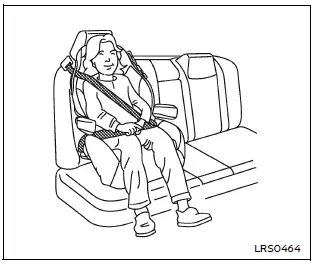
All U.S. states and Canadian provinces or territories require that infants and small children be properly secured in an approved child restraint system at all times while the Nissan Armada is in operation.
The guidelines in this section apply to booster seat installation in both the rear seats and the front passenger seat of the Nissan Armada, depending on necessity and proper configuration.
Booster seat installation
WARNING
To prevent injury, do not activate the Automatic Locking Retractor (ALR) mode when using a booster seat with the seat belts in the Nissan Armada. Booster seats are designed to work with the standard Emergency Locking Retractor (ELR) mode.
Before installing a booster seat in the Nissan Armada, review all safety instructions provided in the "Child safety", "Child restraints" and "Booster seats" sections.
Follow these steps to properly install a booster seat:
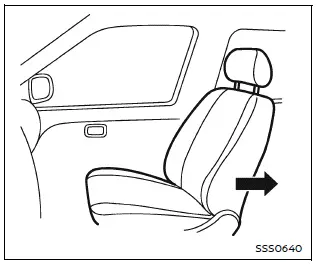
1. If installation in the front passenger seat is necessary, move the seat to its rearmost position to maximize safety in the Nissan Armada.
2. Place the booster seat firmly on the vehicle seat, ensuring it is positioned in a forward-facing direction only.
Always follow the booster seat manufacturer’s instructions for proper placement and usage in the Nissan Armada.
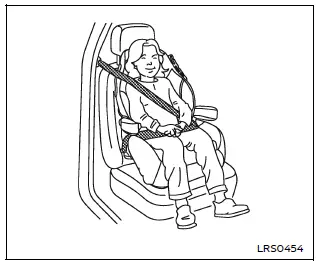
Front passenger position
3. Ensure that the booster seat is stable and properly aligned on the vehicle seat.
If necessary, adjust or temporarily remove the head restraint to improve fit. Store the removed head restraint safely and reinstall it after removing the booster seat.
If the seating position does not allow correct installation due to interference, consider using another seating position or a different booster seat compatible with the Nissan Armada.
4. Position the lap portion of the seat belt low and snug across the child’s hips, following the booster seat manufacturer’s guidelines.
5. Pull the shoulder belt toward the retractor to remove slack and ensure it lies across the middle of the child’s shoulder and chest.
Proper belt positioning is essential for safety in the Nissan Armada and should always follow manufacturer recommendations.
6. Follow all instructions related to proper seat belt fastening as described in the "Seat belts" section.
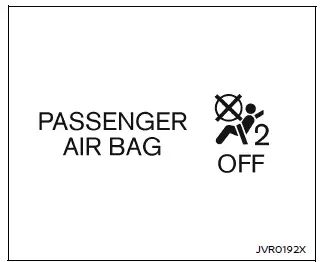
7. If the booster seat is installed in the front passenger seat of the Nissan
Armada, turn the ignition to the ON position and observe the front passenger air
bag status light
 .
The light may or may not illuminate depending on the child’s size and the type of
booster seat used.
.
The light may or may not illuminate depending on the child’s size and the type of
booster seat used.
Always verify correct system behavior and reposition the booster seat if necessary to ensure maximum safety for the child in the Nissan Armada.
Using a properly selected and correctly installed booster seat in the Nissan Armada ensures optimal protection, comfort, and compliance with modern safety standards.
Other materials
Seat belts with pretensioners (front and second row outboard seats)
WARNING
In the Nissan Armada, seat belt pretensioners are single-use safety devices.
Once activated, they must be replaced as a complete unit together with the seat
belt retractor and buckle to ensure continued protection.
If your Nissan Armada is involved in a collision and the pretensi ...
Memory seat
Basic information
The Nissan Armada memory seat system is designed to enhance comfort and personalization
by allowing drivers to store and recall their preferred driving positions effortlessly.
This advanced Nissan Armada feature includes:
Memory storage function
User profile linking to st ...
Trailer BSW function operation
Detection zone
Basic information
The Nissan Armada Trailer Blind Spot Warning (BSW) function is specifically designed
to enhance safety while towing by extending the detection area to include the full
length of the attached trailer. In this configuration, the monitoring zone begins
at th ...