Basic information
For detailed specifications regarding brake fluid for your Nissan Armada, refer to the section "Capacities and recommended fluids/lubricants" in the official documentation.
Maintaining the correct brake fluid condition in the Nissan Armada is essential for ensuring consistent braking performance, safety, and long-term system reliability.
WARNING
- Always use fresh brake fluid from a properly sealed container when servicing your Nissan Armada. Contaminated or degraded fluid can compromise braking efficiency and damage system components.
- Before removing the filler cap, ensure that the surrounding area is clean to prevent dirt or debris from entering the brake system.
- Brake fluid is toxic and hazardous. Store it in clearly labeled containers and keep it out of reach of children and pets.
CAUTION
- Never add brake fluid to your Nissan Armada while the ignition is ON or the engine is running, as fluid levels may change once the system stabilizes.
- Avoid spilling brake fluid on painted surfaces of the Nissan Armada. If contact occurs, rinse immediately with clean water to prevent paint damage.
Brake fluid
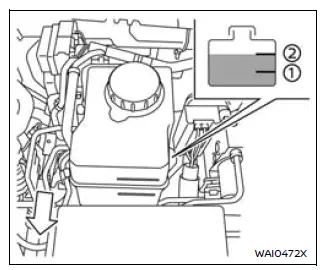
Check the brake fluid level in your Nissan Armada regularly, ensuring it remains between the MIN 1 and MAX 2 markings on the reservoir.
If the brake warning light illuminates or if fluid needs to be added frequently, this may indicate a leak or system issue. In such cases, have the Nissan Armada inspected by a qualified technician or authorized NISSAN dealer as soon as possible.
Other materials
Differential Assembly
Exploded View
Side oil seal
Rear final drive assembly
Rear cover
Gasket
Drain plug
Stud bolt
Filler plug
: N·m (kg-m, ft-lb)
: Always replace after every disassembly.
: Apply Genuine Liquid Gasket, Three Bond 1217 or equivalent. Refer to Recom ...
The Steering Switches Are Inoperative
Diagnosis Procedure
If any of the following malfunctions is found for the steering switch operation.
All switches are inoperative
The specified switch cannot be operated
CHECK STEERING SWITCH SIGNAL CIRCUIT
Check the steering switch signal circuit. Refer to Component Function Check.
Is the inspe ...
Writing of Calibration Data
Work Procedure
DESCRIPTIONIf only the around view monitor control unit is replaced, the calibration data stored in the camera can be written to the around view monitor control unit by selecting "Camera Calibration" of "Work Support" mode in CONSULT.WORK PROCEDUREWRITE CALIBRATION DATA
With CONSULT
...