Work Flow
OVERALL SEQUENCE
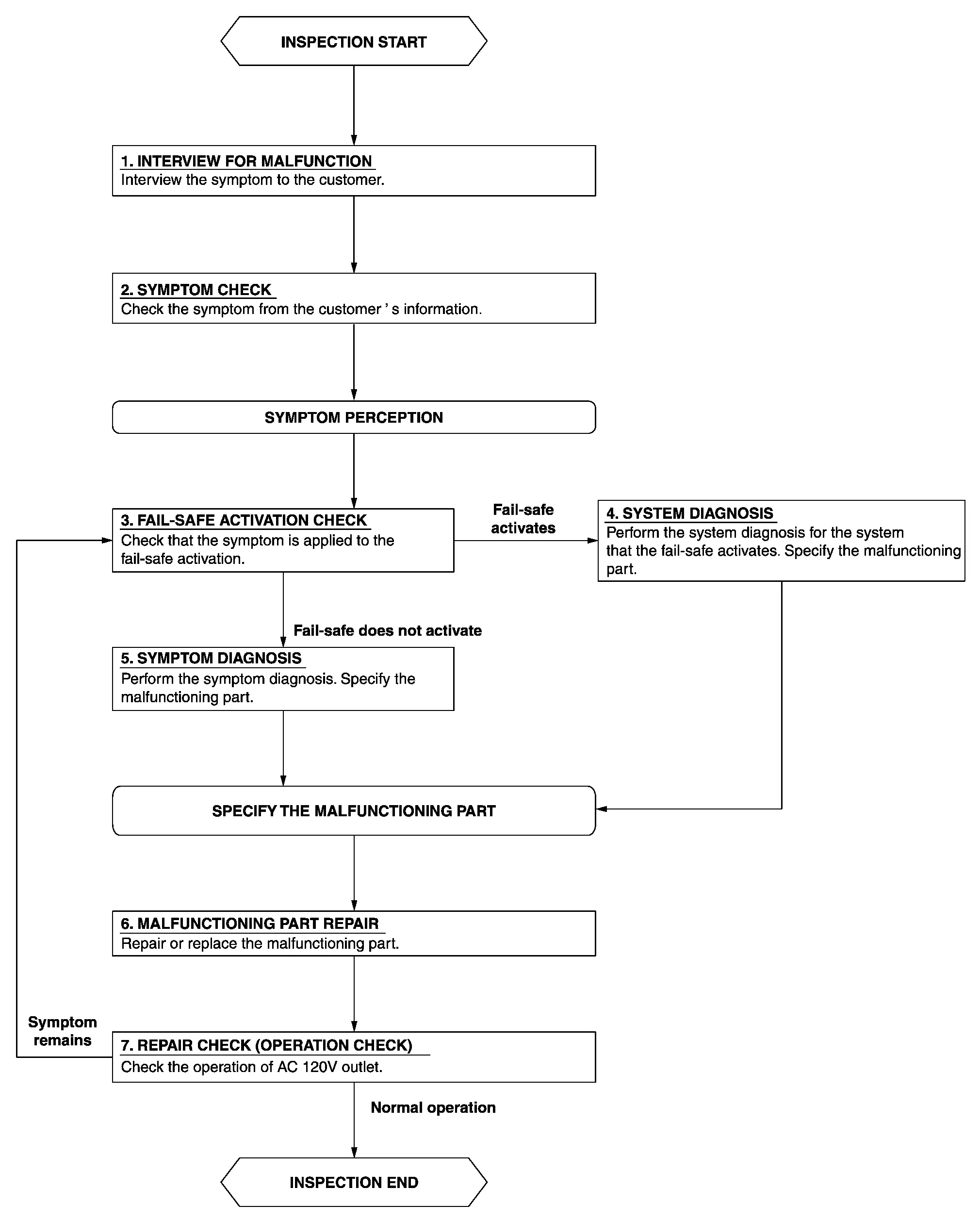
DETAILED FLOW
INTERVIEW FOR MALFUNCTION
Interview the symptom to the customer.
>>
GO TO 2.
SYMPTOM CHECK
Check the symptom from the customer's information.
>>
GO TO 3.
FAIL-SAFE ACTIVATION CHECK
Check that the symptom is applied to the fail-safe activation.
Does the fail-safe activate?
YES>>GO TO 4.
NO>>GO TO 5.
SYSTEM DIAGNOSIS
Perform the system diagnosis for the system that the fail-safe activates. Specify the malfunctioning part.
>>
GO TO 6.
SYMPTOM DIAGNOSIS
Perform the symptom diagnosis. Specify the malfunctioning part.
>>
GO TO 6.
MALFUNCTIONING PART REPAIR
Repair or replace the malfunctioning part.
>>
GO TO 7.
REPAIR CHECK (OPERATION CHECK)
Check the operation of AC 120 V outlet.
Does it operate normally?
YES>>INSPECTION END
NO>>GO TO 3.
Other materials
Diagnosis and Repair Work Flow
Work Flow
WORK FLOW (WITH GR8-1200 NI)Starting System Diagnosis With GR8-1200 NITo test the starting system, use the following special service tool:
Multitasking battery and electrical diagnostic station GR8-1200 NI
NOTE:
Refer to the diagnostic station Instruction Manual for proper starting syste ...
Diagnosis and Repair Work Flow
Work Flow
DETAILED FLOWINTERVIEW FROM THE CUSTOMER
CAUTION:
Customers are not professional. Never guess easily like “maybe the customer means that...,� or “maybe the customer mentions this symptom�.
>>
GO TO 2.
CHECK SYMPTOM
Reproduce the symptom that is indicated by the customer, b ...
Diagnosis and Repair Work Flow
Work Flow
OVERALL SEQUENCEDETAILED FLOWGET INFORMATION FOR SYMPTOM
Get detailed information from the customer about the symptom (the condition and the environment when the incident/malfunction occurs).
Check operation condition of the function that is malfunctioning.
>>
GO TO 2.
CHECK ...