Work Flow
OVERALL SEQUENCE
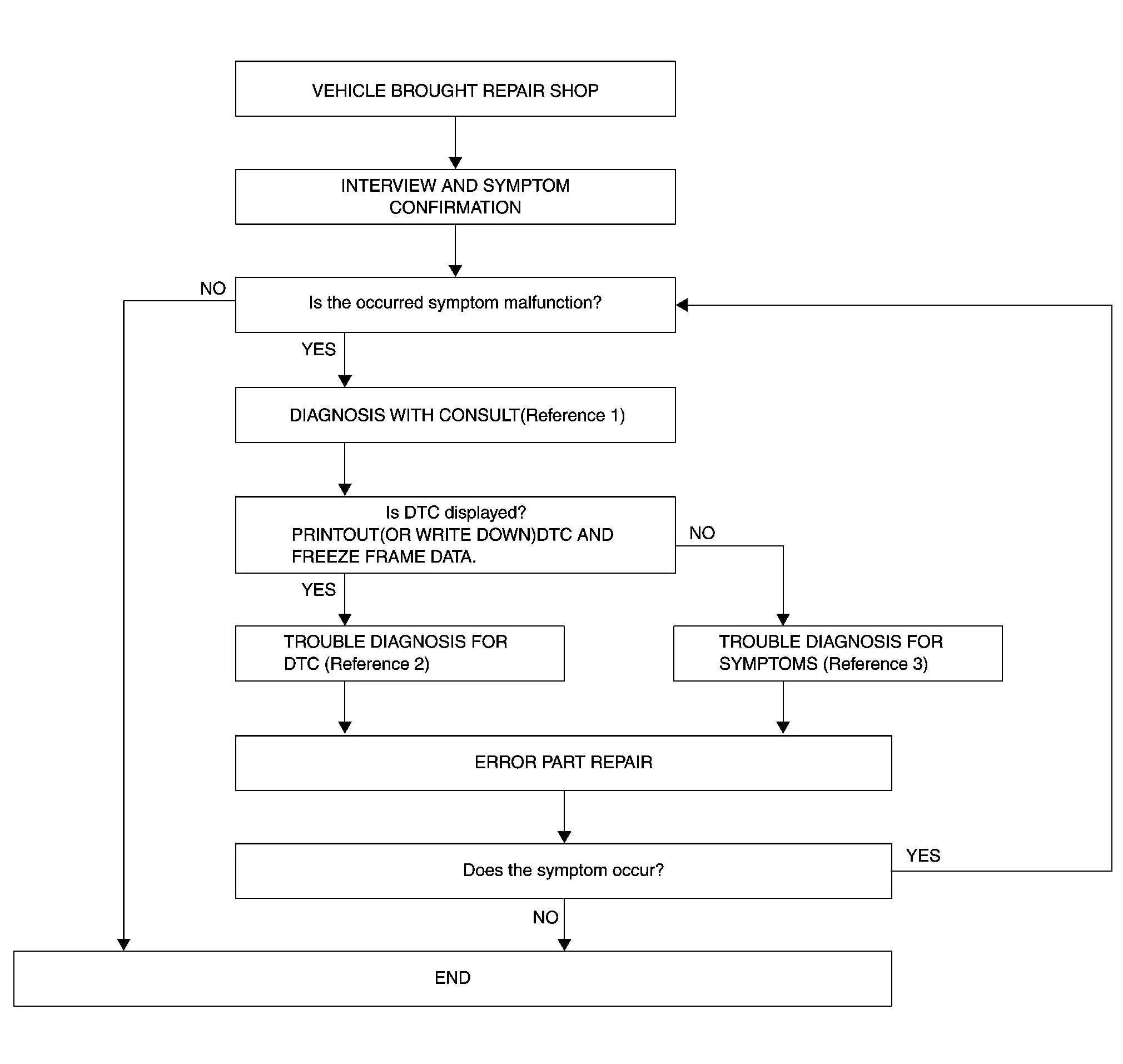
-
Reference 1··· CONSULT Function.
-
Reference 2··· DTC Index (6 Speaker Models).
-
Reference 3··· Symptom Table.
DETAILED FLOW
INTERVIEW AND SYMPTOM CONFIRMATION
Check the malfunction symptoms by performing the following items.
-
Interview the customer to obtain the malfunction information (conditions and environment when the malfunction occurred).
-
Check the symptom.
Is the occurred symptom malfunction?
YES>>GO TO 2.
NO>>INSPECTION END
DIAGNOSIS WITH CONSULT
-
Connect CONSULT and perform a self-diagnosis for “MULTI AV�. Refer to CONSULT Function.
 NOTE:
NOTE:
Skip to step 4 of the diagnosis procedure if “MULTI AV� is not displayed.
-
When DTC is detected, follow the instructions below:
-
Record DTC and Freeze Frame Data.
-
Is DTC displayed?
YES>>GO TO 3.
NO>>GO TO 4.
TROUBLE DIAGNOSIS FOR DTC
-
Check the DTC indicated in the “Self-Diagnosis Results�.
-
Perform the relevant diagnosis referring to the DTC Index. Refer to DTC Index (6 Speaker Models).
>>
GO TO 5.
TROUBLE DIAGNOSIS FOR SYMPTOMS
Perform the relevant diagnosis referring to the diagnosis chart by symptom. Refer to Symptom Table.
>>
GO TO 5.
ERROR PART REPAIR
-
Repair or replace the identified malfunctioning parts.
-
Perform a self-diagnosis for “MULTI AV� with CONSULT.
NOTE:
Erase the stored self-diagnosis results after repairing or replacing the relevant components if any DTC has been indicated in the “Self-Diagnosis Results�.
-
Check that the symptom does not occur.
Does the symptom occur?
YES>>GO TO 1.
NO>>INSPECTION END
Other materials
Instrument panel
Example
The instrument panel of the Nissan Armada combines traditional controls with
advanced digital interfaces, delivering a seamless driving experience. The layout
ensures that all critical vehicle information and multimedia functions are easily
accessible to the driver.
Side venti ...
Cylinder Head
Exploded View
Valve lifter (EXH)
Valve collet (EXH)
Valve spring retainer (EXH)
Valve oil seal (EXH)
Valve spring (EXH)
Valve spring seat (EXH)
Valve guide (EXH)
Spark plug tube
Valve lifter (INT)
Valve collet (INT)
Valve spring retainer (INT)
Valve oil seal (IN ...
Diagnosis and Repair Work Flow
Work Flow
OVERALL SEQUENCEDETAILED FLOWGET INFORMATION FOR SYMPTOM
Get detailed information from the customer about the symptom (the condition and the environment when the incident/malfunction occurs).
Check operation condition of the function that is malfunctioning.
>>
GO TO 2.
CHECK ...