Example
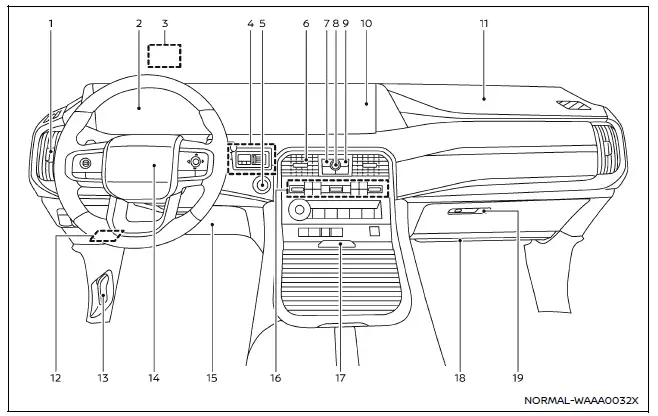
The instrument panel of the Nissan Armada combines traditional controls with advanced digital interfaces, delivering a seamless driving experience. The layout ensures that all critical vehicle information and multimedia functions are easily accessible to the driver.
- Side ventilator
- Meters and gauges Clock
- Head Up Display (HUD)*
- Trailer Brake Controller Unit (TBCU)*
- Push-button ignition switch
- Center ventilator
- CAMERA*/ button
- Audio switches**
- Hazard indicator flasher switch
- Touch screen display
- Intelligent Around View Monitor*
- RearView monitor*
- NissanConnect system**
- Heater and air conditioner
- Defroster
- Heated steering wheel*
- Heated seats*
- Ventilated seats*
- Front passenger supplemental air bag
- Fuse box
- Hood release handle
- Driver supplemental front-impact air bag
- Driver supplemental knee air bag
- Heater and air conditioner
- Console box
- Cup holders
- USB connection ports**
- Wireless charger*
- Front passenger supplemental knee air bag
- Glove box
*: if so equipped
**: Refer to the separate NissanConnect Owner's Manual (if so equipped).
Other materials
Horn
To sound the horn in the Nissan Armada, press firmly on the center pad area of
the steering wheel.
The horn is an essential safety feature used to alert other road users and prevent
potential hazards.
WARNING
Do not attempt to disassemble or modify the horn system in the Nissan Armada,
...
Automatic Back Door Warning Does Not Operate
Description
Automatic back door warning buzzer does not operate when automatic back door warning function are performed.
Diagnosis Procedure
CHECK AUTOMATIC BACK DOOR WARNING BUZZER
Check automatic back door warning buzzer.
Refer to DTC Diagnosis Procedure.
Is the inspection result normal?
YES>&g ...
Map Lamp
Exploded View
Without Moonroof Models
Map lamp bracket
Headlining assembly
Map lamp assembly
: Pawl
: Metal clip
: vehicle front
With Moonroof Models
Map lamp bracket
Headlining assembly
Map lamp assembly
Dual-lock fastener
: Pawl
: Metal clip
: vehicle fron ...