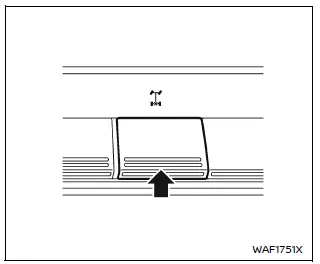
The rear differential lock (DIFF-LOCK) in the Nissan Armada is designed to evenly distribute engine torque between the left and right rear wheels, improving traction in low-grip conditions.
To activate the differential lock in the Nissan Armada, reduce speed below 4 MPH (7 km/h), switch the 4WD system to 4L mode, and press the differential lock switch.
The DIFF-LOCK indicator
 will blink and then remain illuminated once the system is fully engaged.
To disengage the system, press the switch again. The indicator will turn off once the Nissan Armada differential returns to normal operation.
- The Nissan Armada differential lock operates only when the engine is running.
- In 4WD AUTO or 4H modes, the DIFF-LOCK function will not engage even if the switch is activated (indicator will blink).
WARNING
- Use the Nissan Armada differential lock only in emergency situations when the vehicle cannot be freed using standard 4L mode.
- When DIFF-LOCK is engaged in the Nissan Armada, steering becomes more difficult, especially at higher speeds, which may be dangerous and cause drivetrain damage.
- While DIFF-LOCK is active, the ABS warning light will illuminate, indicating that anti-lock braking functionality may be limited.
- Do not use the Nissan Armada differential lock while turning or when
one wheel is spinning, as this may damage drivetrain components.
Improper use can lead to costly repairs and unsafe driving conditions.
- Avoid sudden acceleration while DIFF-LOCK is engaged to protect the Nissan Armada powertrain system.
Failure to follow these precautions in the Nissan Armada may result in loss of steering control, increasing the risk of accidents and serious injury.
Trailer Brake Controller Unit (TBCU)
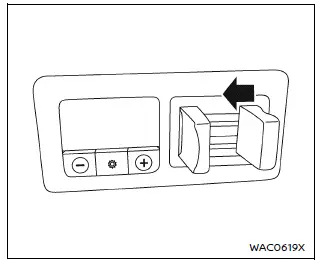
The Nissan Armada Trailer Brake Controller Unit (TBCU), located on the instrument panel, allows the driver to precisely adjust the braking force applied to a connected trailer.
This system improves towing stability and safety by synchronizing trailer braking with vehicle deceleration.
Proper adjustment of the TBCU in the Nissan Armada is essential for maintaining control and ensuring smooth braking performance while towing heavy loads.
Other materials
System temporarily unavailable
While operating the Nissan Armada, certain road environments such as winding
mountain routes, steep inclines, sharp curves, narrow lanes, or areas under construction
can temporarily affect the performance of the driver assistance systems. In these
situations, the sensors may incorrectly id ...
Additional Service When Replacing Power Window Motor
Description
When each power window motor replaced, the initialization is necessary for normal operation of power window system. Refer to Work Procedure.CAUTION:
The following specified operations cannot be performed under the non-initialized condition.
Auto-up operation
Anti-pinch function
Wo ...
Normal Operating Condition
Description
FRONT WIPER MOTOR PROTECTION FUNCTION
The CPU integrated in the front wiper motor may stop the front wiper to protect the front wiper motor if any obstruction (operation resistance) such as a large amount of snow is detected during the front wiper operation.
At that time turn OFF the ...