Exploded View
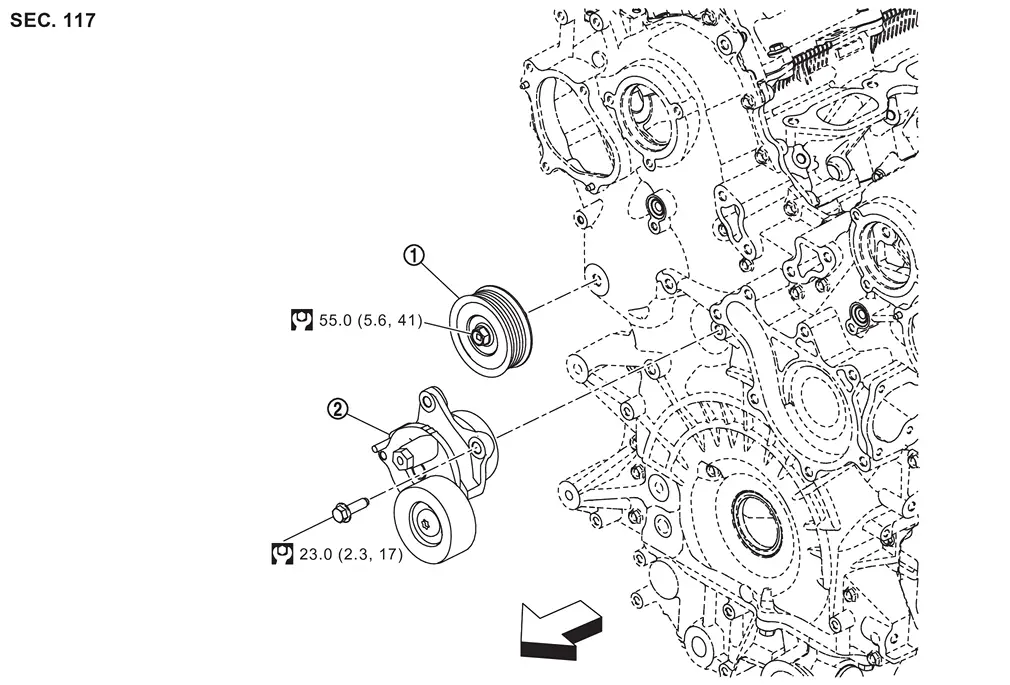
 |
Idler pulley |  |
Drive belt auto-tensioner | ||
 |
: N·m (kg-m, ft-lb) | ||||
| : vehicle front | |||||
Removal and Installation
WARNING:
-
Jacking up or lift up the vehicle may the vehicle height to go down which cause a personal injury and/or damage to the air suspension component parts. Refer to Precaution for when Jacking and Lifting Up the vehicle with Electronic Air Suspension System.
REMOVAL
Remove drive belt. Refer to Removal & Installation.
-
Keep drive belt auto-tensioner pulley arm locked after drive belt is removed.
Remove drive belt auto-tensioner and idler pulley.
-
Keep drive belt auto-tensioner pulley arm locked to install or remove drive belt auto-tensioner.
INSTALLATION
Installation is the reverse order of removal.
CAUTION:
If there is damage greater than peeled paint, replace drive belt auto-tensioner.
Other materials
Engine protection mode
The Nissan Armada is equipped with an advanced engine protection mode designed
to help prevent engine damage when operating under extreme conditions. This system
activates when engine coolant temperature rises excessively, such as during towing
heavy loads, driving uphill, or operating in high ...
Noise, Vibration and Harshness (nvh) Troubleshooting
NVH Troubleshooting Chart
NVH Troubleshooting chartUse the Chart Below to Help You Find the Cause of the Symptom
Locate the area where noise occurs.
Confirm the type of noise.
Specify the operating condition of the engine.
Check specified noise source.
If necessary, ...
Precautions for Supplemental Restraint System (srs) Air Bag and Seat Belt Pre-Tensioner
PRECAUTIONS FOR SUPPLEMENTAL RESTRAINT SYSTEM (SRS) AIR BAG AND SEAT BELT PRE-TENSIONER : Precautions
The Supplemental Restraint System such as “AIR BAG� and “SEAT BELT PRE-TENSIONER�, used along with a front seat belt, helps to reduce the risk or severity of injury to the driver and front p ...