Removal and Installation
REMOVAL
CAUTION:
-
Before replacing driving video recorder control module, perform “ADDITIONAL SERVICE WHEN REPLACING DRIVING VIDEO RECORDER CONTROL MODULE�. For details, refer to Work Procedure.
-
Before replacing the driving video recorder control module, the customer should be informed if the files in the driving video recorder control module need to be backed up.
Remove the Front center console cover. Refer to Removal and Installation.
Disconnect connectors  from driving video recorder control module
  .
.
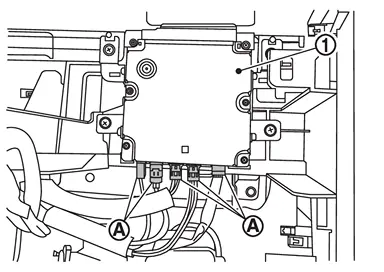
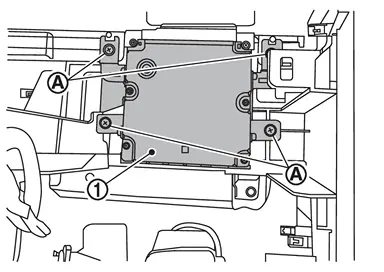
Remove the mounting screws , and remove driving video recorder control module .
INSTALLATION
Note the following, and install in the reverse order of removal.
CAUTION:
After installation, perform “ADDITIONAL SERVICE WHEN REPLACING DRIVING VIDEO RECORDER CONTROL MODULE�. For details, refer to Work Procedure.
Other materials
Conventional (fixed speed) cruise control
Basic information
The Nissan Armada offers a Conventional (fixed speed) cruise control mode as
a practical alternative to the advanced Intelligent Cruise Control system. This
mode is ideal for steady highway driving when adaptive distance control is not required
and allows the Nissan Armada t ...
Additional Service When Replacing Power Steering Control Module Control Unit
Work Procedure
DESCRIPTIONWhen replacing the power steering control module, the procedures of AFTER REPLACEMENT must be performed.AFTER REPLACEMENTAfter replacing the power steering control module, the following items must be performed:
Power steering control module programming.
Power steering co ...
Horn and Light Function Does Not Operate
Description
Horn and light do not operate when the owner uses telematics function of the smartphone.
Diagnosis Procedure
CHECK TELEMATICS SYSTEM SYMPTOM TABLE
Check telematics system symptom table.
>>
GO TO 2.
CHECK INTELLIGENT KEY SYSTEM (REMOTE KEYLESS ENTRY FUNCTION)
Press the LOCK butto ...